/*
	Antenna House PDF Tool API V7.0
	C++ Interface sample program

	概要:リンク注釈の作成

	Copyright 2013-2021 Antenna House, Inc.
*/

#include < PdfTk.h >
#include < stdio.h >

using namespace PdfTk;

void addAnnotLink(PtlPages& pages, PtlPage& page, char actionKind);
void setAction(PtlPages& pages, PtlAnnotLink& annotlink, char actionKind);

int main(int argc, char* argv[])
{
	if (argc < 4) {
		printf("usage: AppendAnnotLink.exe in-pdf-file out-pdf-file アクションの種類\n\n");
		printf("アクションの種類\n0 : GOTOアクションの設定\n1 : GOTORアクションの設定\n2 : Launchアクションの設定\n3 : URIアクションの設定\n");
		return 1;
	}
	try
	{
		PtlParamInput input(argv[1]);
		PtlParamOutput output(argv[2]);

		const char* actionKind = argv[3];
		switch (actionKind[0]) {
		case '0':
		case '1':
		case '2':
		case '3':
			break;
		default:
			printf("usage: AppendAnnotLink.exe in-pdf-file out-pdf-file アクションの種類\n\n");
			printf("アクションの種類\n0 : GOTOアクションの設定\n1 : GOTORアクションの設定\n2 : Launchアクションの設定\n3 : URIアクションの設定\n");
			return 1;
		}

		PtlPDFDocument doc;

		// PDFファイルをロードします。
		doc.load(input);

		// ページコンテナの取得
		PtlPages& pages = doc.getPages();

		// ページコンテナが空かどうか
		if (pages.isEmpty()){
			printf("ページコンテナが空\n");
			return 1;
		}

		// 1ページ目の取得
		PtlPage page = pages.get(0);

		// 注釈の追加
		addAnnotLink(pages, page, actionKind[0]);

		// ファイルに保存します。
		doc.save(output);

		printf("完了!\n");
	}
	catch (const PtlException &e)
	{
		fprintf(stderr, "Error code : %d\n %s\n", e.getErrorCode(), e.getErrorMessage().c_str());
		return 1;
	}
	return 0;
}

void addAnnotLink(PtlPages& pages, PtlPage& page, char actionKind)
{
	// 注釈コンテナの取得
	PtlAnnots& annots = page.getAnnots();

	// PDFのリンク注釈
	PtlAnnotLink annotlink;

	// 矩形座標を設定
	annotlink.setRect(PtlRect(30.0f,30.0f,50.0f,50.0f));

	// 内容を設定
	annotlink.setTextContents("PDFのリンク注釈");

	// アクションの設定
    setAction(pages, annotlink, actionKind);

	//注釈の追加
	annots.append(annotlink);
}

void setAction(PtlPages& pages, PtlAnnotLink& annotlink, char actionKind)
{
	// 宛先の設定
	PtlDestFit destfit;
	// 宛先ページの設定(最終ページに)
	destfit.setPageNumber(pages.getCount() - 1);

	switch (actionKind) {
	case '0':
		{
			// GOTOアクションの設定
			PtlActionGoTo acttiongoto;
			// 宛先の設定
			acttiongoto.setDest(destfit);
			// アクションの設定
			annotlink.setAction(acttiongoto);
			break;
		}
	case '1':
		{
			// GOTORアクションの設定
			PtlActionGoToR actiongotor;
			// 宛先の設定
			actiongotor.setDest(destfit);
			// ファイル間移動用PDFファイルを設定
			actiongotor.setFileName("test.pdf");
			// 新ウィンドウフラグを設定
			actiongotor.setNewWindowFlag(true);
			// アクションの設定
			annotlink.setAction(actiongotor);
			break;
		}
	case '2':
		{
			// Launchアクションの設定
			PtlActionLaunch actionlaunch;
			// 起動ファイル名を設定
			actionlaunch.setFileName("test.txt");
			// 新ウィンドウフラグを設定
			actionlaunch.setNewWindowFlag(true);
			// アクションの設定
			annotlink.setAction(actionlaunch);
			break;
		}
	case '3':
		{
			// URIアクションの設定
			PtlActionURI actionurl;
			// URIを設定
			actionurl.setURI("http://www.antenna.co.jp/");
			// アクションの設定
			annotlink.setAction(actionurl);
		}
	}
}


PDF Tool APIサンプルコード:リンク注釈の追加
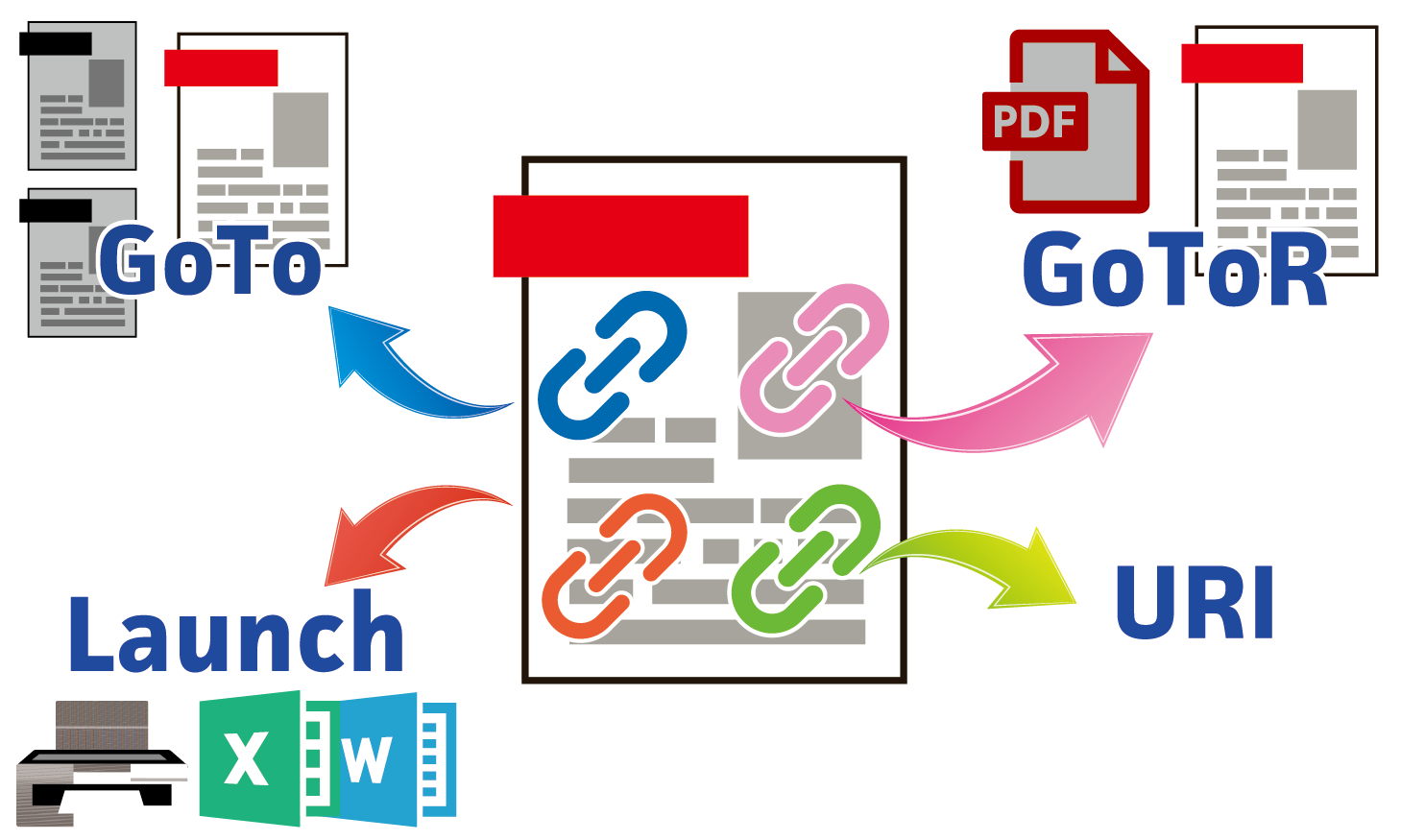
リンク注釈を挿入し、アクションを指定します。
概要
サンプルコードの概要
入力PDFの1ページ目に指定した種類のリンク注釈を挿入します。
リンク注釈の内容はそれぞれプログラム内部であらかじめファイル名・URLを記述しています。
- PtlAnnotLink: PDFのリンク注釈を表現したクラス
- PtlAnnotLink setAction(PtlAction action):アクションを設定します
- PtlAction: PDFのアクションを表現したクラスですべてのアクションクラスのベースクラス
以下のサブクラスがあり、実際にはこちらを用います。 - PtlActionGoTo : PDFのGoToアクションを表現したクラス
- PtlActionGoToR : PDFのGoToRアクションを表現したクラス
- PtlActionLaunch : PDFのLaunchアクションを表現したクラス
- PtlActionURI : PDFのURIアクションを表現したクラス
サンプルコード
/*
    Antenna House PDF Tool API V7.0
    Java Interface sample program

    概要:リンク注釈の作成

    Copyright 2015-2021 Antenna House, Inc.
*/

package Sample;

import java.io.*;
import jp.co.antenna.ptl.*;

public class AppendAnnotLink {

    public static void main(String[] args) {
        if (args.length < 3)
        {
            System.out.println("usage: java AppendAnnotLink in-pdf-file out-pdf-file アクションの種類\n");
            System.out.println("アクションの種類\n0 : GOTOアクションの設定\n1 : GOTORアクションの設定\n2 : Launchアクションの設定\n3 : URIアクションの設定");
            return;
        }

        String actionKind = args[2];
        switch (actionKind) {
        case "0":
        case "1":
        case "2":
        case "3":
            break;
        default:
            return;
        }

        try (PtlParamInput inputFile = new PtlParamInput(args[0]);
             PtlParamOutput outputFile = new PtlParamOutput(args[1]);
             PtlPDFDocument doc = new PtlPDFDocument())
        {
            // PDFファイルをロードします。
            doc.load(inputFile);

            try (PtlPages pages = doc.getPages()) //ページコンテナの取得
            {
                // ページコンテナが空かどうか
                if (pages.isEmpty())
                {
                    System.out.println("ページコンテナが空\n");
                    return;
                }

                try (PtlPage page = pages.get(0)) //1ページ目の取得
                {
                    // リンク注釈追加
                    addAnnotLink(pages, page, actionKind);
                }
            }

            // ファイルに保存します。
            doc.save(outputFile);
        }
        catch (PtlException pex) {
             System.out.println("PtlException : ErrorCode = " + pex.getErrorCode() + "\n  " + pex.getErrorMessage());
        }
        catch (Exception ex) {
            System.out.println(ex.getMessage());
            ex.printStackTrace();
        }
        catch (Error ex) {
            System.out.println(ex.getMessage());
            ex.printStackTrace();
        }
        finally {
            System.out.println("-- 完了 --");
        }
    }

    public static void addAnnotLink(PtlPages pages, PtlPage page, String actionKind) throws PtlException, Exception, Error
    {
        try (PtlAnnots annots = page.getAnnots(); //注釈コンテナの取得
             PtlAnnotLink annotlink = new PtlAnnotLink()) //PDFのリンク注釈
        {
            // 矩形座標を設定
            try (PtlRect rect = new PtlRect(30.0f, 30.0f, 50.0f, 50.0f))
            {
                annotlink.setRect(rect);
            }

            // 内容を設定
            annotlink.setTextContents("PDFのリンク注釈");

            // アクションの設定
            setAction(pages, annotlink, actionKind);

            // 注釈の追加
            annots.append(annotlink);
        }
    }

    public static void setAction(PtlPages pages, PtlAnnotLink annotlink, String actionKind) throws PtlException, Exception, Error
    {
        switch (actionKind)
        {
        case "0":
            // GOTOアクションの設定
            try (PtlActionGoTo acttiongoto = new PtlActionGoTo();
                 PtlDestFit destfit = new PtlDestFit()) //宛先
            {
                // 宛先ページの設定(最終ページに)
                destfit.setPageNumber(pages.getCount() - 1);
                // 宛先の設定
                acttiongoto.setDest(destfit);
                // アクションの設定
                annotlink.setAction(acttiongoto);
            }
            break;
        case "1":
            // GOTORアクションの設定
            try (PtlActionGoToR actiongotor = new PtlActionGoToR();
                 PtlDestFit destfit = new PtlDestFit()) //宛先
            {
                // 宛先ページの設定(最終ページに)
                destfit.setPageNumber(pages.getCount() - 1);
                // 宛先の設定
                actiongotor.setDest(destfit);
                // ファイル間移動用PDFファイルを設定
                actiongotor.setFileName("test.pdf");
                // 新ウィンドウフラグを設定
                actiongotor.setNewWindowFlag(true);
                // アクションの設定
                annotlink.setAction(actiongotor);
            }
            break;
        case "2":
            // Launchアクションの設定
            try (PtlActionLaunch actionlaunch = new PtlActionLaunch())
            {
                // 起動ファイル名を設定
                actionlaunch.setFileName("test.txt");
                // 新ウィンドウフラグを設定
                actionlaunch.setNewWindowFlag(true);
                // アクションの設定
                annotlink.setAction(actionlaunch);
            }
            break;
        case "3":
            // URIアクションの設定
            try (PtlActionURI actionurl = new PtlActionURI())
            {
                // URIを設定
                actionurl.setURI("http://www.antenna.co.jp/");
                // アクションの設定
                annotlink.setAction(actionurl);
            }
            break;
        }
    }
}
/*
	Antenna House PDF Tool API V7.0
	.NET Interface sample program

	概要:リンク注釈の作成

	Copyright 2013-2021 Antenna House, Inc.
*/

using System;
using PdfTkNet;

namespace AppendAnnotLink
{
    class Program
    {
        static void Main(string[] args)
        {
            if (args.Length < 3)
            {
                Console.WriteLine("usage: AppendAnnotLink.exe in-pdf-file out-pdf-file アクションの種類\n");
                Console.WriteLine("アクションの種類\n0 : GOTOアクションの設定\n1 : GOTORアクションの設定\n2 : Launchアクションの設定\n3 : URIアクションの設定\n");
                return;
            }
            String actionKind = args[2];
            switch (actionKind)
            {
                case "0":
                case "1":
                case "2":
                case "3":
                    break;
                default:
                    Console.WriteLine("usage: AppendAnnotLink.exe in-pdf-file out-pdf-file アクションの種類\n");
                    Console.WriteLine("アクションの種類\n0 : GOTOアクションの設定\n1 : GOTORアクションの設定\n2 : Launchアクションの設定\n3 : URIアクションの設定\n");
                    return;
            }

            try
            {
                using (PtlParamInput inputFile = new PtlParamInput(args[0]))
                using (PtlParamOutput outputFile = new PtlParamOutput(args[1]))
                using (PtlPDFDocument doc = new PtlPDFDocument())
                {
                    // PDFファイルをロードします。
                    doc.load(inputFile);

                    // ページコンテナの取得
                    using (PtlPages pages = doc.getPages())
                    {
                        // ページコンテナが空かどうか
                        if (pages.isEmpty())
                        {
                            Console.WriteLine("ページコンテナが空");
                            return;
                        }

                        // 1ページ目の取得
                        using (PtlPage page = pages.get(0))
                        {
                            // 注釈の追加
                            addAnnotLink(pages, page, actionKind);
                        }
                    }

                    // ファイルに保存します。
                    doc.save(outputFile);
                }
            }
            catch (PtlException pex)
            {
                Console.WriteLine(pex.getErrorCode() + " : " + pex.getErrorMessageJP());
                pex.Dispose();
            }
            catch (Exception ex)
            {
                Console.WriteLine(ex.Message);
            }
            finally
            {
                Console.WriteLine("-- 完了 --");
            }
        }

        static void addAnnotLink(PtlPages pages, PtlPage page, String actionKind)
        {
            // 注釈コンテナの取得
            using (PtlAnnots annots = page.getAnnots())
            {
                // PDFのリンク注釈
                using (PtlAnnotLink annotlink = new PtlAnnotLink())
                {
                    // 矩形座標を設定
                    using (PtlRect rectAnnot = new PtlRect(30.0f, 30.0f, 50.0f, 50.0f))
                    {
                        annotlink.setRect(rectAnnot);
                    }

                    // 内容を設定
                    annotlink.setTextContents("PDFのリンク注釈");

                    // アクションの設定
                    setAction(pages, annotlink, actionKind);

                    // 注釈の追加
                    annots.append(annotlink);
                }
            }
        }

        static void setAction(PtlPages pages, PtlAnnotLink annotlink, String actionKind)
        {
            switch (actionKind)
            {
            case "0":
                {
                    // GOTOアクションの設定
                    using (PtlActionGoTo acttiongoto = new PtlActionGoTo())
                    using (PtlDestFit destfit = new PtlDestFit())
                    {
                        // 宛先ページの設定(最終ページに)
                        destfit.setPageNumber(pages.getCount() - 1);
                        acttiongoto.setDest(destfit);
                        // アクションの設定
                        annotlink.setAction(acttiongoto);
                    }
                    break;
                }
            case "1":
                {
                    // GOTORアクションの設定
                    using (PtlActionGoToR actiongotor = new PtlActionGoToR())
                    using (PtlDestFit destfit = new PtlDestFit())
                    {
                        // 宛先ページの設定(最終ページに)
                        destfit.setPageNumber(pages.getCount() - 1);
                        actiongotor.setDest(destfit);
                        // ファイル間移動用PDFファイルを設定
                        actiongotor.setFileName("test.pdf");
                        // 新ウィンドウフラグを設定
                        actiongotor.setNewWindowFlag(true);
                        // アクションの設定
                        annotlink.setAction(actiongotor);
                    }
                    break;
                }
            case "2":
                {
                    // Launchアクションの設定
                    using (PtlActionLaunch actionlaunch = new PtlActionLaunch())
                    {
                        // 起動ファイル名を設定
                        actionlaunch.setFileName("test.txt");
                        // 新ウィンドウフラグを設定
                        actionlaunch.setNewWindowFlag(true);
                        // アクションの設定
                        annotlink.setAction(actionlaunch);
                    }
                    break;
                }
            case "3":
                {
                    // URIアクションの設定
                    using (PtlActionURI actionurl = new PtlActionURI())
                    {
                        // URIを設定
                        actionurl.setURI("http://www.antenna.co.jp/");
                        // アクションの設定
                        annotlink.setAction(actionurl);
                    }
                    break;
                }
            }
        }
    }
}
実行例
コマンドラインでの実行例
AppendAnnotLink.exe c:\in\in.pdf c:\sav\outAppendAnnotLink_0.pdf 0
-- 完了 --

AppendAnnotLink.exe c:\in\in.pdf" "c:\sav\outAppendAnnotLink_1.pdf 1
-- 完了 --

AppendAnnotLink.exe c:\in\in.pdf c:\sav\outAppendAnnotLink_2.pdf 2
-- 完了 --

AppendAnnotLink.exe c:\in\in.pdf c:\sav\outAppendAnnotLink_3.pdf 3
-- 完了 --
java -jar AppendAnnotLink.jar C:\in\in.pdf C:\sav\outAppendAnnotLink_0.pdf 0
-- 完了 --

java -jar AppendAnnotLink.jar C:\in\in.pdf C:\sav\outAppendAnnotLink_1.pdf 1
-- 完了 --

java -jar AppendAnnotLink.jar C:\in\in.pdf C:\sav\outAppendAnnotLink_2.pdf 2
-- 完了 --

java -jar AppendAnnotLink.jar C:\in\in.pdf C:\sav\outAppendAnnotLink_3.pdf 3
-- 完了 --
AppendAnnotLink.exe c:\in\in.pdf c:\sav\outAppendAnnotLink_0.pdf 0
完了!

AppendAnnotLink.exe c:\in\in.pdf c:\sav\outAppendAnnotLink_1.pdf 1
完了!

AppendAnnotLink.exe c:\in\in.pdf" "c:\sav\outAppendAnnotLink_2.pdf 2
完了!

AppendAnnotLink.exe c:\in\in.pdf c:\sav\outAppendAnnotLink_3.pdf 3
完了!
出力結果イメージ
入力PDFの1ページ目左下に四角いリンク注釈が追加されています。
※出力結果ファイルはリンク注釈に対応したPDFビューアで表示してください。