/*
	Antenna House PDF Tool API V7.0
	C++ Interface sample program

	概要:テキスト注釈の作成

	Copyright 2013-2021 Antenna House, Inc.
*/

#include < PdfTk.h >
#include < stdio.h >

using namespace PdfTk;

void addAnnotText(PtlPage& page);

int main(int argc, char* argv[])
{
	if (argc < 3) {
		printf("usage: AppendAnnotText.exe in-pdf-file out-pdf-file\n");
		return 1;
	}
	try
	{
		PtlParamInput input(argv[1]);
		PtlParamOutput output(argv[2]);

		PtlPDFDocument doc;

		// PDFファイルをロードします。
		doc.load(input);

		// ページコンテナの取得
		PtlPages& pages = doc.getPages();

		// ページコンテナが空かどうか
		if (pages.isEmpty()){
			printf("ページコンテナが空\n");
			return 1;
		}

		// 1ページ目の取得
		PtlPage page = pages.get(0);

		// 注釈の追加
		addAnnotText(page);
		PtlContent content = page.getContent();
		PtlParamWriteString param;
		PtlParamFont font;
		param.setFont(font);
		content.writeString(PtlRect(0.0, 0.0, 100.0, 100.0), PtlContent::ALIGN_CENTER, "test",param);
		doc.setSaveOption(PtlPDFDocument::SAVE_INCREMENTAL_UPDATE);
		// ファイルに保存します。
		doc.save(output);

		printf("完了!\n");
	}
	catch (const PtlException &e)
	{
		fprintf(stderr, "Error code : %d\n %s\n", e.getErrorCode(), e.getErrorMessage().c_str());
		return 1;
	}
	return 0;
}

void addAnnotText(PtlPage& page)
{
	// 注釈コンテナの取得 PtlPage::getAnnots
	PtlAnnots& annots = page.getAnnots();

	// PDFのテキスト注釈
	PtlAnnotText annottext;

	//------------------------------------------------------------

	// アイコンタイプ設定 ICON_COMMENT = 1, /* コメント */
	annottext.setIconType(PtlAnnotText::ICON_NOTE);

	// アイコンサイズ
	PtlRect rectSize = annottext.getRect();

	// 矩形座標を設定 座標の単位はmmで原点(0,0)は左下
	annottext.setRect(PtlRect(50.0f, 50.0f, 50.0f+rectSize.getRight(), 50.0f+rectSize.getTop()));

	// 内容を設定(注釈用に表示されるテキスト・可読な形式での注釈コンテンツの代替説明)
	annottext.setTextContents("可読な形式での注釈コンテンツの代替説明");

	// 日時の設定(2013/01/01 00:00:00)
	annottext.setDate(PtlDate(2013, 1, 1, 0, 0, 0));

	// 注釈フラグを設定(論理和) FLAG_NOROTATE = 0x00000010, /* 注釈の外観をページにあわせて回転しません。 */
	annottext.setAnnotFlags(PtlAnnotText::FLAG_NOROTATE);

	// 色を設定 setColor(const PtlColorDeviceRGB& color);
	annottext.setColor(PtlColorDeviceRGB(0.0f, 0.0f, 1.0f));

	// 境界線スタイルを設定 BORDER_SOLID = 1, /* 実線(注釈を囲む実線の矩形) */
	annottext.setBorderStyle(PtlAnnotText::BORDER_SOLID);

	// 境界線幅を設定 BORDER_WIDTH_THIN = 1, /* 細い */
	annottext.setBorderWidth(PtlAnnotText::BORDER_WIDTH_THIN);

	//------

	// ポップアップウィンドウのタイトル文字列設定
	annottext.setMarkUpTitle("ポップアップウィンドウのタイトル文字列");

	// サブジェクトの短い説明設定
	annottext.setMarkUpSubj("サブジェクトの短い説明設定");

	// 注釈生成日時の設定(2012/12/31 23:59:59)
	annottext.setMarkUpDate(PtlDate(2012, 12 , 31, 23, 59, 59));

	// 不透明度を設定 0.0 ~ 1.0。0.0が透明、1.0が不透明
	annottext.setMarkUpCA(0.8f);

	//------

	//■PtlAnnotPopup
	PtlAnnotPopup annotpopup;

	// 矩形座標を設定 座標の単位はmmで原点(0,0)は左下
	annotpopup.setRect(PtlRect(100.0f, 50.0f, 150.0f, 150.0f));

	// オープン状態を設定 true=オープン状態
	annotpopup.setOpenState(true);

	// ポップアップ注釈を設定
	annottext.setAnnotPopUp(annotpopup);

	//------


	// 注釈の追加
	annots.append(annottext);
}


PDF Tool APIサンプルコード:テキスト注釈の作成
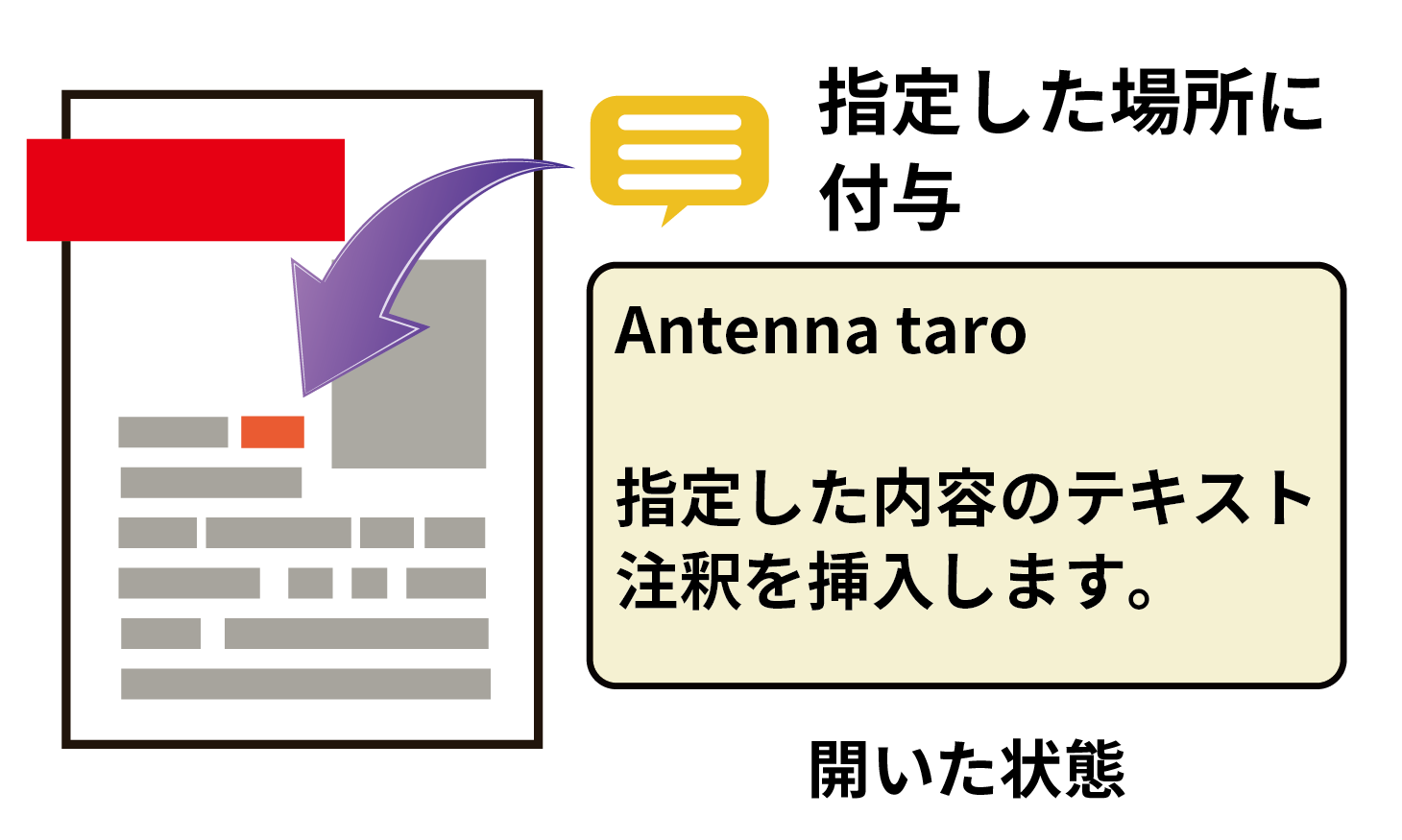
指定した内容のテキスト注釈を挿入します。
概要
サンプルコードの概要
テキスト注釈はPDF内の指定した位置に付加される付箋メモのような注釈です。
テキスト注釈には内容を設定したポップアップ注釈を付随して設定します。
閉じているときはアイコンとして表示し、
開いている場合はその付箋メモのテキストはポップアップウィンドウで表示されます。
- PtlAnnotText: PDFのテキスト注釈。
- PtlAnnot.setTextContents(java.lang.String contents): テキストの内容を設定。
- PtlAnnot.setColor(PtlColorDeviceRGB color): テキストの色を設定。
- PtlAnnotMarkup: PDFのマークアップ注釈を表現したクラス。テキスト注釈のベースクラス。
- PtlAnnotMarkup.setMarkUpTitle(java.lang.String title): 注釈作成者の名前を設定。
- PtlAnnotMarkup.setMarkUpSubj(java.lang.String subj): 注釈のタイトルを設定。
- PtlAnnotMarkup.setMarkUpDate(dateMarkup): 注釈の作成日時を設定。
- PtlAnnotMarkup.setAnnotPopUp(PtlAnnotPopup popup): ポップアップ注釈を設定。
- PtlAnnotPopup: ポップアップ注釈。
- PtlAnnot.setRect(PtlRect rectMM): 矩形座標を設定。PtlAnnotTextに対してはテキスト注釈のアイコンの位置、PtlAnnotPopupに対してはポップアップ注釈の出現位置を設定。
- PtlAnnotPopup.setOpenState(boolean state): オープン状態を設定。trueでオープン状態、falseでクローズ状態。
サンプルコード
/*
    Antenna House PDF Tool API V7.0
    Java Interface sample program

    概要:テキスト注釈の作成

    Copyright 2015-2021 Antenna House, Inc.
*/

package Sample;

import jp.co.antenna.ptl.*;

public class AppendAnnotText {

    /**
     * @param args the command line arguments
     */
    public static void main(String[] args) {
        if (args.length < 2)
        {
            System.out.println("usage: java AppendAnnotText in-pdf-file out-pdf-file");
            return;
        }

        try (PtlParamInput inputFile = new PtlParamInput(args[0]);
             PtlParamOutput outputFile = new PtlParamOutput(args[1]);
             PtlPDFDocument doc = new PtlPDFDocument())
        {
            // PDFファイルをロードします。
            doc.load(inputFile);

            try (PtlPages pages = doc.getPages()) // ページコンテナの取得
            {
                // ページコンテナが空かどうか
                if (pages.isEmpty())
                {
                    System.out.println("ページコンテナが空\n");
                    return;
                }

                try (PtlPage page = pages.get(0)) // 1ページ目の取得
                {
                    // テキスト注釈追加
                    addAnnotText(page);
                }
            }

            // ファイルに保存します。
            doc.save(outputFile);
        }
        catch (PtlException pex) {
            System.out.println("PtlException : ErrorCode = " + pex.getErrorCode() + "\n  " + pex.getErrorMessage());
        }
        catch (Exception ex) {
            System.out.println(ex.getMessage());
            ex.printStackTrace();
        }
        catch (Error ex) {
            System.out.println(ex.getMessage());
            ex.printStackTrace();
        }
        finally {
            System.out.println("-- 完了 --");
        }
    }

    public static void addAnnotText(PtlPage page) throws PtlException, Exception, Error
    {
        try (PtlAnnots annots = page.getAnnots(); // 注釈コンテナの取得
             PtlAnnotText annottext = new PtlAnnotText(); // PDFのテキスト注釈
             PtlAnnotPopup annotpopup = new PtlAnnotPopup()) // ポップアップ注釈
        {
             // アイコンタイプ設定 ICON_COMMENT = 1, /* コメント */
            annottext.setIconType(PtlAnnotText.ICON_TYPE.ICON_COMMENT);

            // 矩形座標を設定 座標の単位はmmで原点(0,0)は左下
            try (PtlRect rectSize = annottext.getRect();
                 PtlRect rectAnnot = new PtlRect(50.0f, 50.0f, 50.0f+rectSize.getRight(), 50.0f+rectSize.getTop()))
            {
                annottext.setRect(rectAnnot);
            }

            // 内容を設定(注釈用に表示されるテキスト・可読な形式での注釈コンテンツの代替説明)
            annottext.setTextContents("内容を設定(注釈用に表示されるテキスト・可読な形式での注釈コンテンツの代替説明)");

            // 日時の設定(2013/01/01 00:00:00)
            try (PtlDate date = new PtlDate(2013, 1, 1, 0, 0, 0))
            {
                annottext.setDate(date);
            }

            // 注釈フラグを設定(論理和) FLAG_NOROTATE = 0x00000010, /* 注釈の外観をページにあわせて回転しません。 */
            annottext.setAnnotFlags(PtlAnnotText.FLAG_NOROTATE);

            // 色を設定 setColor(const PtlColorDeviceRGB& color);
            try (PtlColorDeviceRGB color =  new PtlColorDeviceRGB(0.0f, 0.0f, 1.0f))
            {
                annottext.setColor(color);
            }

            // 境界線スタイルを設定 BORDER_SOLID = 1, /* 実線(注釈を囲む実線の矩形) */
            annottext.setBorderStyle(PtlAnnotText.BORDER_STYLE.BORDER_SOLID);

            // 境界線幅を設定 BORDER_WIDTH_THIN = 1, /* 細い */
            annottext.setBorderWidth(PtlAnnotText.BORDER_LINE_WIDTH.BORDER_WIDTH_THIN);

            // ポップアップウィンドウのタイトル文字列設定
            annottext.setMarkUpTitle("ポップアップウィンドウのタイトル文字列");

            // サブジェクトの短い説明設定
            annottext.setMarkUpSubj("サブジェクトの短い説明設定");

            // 注釈生成日時の設定(2012/12/31 23:59:59)
            try (PtlDate dateMarkup = new PtlDate(2012, 12, 31, 23, 59, 59))
            {
                annottext.setMarkUpDate(dateMarkup);
            }

            // 不透明度を設定 0.0 ~ 1.0。0.0が透明、1.0が不透明
            annottext.setMarkUpCA(0.8f);

            // ポップアップ
            // 矩形座標を設定 座標の単位はmmで原点(0,0)は左下
            try (PtlRect rectPopup = new PtlRect(100.0f, 50.0f, 150.0f, 150.0f))
            {
                annotpopup.setRect(rectPopup);
            }

            // オープン状態を設定 true=オープン状態、 false=クローズ状態
            annotpopup.setOpenState(true);

            // ポップアップ注釈を設定
            annottext.setAnnotPopUp(annotpopup);

            // 注釈の追加
            annots.append(annottext);
        }
    }
}
/*
	Antenna House PDF Tool API V7.0
	.NET Interface sample program

	概要:テキスト注釈の作成

	Copyright 2013-2021 Antenna House, Inc.
*/

using System;
using PdfTkNet;

namespace AppendAnnotText
{
    class Program
    {
        static void Main(string[] args)
        {
            if (args.Length < 2)
            {
                Console.WriteLine("usage: AppendAnnotText.exe in-pdf-file out-pdf-file");
                return;
            }

            try
            {
                using (PtlParamInput inputFile = new PtlParamInput(args[0]))
                using (PtlParamOutput outputFile = new PtlParamOutput(args[1]))
                using (PtlPDFDocument doc = new PtlPDFDocument())
                {
                    //PDFファイルをロードします。
                    doc.load(inputFile);

                    //ページコンテナの取得
                    using (PtlPages pages = doc.getPages())
                    {
                        //ページコンテナが空かどうか
                        if (pages.isEmpty())
                        {
                            Console.WriteLine("ページコンテナが空");
                            return;
                        }

                        // 1ページ目の取得
                        using (PtlPage page = pages.get(0))
                        {
                            // テキスト注釈追加
                            addAnnotText(page);
                        }
                    }

                    // ファイルに保存します。
                    doc.save(outputFile);
                }
            }
            catch (PtlException pex)
            {
                Console.WriteLine(pex.getErrorCode() + " : " + pex.getErrorMessageJP());
                pex.Dispose();
            }
            catch (Exception ex)
            {
                Console.WriteLine(ex.Message);
            }
            finally
            {
                Console.WriteLine("-- 完了 --");
            }
        }

        static void addAnnotText(PtlPage page)
        {
            //注釈コンテナの取得
            using (PtlAnnots annots = page.getAnnots())
            {
                //PDFのテキスト注釈
                using (PtlAnnotText annottext = new PtlAnnotText())
                using (PtlAnnotPopup annotpopup = new PtlAnnotPopup())
                {
                    //------------------------------------------------------------
                    //アイコンタイプ設定 ICON_COMMENT = 1, /* コメント */
                    annottext.setIconType(PtlAnnotText.ICON_TYPE.ICON_COMMENT);

                    //矩形座標を設定 座標の単位はmmで原点(0,0)は左下
                    using (PtlRect rectSize = annottext.getRect())
                    using (PtlRect rectAnnot = new PtlRect(50.0f, 50.0f, 50.0f + rectSize.getRight(), 50.0f + rectSize.getTop()))
                    {
                        annottext.setRect(rectAnnot);
                    }

                    //内容を設定(注釈用に表示されるテキスト・可読な形式での注釈コンテンツの代替説明)
                    annottext.setTextContents("内容を設定(注釈用に表示されるテキスト・可読な形式での注釈コンテンツの代替説明)");

                    //日時の設定(2013/01/01 00:00:00)
                    using (PtlDate date = new PtlDate(2013, 1, 1, 0, 0, 0))
                    {
                        annottext.setDate(date);
                    }

                    //注釈フラグを設定(論理和) FLAG_NOROTATE = 0x00000010, /* 注釈の外観をページにあわせて回転しません。 */
                    annottext.setAnnotFlags(PtlAnnotText.ANNOT_FLAGS.FLAG_NOROTATE);

                    //色を設定 setColor(const PtlColorDeviceRGB& color);
                    using (PtlColorDeviceRGB color = new PtlColorDeviceRGB(0.0f, 0.0f, 1.0f))
                    {
                        annottext.setColor(color);
                    }

                    //境界線スタイルを設定 BORDER_SOLID = 1, /* 実線(注釈を囲む実線の矩形) */
                    annottext.setBorderStyle(PtlAnnotText.BORDER_STYLE.BORDER_SOLID);

                    //境界線幅を設定 BORDER_WIDTH_THIN = 1, /* 細い */
                    annottext.setBorderWidth(PtlAnnotText.BORDER_LINE_WIDTH.BORDER_WIDTH_THIN);

                    //------

                    //ポップアップウィンドウのタイトル文字列設定
                    annottext.setMarkUpTitle("ポップアップウィンドウのタイトル文字列");

                    //サブジェクトの短い説明設定
                    annottext.setMarkUpSubj("サブジェクトの短い説明設定");

                    //注釈生成日時の設定(2012/12/31 23:59:59)
                    using (PtlDate dateMarkup = new PtlDate(2012, 12, 31, 23, 59, 59))
                    {
                        annottext.setMarkUpDate(dateMarkup);
                    }

                    //不透明度を設定 0.0 ~ 1.0。0.0が透明、1.0が不透明
                    annottext.setMarkUpCA(0.8f);

                    //------

                    //■PtlAnnotPopup
                    //矩形座標を設定 座標の単位はmmで原点(0,0)は左下
                    using (PtlRect rectPopup = new PtlRect(100.0f, 50.0f, 150.0f, 150.0f))
                    {
                        annotpopup.setRect(rectPopup);
                    }

                    //オープン状態を設定 true=オープン状態
                    annotpopup.setOpenState(true);

                    //ポップアップ注釈を設定
                    annottext.setAnnotPopUp(annotpopup);

                    //------

                    //注釈の追加
                    annots.append(annottext);
                }
            }
        }
    }
}
実行例
コマンドラインでの実行例
AppendAnnotText.exe C:\in\in.pdf C:\sav\outAppendAnnotText.pdf
完了!
java -jar AppendAnnotText.jar C:\in\in.pdf C:\sav\outAppendAnnotText.pdf
-- 完了 --
AppendAnnotText.exe C:\in\in.pdf C:\sav\outAppendAnnotText.pdf
-- 完了 --
出力結果イメージ
埋め込んだテキスト注釈のアイコンをダブルクリックしてポップアップ注釈を表示したところです。
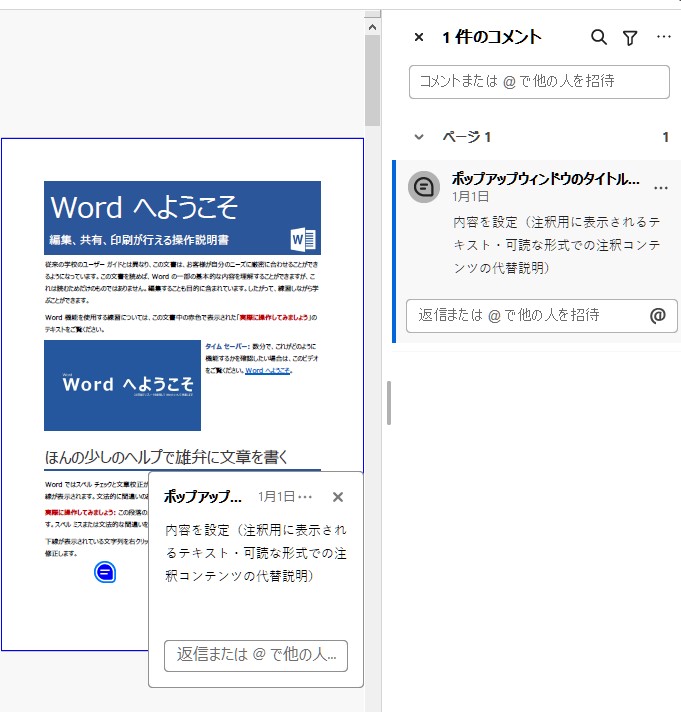
※出力結果ファイルはテキスト注釈に対応したPDFビューアで表示してください。