/*
	Antenna House PDF Tool API V7.0
	C++ Interface sample program

	概要:しおりの追加

	Copyright 2013-2021 Antenna House, Inc.
*/

#include < PdfTk.h >
#include < stdio.h >

using namespace PdfTk;

void createOutline(PtlOutline& outlineRoot);

int main(int argc, char* argv[])
{
	if (argc < 3) {
		printf("usage: AppendOutline.exe in-pdf-file out-pdf-file\n");
		return 1;
	}
	try
	{
		PtlParamInput input(argv[1]);
		PtlParamOutput output(argv[2]);

		PtlPDFDocument doc;

		// PDFファイルをロードします。
		doc.load(input);

		//ルートアウトラインの取得
		PtlOutline outlineRoot = doc.getRootOutline();

		// しおりの追加
		createOutline(outlineRoot);

		// ファイルに保存します。
		doc.save(output);

		printf("完了!\n");
	}
	catch (const PtlException &e)
	{
		fprintf(stderr, "Error code : %d\n %s\n", e.getErrorCode(), e.getErrorMessage().c_str());
		return 1;
	}
	return 0;
}

void createOutline(PtlOutline& outlineRoot)
{
	PtlOutline outlineActionGoTo;
	{
		outlineActionGoTo.setTitle("ActionGoTo DestFit");
		// アクション
		PtlActionGoTo actiongoto; // PtlActionGoTo : GoToアクション<現在のドキュメント内の宛先へ移動>
			// PtlDestFit : Fit型
			PtlDestFit destfit;
			// 宛先ページの設定
			destfit.setPageNumber(1);
			// 宛先の設定
		actiongoto.setDest(destfit);
		// アクションの設定
		outlineActionGoTo.setAction(actiongoto);
		// アウトラインタイトルの色を設定
		outlineActionGoTo.setColor(PtlColorDeviceRGB(0.0f, 1.0f, 0.0f));
		// アウトラインフラグを設定
		outlineActionGoTo.setFlags(PtlOutline::FLAG_ITALIC);
		// PDF表示時の子アウトラインをオープンするかどうかの設定
		outlineActionGoTo.setOpen(true);
		// 子アウトラインの追加
		outlineRoot.appendLastChild(outlineActionGoTo);

		PtlOutline outlineActionGoToR;
		{
			outlineActionGoToR.setTitle("ActionGoToR DestFitH");
			// アクション
			PtlActionGoToR actiongotor; // PtlActionGoToR : GoToRアクション<("Go-to remote")他のドキュメント内への移>
				PtlDestFitH destfith; // PtlDestFitH : FitH型
				// 宛先ページの設定
				destfith.setPageNumber(3);
				// topの設定
				destfith.setTopNull();
				// dest1.setTop(NULL_VALUE_CSTR);
			// 宛先の設定
			actiongotor.setDest(destfith);
			// ファイル間移動用PDFファイル名を取得(ファイル名もしくは相対パス指定)
			actiongotor.setFileName("test.pdf");
			// 宛先文書を新ウィンドウでオープンするかどうかのフラグを設定(true: 新ウィンドウでオープンする。false: しない)
			actiongotor.setNewWindowFlag(false);
			// アクションの設定
			outlineActionGoToR.setAction(actiongotor);

			// アウトラインタイトルの色を設定
			outlineActionGoToR.setColor(PtlColorDeviceRGB(0.0f, 0.0f, 1.0f));
			// アウトラインフラグを設定
			outlineActionGoToR.setFlags(PtlOutline::FLAG_NORMAL);
			// PDF表示時の子アウトラインをオープンするかどうかの設定
			outlineActionGoToR.setOpen(false);
			// 子アウトラインの追加
			outlineActionGoTo.appendLastChild(outlineActionGoToR);
		}
	}

	PtlOutline outlineActionLaunch;
	{
		outlineActionLaunch.setTitle("ActionLaunch");
		// アクション
		PtlActionLaunch actionlaunch; // PtlActionLaunch : Launchアクション<アプリケーションの起動、通常、ファイルを開
		// 起動ファイル名を設定
		actionlaunch.setFileName("test.jpg");
		// 宛先文書を新ウィンドウでオープンするかどうかのフラグを設定(true: 新ウィンドウでオープンする false: しない)
		actionlaunch.setNewWindowFlag(true);
		// アクションの設定
		outlineActionLaunch.setAction(actionlaunch);
		// アウトラインタイトルの色を設定
		outlineActionLaunch.setColor(PtlColorDeviceRGB(0.0f, 1.0f, 1.0f));
		// アウトラインフラグを設定
		outlineActionLaunch.setFlags(PtlOutline::FLAG_BOLD);
		// PDF表示時の子アウトラインをオープンするかどうかの設定
		outlineActionLaunch.setOpen(false);
		// 子アウトラインの追加
		outlineRoot.appendLastChild(outlineActionLaunch);
	}

	PtlOutline outlineActionURI;
	{
		// アウトラインタイトル文字列を設定
		outlineActionURI.setTitle("ActionURI");
		// アクション
		PtlActionURI actionuri; // PtlActionURI : URIアクション
		// URIを設定
		actionuri.setURI("http://www.antenna.co.jp/");
		// アクションの設定
		outlineActionURI.setAction(actionuri);
		// アウトラインタイトルの色を設定
		outlineActionURI.setColor(PtlColorDeviceRGB(.01f, 0.5f, 0.0f));
		// アウトラインフラグを設定
		outlineActionURI.setFlags(PtlOutline::FLAG_BOLD | PtlOutline::FLAG_ITALIC);
		// PDF表示時の子アウトラインをオープンするかどうかの設定
		outlineActionURI.setOpen(true);
		// 子アウトラインの追加
		outlineRoot.appendLastChild(outlineActionURI);
	}
}


PDF Tool APIサンプルコード:しおりの追加
PDF文書にしおりを作成します。
概要
サンプルコードの概要
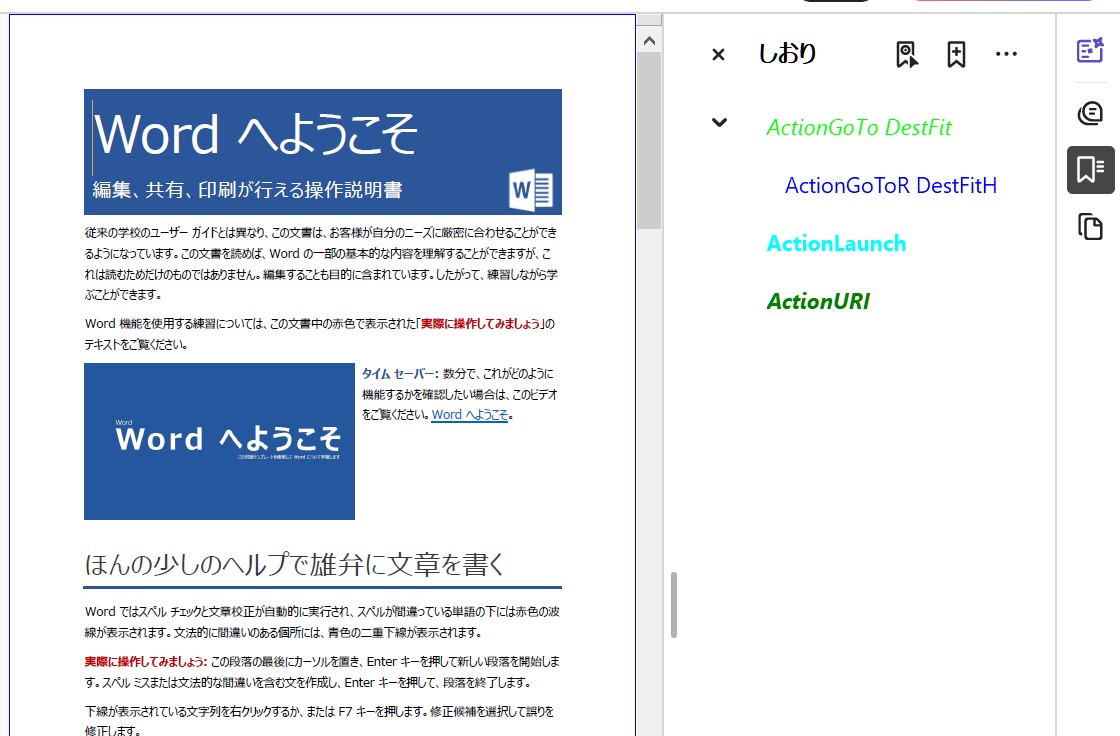
4種類のしおりが追加されます。
ActionGoTo DestFit 現在のドキュメント内の宛先へ移動
2P目に移動 文字色黄緑色
ActionGoToR DestFitH 他のドキュメント内への移動
同フォルダ内のtest.pdfの4P目に移動 文字色青色
ActionLaunch アプリケーションの起動、通常、ファイルを開く
test.jpg を開く 文字色水色
ActionURI URIアクション
WEBサイト https://... を開く 文字色緑色
- PtlOutline :PDFのアウトライン(しおり)を表現したクラス
- PtlOutline.setTitle() :アウトラインタイトル文字列を設定
- PtlOutline.setDest() :宛先の設定
- PtlOutline.setAction() :アクションの設定
- PtlOutline.setColor() :アウトラインタイトルの色を設定
- PtlOutline.setFlags() :アウトラインフラグを設定
- PtlOutline.setOpen :PDF表示時の子アウトラインをオープンするかどうかの設定
- PtlOutline.appendLastChild() :子アウトラインの追加
- PtlOutline.appendNextSibling() :兄弟アウトラインの追加
サンプルコード
/*
    Antenna House PDF Tool API V7.0
    Java Interface sample program

    概要:しおりの追加

    Copyright 2015-2021 Antenna House, Inc.
*/

package Sample;

import jp.co.antenna.ptl.*;

public class AppendOutline {

    /**
     * @param args the command line arguments
     */
    public static void main(String[] args) {
        if (args.length < 2)
        {
            System.out.println("usage: java AppendOutline in-pdf-file out-pdf-file");
            return;
        }

        try (PtlParamInput inputFile = new PtlParamInput(args[0]);
             PtlParamOutput outputFile = new PtlParamOutput(args[1]);
             PtlPDFDocument doc = new PtlPDFDocument())
        {
            // PDFファイルをロードします。
            doc.load(inputFile);

            try (PtlOutline outlineRoot = doc.getRootOutline()) //ルートアウトラインの取得
            {
                // しおりの追加
                createOutline(outlineRoot);
            }

            // ファイルに保存します。
            doc.save(outputFile);
        }
        catch (PtlException pex) {
            System.out.println("PtlException : ErrorCode = " + pex.getErrorCode() + "\n  " + pex.getErrorMessage());
        }
        catch (Exception ex) {
            System.out.println(ex.getMessage());
            ex.printStackTrace();
        }
        catch (Error ex) {
            System.out.println(ex.getMessage());
            ex.printStackTrace();
        }
        finally {
            System.out.println("-- 完了 --");
        }
    }

    static void createOutline(PtlOutline outlineRoot) throws PtlException, Exception, Error
    {
        try (PtlOutline outlineActionGoTo = new PtlOutline())
        {
            outlineActionGoTo.setTitle("ActionGoTo DestFit");
            // アクション
            try (PtlActionGoTo actiongoto = new PtlActionGoTo(); // PtlActionGoTo : GoToアクション<現在のドキュメント内の宛先へ移動>
                 PtlDestFit destfit = new PtlDestFit())          // PtlDestFit : Fit型
            {
                // 宛先ページの設定
                destfit.setPageNumber(1);
                // 宛先の設定
                actiongoto.setDest(destfit);
                // アクションの設定
                outlineActionGoTo.setAction(actiongoto);
            }
            // アウトラインタイトルの色を設定
            try (PtlColorDeviceRGB color =  new PtlColorDeviceRGB(0.0f, 1.0f, 0.0f))
            {
                outlineActionGoTo.setColor(color);
            }
            // アウトラインフラグを設定
            outlineActionGoTo.setFlags(PtlOutline.FLAG_ITALIC);
            // PDF表示時の子アウトラインをオープンするかどうかの設定
            outlineActionGoTo.setOpen(true);
            // 子アウトラインの追加
            outlineRoot.appendLastChild(outlineActionGoTo);

            try (PtlOutline outlineActionGoToR = new PtlOutline())
            {
                outlineActionGoToR.setTitle("ActionGoToR DestFitH");
                // アクション
                try (PtlActionGoToR actiongotor = new PtlActionGoToR(); // PtlActionGoToR : GoToRアクション<("Go-to remote")他のドキュメント内への移>
                     PtlDestFitH destfith = new PtlDestFitH()) // PtlDestFitH : FitH型
                {
                    // 宛先ページの設定
                    destfith.setPageNumber(3);
                    // topの設定
                    destfith.setTopNull();
                    // dest1.setTop(NULL_VALUE_CSTR);
                    // 宛先の設定
                    actiongotor.setDest(destfith);
                    // ファイル間移動用PDFファイル名を取得(ファイル名もしくは相対パス指定)
                    actiongotor.setFileName("test.pdf");
                    // 宛先文書を新ウィンドウでオープンするかどうかのフラグを設定(true: 新ウィンドウでオープンする。false: しない)
                    actiongotor.setNewWindowFlag(false);
                    // アクションの設定
                    outlineActionGoToR.setAction(actiongotor);
                }
                // アウトラインタイトルの色を設定
                try (PtlColorDeviceRGB color =  new PtlColorDeviceRGB(0.0f, 0.0f, 1.0f))
                {
                    outlineActionGoToR.setColor(color);
                }
                // アウトラインフラグを設定
                outlineActionGoToR.setFlags(PtlOutline.FLAG_NORMAL);
                // PDF表示時の子アウトラインをオープンするかどうかの設定
                outlineActionGoToR.setOpen(false);
                // 子アウトラインの追加
                outlineActionGoTo.appendLastChild(outlineActionGoToR);
            }
        }

        try (PtlOutline outlineActionLaunch = new PtlOutline())
        {
            outlineActionLaunch.setTitle("ActionLaunch");
            // アクション
            try (PtlActionLaunch actionlaunch = new PtlActionLaunch()) // PtlActionLaunch : Launchアクション<アプリケーションの起動、通常、ファイルを開
            {
                // 起動ファイル名を設定
                actionlaunch.setFileName("test.jpg");
                // 宛先文書を新ウィンドウでオープンするかどうかのフラグを設定(true: 新ウィンドウでオープンする false: しない)
                actionlaunch.setNewWindowFlag(true);
                // アクションの設定
                outlineActionLaunch.setAction(actionlaunch);
            }
            // アウトラインタイトルの色を設定
            try (PtlColorDeviceRGB color =  new PtlColorDeviceRGB(0.0f, 1.0f, 1.0f))
            {
                outlineActionLaunch.setColor(color);
            }
            // アウトラインフラグを設定
            outlineActionLaunch.setFlags(PtlOutline.FLAG_BOLD);
            // PDF表示時の子アウトラインをオープンするかどうかの設定
            outlineActionLaunch.setOpen(false);
            // 子アウトラインの追加
            outlineRoot.appendLastChild(outlineActionLaunch);
        }

        // URIアクション    -----------------------------------
        try (PtlOutline outlineActionURI = new PtlOutline())
        {
            // アウトラインタイトル文字列を設定
            outlineActionURI.setTitle("ActionURI");
            // アクション
            try (PtlActionURI actionuri = new PtlActionURI()) // PtlActionURI : URIアクション
            {
                // URIを設定
                actionuri.setURI("http://www.antenna.co.jp/");
                // アクションの設定
                outlineActionURI.setAction(actionuri);
            }
            // アウトラインタイトルの色を設定
            try (PtlColorDeviceRGB color =  new PtlColorDeviceRGB(.01f, 0.5f, 0.0f))
            {
                outlineActionURI.setColor(color);
            }
            // アウトラインフラグを設定
            outlineActionURI.setFlags(PtlOutline.FLAG_BOLD | PtlOutline.FLAG_ITALIC);
            // PDF表示時の子アウトラインをオープンするかどうかの設定
            outlineActionURI.setOpen(true);
            // 子アウトラインの追加
            outlineRoot.appendLastChild(outlineActionURI);
        }
    }
}
/*
	Antenna House PDF Tool API V7.0
	.NET Interface sample program

	概要:しおりの追加

	Copyright 2013-2021 Antenna House, Inc.
*/

using System;
using PdfTkNet;

namespace AppendOutline
{
    class Program
    {
        static void Main(string[] args)
        {
            if (args.Length < 2)
            {
                Console.WriteLine("usage: AppendOutline.exe in-pdf-file out-pdf-file");
                return;
            }

            try
            {
                using (PtlParamInput inputFile = new PtlParamInput(args[0]))
                using (PtlParamOutput outputFile = new PtlParamOutput(args[1]))
                using (PtlPDFDocument doc = new PtlPDFDocument())
                {
                    // PDFファイルをロードします。
                    doc.load(inputFile);

                    // ルートアウトラインの取得
                    using (PtlOutline outlineRoot = doc.getRootOutline())
                    {
                        // しおりの追加
                        createOutline(outlineRoot);
                    }

                    // ファイルに保存します。
                    doc.save(outputFile);
                }
            }
            catch (PtlException pex)
            {
                Console.WriteLine(pex.getErrorCode() + " : " + pex.getErrorMessageJP());
                pex.Dispose();
            }
            catch (Exception ex)
            {
                Console.WriteLine(ex.Message);
            }
            finally
            {
                Console.WriteLine("-- 完了 --");
            }
        }

        static void createOutline(PtlOutline outlineRoot)
        {
            // GoToアクション	-------------------------------
            using (PtlOutline outlineActionGoTo = new PtlOutline())
            {
                outlineActionGoTo.setTitle("ActionGoTo DestFit");
                // PtlActionGoTo : GoToアクション<現在のドキュメント内の宛先へ移動>
                using (PtlActionGoTo actiongoto = new PtlActionGoTo())
                // PtlDestFit : Fit型

                using (PtlDestFit destfit = new PtlDestFit())
                {
                    // 宛先ページの設定
                    destfit.setPageNumber(1);
                    // 宛先の設定
                    actiongoto.setDest(destfit);
                    // アクションの設定
                    outlineActionGoTo.setAction(actiongoto);
                }
                // アウトラインタイトルの色を設定
                using (PtlColorDeviceRGB color = new PtlColorDeviceRGB(0.0f, 1.0f, 0.0f))
                {
                    outlineActionGoTo.setColor(color);
                }
                // アウトラインフラグを設定
                outlineActionGoTo.setFlags(PtlOutline.ITEM_FLAG.FLAG_ITALIC);
                // PDF表示時の子アウトラインをオープンするかどうかの設定
                outlineActionGoTo.setOpen(true);
                // 子アウトラインの追加
                outlineRoot.appendLastChild(outlineActionGoTo);

                //GoToRアクション	-------------------------------
                using (PtlOutline outlineActionGoToR = new PtlOutline())
                {
                    outlineActionGoToR.setTitle("ActionGoToR DestFitH");
                    // PtlActionGoToR : GoToRアクション<("Go-to remote")他のドキュメント内への移>
                    using (PtlActionGoToR actiongotor = new PtlActionGoToR())
                    // PtlDestFitH : FitH型

                    using (PtlDestFitH destfith = new PtlDestFitH())
                    {
                        // 宛先ページの設定
                        destfith.setPageNumber(1);
                        // topの設定
                        destfith.setTopNull();
                        //dest1.setTop(NULL_VALUE_CSTR);
                        // 宛先の設定
                        actiongotor.setDest(destfith);
                        // ファイル間移動用PDFファイル名を取得(ファイル名もしくは相対パス指定)
                        actiongotor.setFileName("test.pdf");
                        // 宛先文書を新ウィンドウでオープンするかどうかのフラグを設定(true: 新ウィンドウでオープンする。false: しない)
                        actiongotor.setNewWindowFlag(false);
                        // アクションの設定
                        outlineActionGoToR.setAction(actiongotor);
                    }
                    // アウトラインタイトルの色を設定
                    using (PtlColorDeviceRGB color = new PtlColorDeviceRGB(0.0f, 0.0f, 1.0f))
                    {
                        outlineActionGoToR.setColor(color);
                    }
                    // アウトラインフラグを設定
                    outlineActionGoToR.setFlags(PtlOutline.ITEM_FLAG.FLAG_NORMAL);
                    // PDF表示時の子アウトラインをオープンするかどうかの設定
                    outlineActionGoToR.setOpen(false);
                    // 子アウトラインの追加
                    outlineActionGoTo.appendLastChild(outlineActionGoToR);
                }
            }

            // Launchアクション	-------------------------------
            using (PtlOutline outlineActionLaunch = new PtlOutline())
            {
                outlineActionLaunch.setTitle("ActionLaunch");
                // PtlActionLaunch : Launchアクション<アプリケーションの起動、通常、ファイルを開く>
                using (PtlActionLaunch actionlaunch = new PtlActionLaunch())
                {
                    // 起動ファイル名を設定
                    actionlaunch.setFileName("test.jpg");
                    // 宛先文書を新ウィンドウでオープンするかどうかのフラグを設定(true: 新ウィンドウでオープンする false: しない)
                    actionlaunch.setNewWindowFlag(true);
                    // アクションの設定
                    outlineActionLaunch.setAction(actionlaunch);
                }
                // アウトラインタイトルの色を設定
                using (PtlColorDeviceRGB color = new PtlColorDeviceRGB(0.0f, 1.0f, 1.0f))
                {
                    outlineActionLaunch.setColor(color);
                }
                // アウトラインフラグを設定
                outlineActionLaunch.setFlags(PtlOutline.ITEM_FLAG.FLAG_BOLD);
                // PDF表示時の子アウトラインをオープンするかどうかの設定
                outlineActionLaunch.setOpen(false);
                // 子アウトラインの追加
                outlineRoot.appendLastChild(outlineActionLaunch);
            }

            // URIアクション	-----------------------------------
            using (PtlOutline outlineActionURI = new PtlOutline())
            {
                // アウトラインタイトル文字列を設定
                outlineActionURI.setTitle("ActionURI");
                // PtlActionURI : URIアクション
                using (PtlActionURI actionuri = new PtlActionURI())
                {
                    // URIを設定
                    actionuri.setURI("http://www.antenna.co.jp/");
                    // アクションの設定
                    outlineActionURI.setAction(actionuri);
                }
                // アウトラインタイトルの色を設定
                using (PtlColorDeviceRGB color = new PtlColorDeviceRGB(.01f, 0.5f, 0.0f))
                {
                    outlineActionURI.setColor(color);
                }
                // アウトラインフラグを設定
                outlineActionURI.setFlags(PtlOutline.ITEM_FLAG.FLAG_BOLD
                                        | PtlOutline.ITEM_FLAG.FLAG_ITALIC);
                // PDF表示時の子アウトラインをオープンするかどうかの設定
                outlineActionURI.setOpen(true);
                // 子アウトラインの追加
                outlineRoot.appendLastChild(outlineActionURI);
            }
        }
    }
}
実行例
コマンドラインでの実行例
AppendOutline.exe C:\in\in.pdf C:\sav\outAppendOutline.pdf
完了!
java -jar AppendOutline.jar C:\in\in.pdf C:\sav\outAppendOutline.pdf
-- 完了 --
AppendOutline.exe C:\in\in.pdf C:\sav\outAppendOutline.pdf
-- 完了 --
出力結果イメージ
出力されたPDFには4種類のしおりが追加されている。
※出力結果ファイルはしおりの表示に対応したPDFビューアで表示してください。