/*
	Antenna House PDF Tool API V7.0
	C++ Interface sample program

	概要:セキュリティの設定

	Copyright 2013-2021 Antenna House, Inc.
*/

#include < PdfTk.h >
#include < stdio.h >

using namespace PdfTk;

void setEncrypt(PtlEncryptStandard& enc);

int main(int argc, char* argv[])
{
	if (argc < 4) {
		printf("usage: Encrypt.exe in-pdf-file out-pdf-file 暗号化種類 [in-pdf-password]\n");
		printf("暗号化種類\n0 : 128 bit RC4  1 : 128 bit AES  2 : 256 bit AES \n");
		return 1;
	}
	try
	{
		switch (argv[3][0]) {
		case '0':
		case '1':
		case '2':
			break;
		default:
			printf("usage: Encrypt.exe in-pdf-file out-pdf-file 暗号化種類 [in-pdf-password]\nn");
			printf("暗号化種類\n0 : 128 bit RC4  1 : 128 bit AES  2 : 256 bit AES \n");
			return 1;
		}

		PtlParamInput input(argv[1]);
		PtlParamOutput output(argv[2]);

		PtlPDFDocument doc;
		if (argc > 4) {
			PtlParamString password(argv[4]);
			// パスワードのセット
			doc.setPassword(password);
		}
		// PDFファイルをロードします。
		doc.load(input);

		// セキュリティ設定
		switch (argv[3][0])
		{
		case '0':
			{
				// 128 bit RC4
				PtlEncryptStandard128RC4 enc;
				// 暗号化情報の設定
				setEncrypt(enc);
				// 暗号化設定
				doc.setEncrypt(enc);
			}
			break;
		case '1':
			{
				// 128 bit AES
				PtlEncryptStandard128AES enc;
				// 暗号化情報の設定
				setEncrypt(enc);
				// 暗号化設定
				doc.setEncrypt(enc);
			}
			break;
		case '2':
			{
				// 256 bit AES
				PtlEncryptStandard256AES enc;
				// 暗号化情報の設定
				setEncrypt(enc);
				// 暗号化設定
				doc.setEncrypt(enc);
			}
			break;
		default:
			break;
		}

		// ファイルに保存します。
		doc.save(output);

		printf("完了!\n");
	}
	catch (const PtlException &e)
	{
		fprintf(stderr, "Error code : %d\n %s\n", e.getErrorCode(), e.getErrorMessage().c_str());
		return 1;
	}
	return 0;
}

void setEncrypt(PtlEncryptStandard& enc)
{
	// 文書の全てのコンテンツを暗号化
	enc.setEncryptComponent(PtlEncrypt::ENCRYPT_ALL);

	// ユーザパスワード値の設定
	enc.setUserPassword("pass");

	// オーナーパスワード値の設定
	enc.setOwnerPassword("test");

	PtlEncryptPermissionType2 typ;

	// 印刷権限の設定
	// PERM_PRINT_LOW = 1, /* 低解像度 */
	typ.setPrint(PtlEncryptPermissionType2::PERM_PRINT_LOW);

	// 変更権限の設定
	// PERM_MODIFY_ASSEMBLEDOC = 1, /* ページの挿入、削除、回転 */
	typ.setModify(PtlEncryptPermissionType2::PERM_MODIFY_ASSEMBLEDOC);

	// テキスト、画像、その他の内容のコピーを有効にするかどうかの設定
	// false: 有効にしない
	typ.setCopy(false);

	// スクリーンリーダーデバイスのテキストアクセスを有効にするかどうかの設定
	// true: 有効にする
	typ.setAccessibility(true);

	// ユーザアクセス許可フラグの設定
	enc.setPermission(typ);
}


PDF Tool APIサンプルコード:セキュリティ設定
PDF文書にパスワードによる利用制限を設定します。
概要
サンプルコードの概要
PDF文書にパスワードによるセキュリティを設定します。
ユーザーパスワードによるセキュリティを設定するとPDF文書を開くときにパスワードの入力を求めるようになります。
オーナーパスワードを設定するとPDF文書の内容の利用制限を設定できます。
- PtlPDFDocument.setPassword() :暗号化されたPDF文書を読み込む際のパスワードを設定
- PtlEncryptStandard :すべての標準セキュリティハンドラクラスのベースクラス
- PtlEncryptStandard128RC4 :PDFの標準セキュリティハンドラの128ビットRC4暗号化を表現したクラス
- PtlEncryptStandard128AES :PDFの標準セキュリティハンドラの128ビットAES暗号化を表現したクラス
- PtlEncryptStandard256AES :PDFの標準セキュリティハンドラの256ビットAES暗号化を表現したクラス
- PtlEncryptStandard.setUserPassword() :ユーザーパスワード値の設定
- PtlEncryptStandard.setOwnerPassword() :オーナーパスワード値の設定
- PtlEncryptPermissionType2 :ユーザアクセス許可フラグを表現したクラスです。
- PtlEncryptPermissionType2.setPrint() :印刷権限の設定
- PtlEncryptPermissionType2.setModify() :変更権限の設定
- PtlEncryptPermissionType2.setCopy() : テキスト、画像、その他の内容のコピーを有効/無効の設定
- PtlEncryptPermissionType2.setAccesibility() :スクリーンリーダーデバイスのテキストアクセスを有効/無効の設定
- PtlEncryptStandard.setPermission() :ユーザアクセス許可フラグの設定
- PtlPDFDocument.setEncrypt() :暗号化情報の設定
サンプルコード
/*
    Antenna House PDF Tool API V6.0
    Java Interface sample program

    概要:セキュリティの設定

    Copyright 2015-2021 Antenna House, Inc.
*/

package Sample;

import java.io.*;
import jp.co.antenna.ptl.*;

public class Encrypt {

    /**
     * @param args the command line arguments
     */
    public static void main(String[] args) {
        if (args.length < 3)
        {
            System.out.println("usage: java Encrypt in-pdf-file out-pdf-file 暗号化種類 [in-pdf-password]\n");
            System.out.println("暗号化種類\n0 : 128 bit RC4  1 : 128 bit AES  2 : 256 bit AES \n");
            return;
        }

        switch (args[2]) {
        case "0":
        case "1":
        case "2":
            break;
        default:
            System.out.println("usage: java Encrypt in-pdf-file out-pdf-file 暗号化種類 [in-pdf-password]\n");
            System.out.println("暗号化種類\n0 : 128 bit RC4  1 : 128 bit AES  2 : 256 bit AES \n");
            return;
        }

        try (PtlParamInput inputFile = new PtlParamInput(args[0]);
             PtlParamOutput outputFile = new PtlParamOutput(args[1]);
             PtlPDFDocument doc = new PtlPDFDocument())
        {
            if (args.length > 3)
            {
                String password = (String)args[3];
                // パスワードのセット
                doc.setPassword(password);
            }

            // PDFファイルをロードします。
            doc.load(inputFile);

            // セキュリティ設定
            switch (args[2])
            {
            case "0":
                // 128 bit RC4
                try (PtlEncryptStandard128RC4 enc = new PtlEncryptStandard128RC4())
                {
                    // 暗号化情報の設定
                    setEncrypt(enc);
                    // 暗号化の設定
                    doc.setEncrypt(enc);
                }
                break;
            case "1":
                // 128 bit AES
                try (PtlEncryptStandard128AES enc = new PtlEncryptStandard128AES())
                {
                    // 暗号化情報の設定
                    setEncrypt(enc);
                    // 暗号化の設定
                    doc.setEncrypt(enc);
                }
                break;
            case "2":
                // 256 bit AES
                try (PtlEncryptStandard256AES enc = new PtlEncryptStandard256AES())
                {
                    // 暗号化情報の設定
                    setEncrypt(enc);
                    // 暗号化の設定
                    doc.setEncrypt(enc);
                }
                break;
            }

            // ファイルに保存します。
            doc.save(outputFile);
        }
        catch (PtlException pex) {
            System.out.println("PtlException : ErrorCode = " + pex.getErrorCode() + "\n  " + pex.getErrorMessage());
        }
        catch (Exception ex) {
            System.out.println(ex.getMessage());
            ex.printStackTrace();
        }
        catch (Error ex) {
            System.out.println(ex.getMessage());
            ex.printStackTrace();
        }
        finally {
            System.out.println("-- 完了 --");
        }
    }

    public static void setEncrypt(PtlEncryptStandard enc) throws PtlException, Exception, Error
    {
        // 文書の全てのコンテンツを暗号化
        enc.setEncryptComponent(PtlEncrypt.ENCRYPT_COMPONENT.ENCRYPT_ALL);

        // ユーザパスワード値の設定
        enc.setUserPassword("user");

        // オーナーパスワード値の設定
        enc.setOwnerPassword("owner");

        try (PtlEncryptPermissionType2 permissionType2 = new PtlEncryptPermissionType2())
        {
            // 印刷権限の設定
            // PERM_PRINT_LOW = 1 低解像度
            permissionType2.setPrint(PtlEncryptPermissionType2.PERMISSION_PRINT.PERM_PRINT_LOW);

            // 変更権限の設定
            // PERM_MODIFY_ASSEMBLEDOC = 1 ページの挿入、削除、回転
            permissionType2.setModify(PtlEncryptPermissionType2.PERMISSION_MODIFY.PERM_MODIFY_ASSEMBLEDOC);

            // テキスト、画像、その他の内容のコピーを有効にするかどうかの設定
            // false: 有効にしない
            permissionType2.setCopy(false);

            // スクリーンリーダーデバイスのテキストアクセスを有効にするかどうかの設定
            // true: 有効にする
            permissionType2.setAccessibility(true);

            // ユーザアクセス許可フラグの設定
            enc.setPermission(permissionType2);
        }
    }
}
/*
	Antenna House PDF Tool API V6.0
	.NET Interface sample program

	概要:セキュリティの設定

	Copyright 2013-2021 Antenna House, Inc.
*/

using System;
using PdfTkNet;

namespace Encrypt
{
    class Program
    {
        static void Main(string[] args)
        {
            if (args.Length < 3)
            {
                Console.WriteLine("usage: Encrypt.exe in-pdf-file out-pdf-file 暗号化種類 (in-pdf-password)\n");
                Console.WriteLine("暗号化種類\n0 : 40 bit RC4  1 : 128 bit AES  2 : 256 bit AES \n");
                return;
            }

            switch (args[2])
            {
            case "0":
            case "1":
            case "2":
                break;
            default:
                Console.WriteLine("usage: Encrypt.exe in-pdf-file out-pdf-file 暗号化種類 (in-pdf-password)\n");
                Console.WriteLine("暗号化種類\n0 : 40 bit RC4  1 : 128 bit AES  2 : 256 bit AES \n");
                return;
            }

            try
            {
                using (PtlParamInput inputFile = new PtlParamInput(args[0]))
                using (PtlParamOutput outputFile = new PtlParamOutput(args[1]))
                using (PtlPDFDocument doc = new PtlPDFDocument())
                {
                    if (args.Length > 3)
                    {
                        string password = (string)args[3];
                        // パスワードのセット
                        doc.setPassword(password);
                    }

                    // PDFファイルをロードします。
                    doc.load(inputFile);

                    // セキュリティ設定
                    switch (args[2])
                    {
                    case "0":
                        // 128 bit RC4
                        using (PtlEncryptStandard128RC4 enc = new PtlEncryptStandard128RC4())
                        {
                            // 暗号化情報の設定
                            setEncrypt(enc);
                            // 暗号化の設定
                            doc.setEncrypt(enc);
                        }
                        break;
                    case "1":
                        // 128 bit AES
                        using (PtlEncryptStandard128AES enc = new PtlEncryptStandard128AES())
                        {
                            // 暗号化情報の設定
                            setEncrypt(enc);
                            // 暗号化の設定
                            doc.setEncrypt(enc);
                        }
                        break;
                    case "2":
                        // 256 bit AES
                        using (PtlEncryptStandard256AES enc = new PtlEncryptStandard256AES())
                        {
                            // 暗号化情報の設定
                            setEncrypt(enc);
                            // 暗号化の設定
                            doc.setEncrypt(enc);
                        }
                        break;
                    }
                    // ファイルに保存します。
                    doc.save(outputFile);
                }
            }
            catch (PtlException pex)
            {
                Console.WriteLine(pex.getErrorCode() + " : " + pex.getErrorMessageJP());
                pex.Dispose();
            }
            catch (Exception ex)
            {
                Console.WriteLine(ex.Message);
            }
            finally
            {
                Console.WriteLine("-- 完了 --");
            }
        }

        static void setEncrypt(PtlEncryptStandard enc)
        {
            // 文書の全てのコンテンツを暗号化
            enc.setEncryptComponent(PtlEncrypt.ENCRYPT_COMPONENT.ENCRYPT_ALL);

            // ユーザパスワード値の設定
            enc.setUserPassword("pass");

            // オーナーパスワード値の設定
            enc.setOwnerPassword("test");

            using (PtlEncryptPermissionType2 typ = new PtlEncryptPermissionType2())
            {
                // 印刷権限の設定
                // PERM_PRINT_LOW = 1, /* 低解像度 */
                typ.setPrint(PtlEncryptPermissionType2.PERMISSION_PRINT.PERM_PRINT_LOW);

                // 変更権限の設定
                // PERM_MODIFY_ASSEMBLEDOC = 1, /* ページの挿入、削除、回転 */
                typ.setModify(PtlEncryptPermissionType2.PERMISSION_MODIFY.PERM_MODIFY_ASSEMBLEDOC);

                // テキスト、画像、その他の内容のコピーを有効にするかどうかの設定
                // false: 有効にしない
                typ.setCopy(false);

                // スクリーンリーダーデバイスのテキストアクセスを有効にするかどうかの設定
                // true: 有効にする
                typ.setAccessibility(true);

                //ユーザアクセス許可フラグの設定
                enc.setPermission(typ);
            }
        }
    }
}
AHPDFToolCmd70.exe -encrypt -userPass "pass" -ownerPass "test" -filterType 4 -perms2 -print 1 -modify 1 -copy false -accesibility true -d C:\in\test.pdf -o C:\sav\outEncrypt.pdf
実行例
コマンドラインでの実行例
Encrypt.exe C:\in\test.pdf C:\sav\outEncrypt.pdf 2
完了!
java -jar Encrypt.jar C:\in\test.pdf C:\sav\outEncrypt.pdf 2
-- 完了 --
Encrypt.exe C:\in\test.pdf C:\sav\outEncrypt.pdf 2
-- 完了 --
AHPDFToolCmd70.exe -encrypt -userPass "pass" -ownerPass "test" -filterType 4 -perms2  -print 1 -modify 1 -copy false -accesibility true -d C:\in\test.pdf -o C:\sav\outEncrypt.pdf
 use time 0.034000s
出力結果イメージ
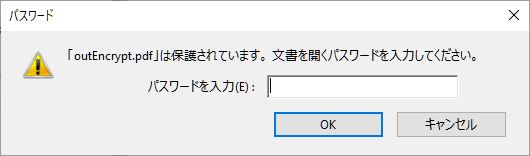
出力されたPDFを開くとパスワードの入力を求められます。
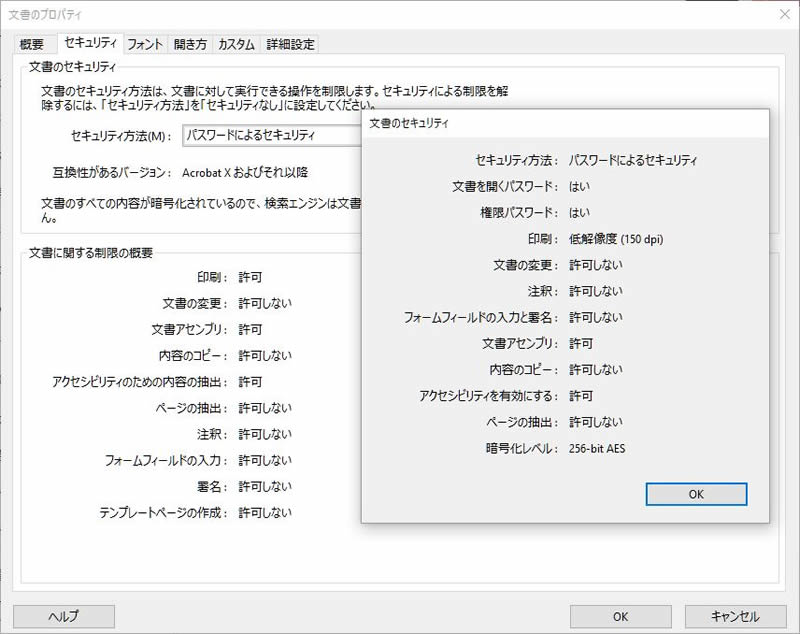
文書のプロパティにて設定したセキュリティを確認できます。