/*
	Antenna House PDF Tool API V8.0
	C++ Interface sample program

	概要:各種注釈の作成

	Copyright 2025 Antenna House, Inc.
*/

#include < PdfTk.h >
#include < stdio.h >

using namespace PdfTk;

void addAnnotFreeText(PtlPage& page, bool on);
void addAnnotCircle(PtlPage& page);
void addAnnotSquare(PtlPage& page);
void addAnnotLine(PtlPage& page);
void addAnnotPolyLine(PtlPage& page);
void addAnnotPolygone(PtlPage& page);

int main(int argc, char* argv[])
{
	if (argc < 4)
	{
		printf("usage: AppendAnnotShapes.exe in-pdf-file out-pdf-file 規格\n");
		printf("規格\n1 : FreeText注釈(引き出し線あり)  2 : FreeText(引き出し線なし)注釈  3 : 円注釈\n");
		printf("4 : 矩形注釈  5 : ライン注釈  6 : 折れ線注釈  7 : 多角形注釈\n");
		return 1;
	}

	try {
		PtlParamInput input(argv[1]);
		PtlParamOutput output(argv[2]);

		PtlPDFDocument doc;

		// PDFファイルをロードします。
		doc.load(input);

		// ページコンテナの取得
		PtlPages& pages = doc.getPages();

		// ページコンテナが空かどうか
		if (pages.isEmpty()) {
			printf("ページコンテナが空\n");
			return 1;
		}

		// 1ページ目の取得
		PtlPage page = pages.get(0);

		const char* kind = argv[3];
		switch (kind[0]) {
		case '1':
		// FreeText注釈(引き出し線あり)の追加
			addAnnotFreeText(page, true);
			break;
		case '2':
			// FreeText注釈(引き出し線なし)の追加
			addAnnotFreeText(page, false);
			break;
		case '3':
			// 円注釈の追加
			addAnnotCircle(page);
			break;
		case '4':
			// 矩形注釈の追加
			addAnnotSquare(page);
			break;
		case '5':
			// ライン注釈の追加
			addAnnotLine(page);
			break;
		case '6':
			// 折れ線注釈の追加
			addAnnotPolyLine(page);
			break;
		case '7':
			// 多角形注釈の追加
			addAnnotPolygone(page);
			break;
		default:
			printf("usage: AppendAnnotShapes.exe in-pdf-file out-pdf-file 規格\n");
			printf("規格\n1 : FreeText注釈(引き出し線あり)  2 : FreeText(引き出し線なし)注釈  3 : 円注釈\n");
			printf("4 : 矩形注釈  5 : ライン注釈  6 : 折れ線注釈  7 : 多角形注釈\n");
			return 1;
		}

		// ファイルに保存します。
		doc.save(output);
		printf("完了!\n");
	}
	catch (PtlException e)
	{
		fprintf(stderr, "Error code : %d\n %s\n", e.getErrorCode(), e.getErrorMessage().c_str());
		return 1;
	}

}

void addAnnotFreeText(PtlPage& page, bool on)
{
	// 注釈コンテナの取得
	PtlAnnots& annots = page.getAnnots();

	// フリーテキスト注釈
	PtlAnnotFreeText annotFreeText;

	// 矩形座標を設定 座標の単位はmmで原点(0,0)は左下
	PtlRect rect(50, 100, 95, 150);
	annotFreeText.setTextBoxRect(rect);

	// 色を設定
	PtlColorDeviceRGB colorRed(1.0f, 0.0f, 0.0f);
	annotFreeText.setColor(colorRed);

	// 内部色を設定
	PtlColorDeviceRGB colorBlue(0.0f, 0.0f, 1.0f);
	annotFreeText.setInteriorColor(colorBlue);

	// 内容を設定(注釈用に表示されるテキスト・可読な形式での注釈コンテンツの代替説明)
	annotFreeText.setTextContents("フリーテキスト注釈サンプル");

	// 日時の設定(2025/01/01 00:00:00)
	annotFreeText.setDate(PtlDate(2025, 1, 1, 0, 0, 0));

	// ポップアップウィンドウのタイトル文字列設定
	annotFreeText.setMarkUpTitle("Antenna House");

	// サブジェクトの短い説明設定
	annotFreeText.setMarkUpSubj("サブジェクトの短い説明");

	// 注釈生成日時の設定(2025/01/01 00:00:00)
	annotFreeText.setMarkUpDate(PtlDate(2025, 1, 1, 0, 0, 0));

	// 不透明度を設定 0.0 ~ 1.0。0.0が透明、1.0が不透明
	annotFreeText.setMarkUpCA(0.8f);

	// フリーテキスト注釈のテキストボックス
	PtlTextBoxAnnot textBox;

	// テキストボックスに書く文字のパラメータ1
	PtlParamTextBoxAnnot paramTextBox1;
	PtlParamFontAnnot font("MS ゴシック", 12, false, false);
	paramTextBox1.setFont(font);
	paramTextBox1.setTextColor(colorRed);

	// テキストボックスに書く文字のパラメータ2
	PtlParamTextBoxAnnot paramTextBox2;
	PtlParamFontAnnot font2("MS 明朝", 20, false, false);
	paramTextBox2.setFont(font2);
	paramTextBox2.setTextColor(PtlColorDeviceRGB(0.0f, 0.0f, 0.0f));
	paramTextBox2.setUnderline(true);

	// テキストボックスに書く文字のパラメータ3
	PtlParamTextBoxAnnot paramTextBox3;
	PtlParamFontAnnot font3("MS P明朝", 20, true, true);
	paramTextBox3.setFont(font3);
	paramTextBox3.setTextColor(PtlColorDeviceRGB(0.0f, 0.0f, 0.0f));
	paramTextBox3.setStrikeOut(true);

	// テキストボックスに書く文字のパラメータ4
	PtlParamTextBoxAnnot paramTextBox4;
	PtlParamFontAnnot font4("MS 明朝", 10, false, true);
	paramTextBox4.setFont(font4);
	paramTextBox4.setTextColor(PtlColorDeviceRGB(0.0f, 0.0f, 0.0f));

	// テキストボックスへテキスト書き込み
	textBox.writeStringNL("あいうえお", paramTextBox1);
	textBox.writeStringNL("かきくけこ", paramTextBox2);
	textBox.writeString("さしすせそ", paramTextBox1);
	textBox.writeString("たちつてと", paramTextBox3);
	textBox.writeStringNL("なにぬねの", paramTextBox4);

	// フリーテキスト注釈にテキストボックスを設定
	annotFreeText.setTextBox(textBox);

	if (on)
	{
		// 引き出し線の設定
		PtlPoints& points = annotFreeText.getCalloutPoints();
		// 右から右下へ
		points.append(150, 70);
		points.append(130, 125);
		points.append(95, 125);
		// 引き出し線の線端
		annotFreeText.setLineEndingStyle(PtlAnnotFreeText::STYLE_OPEN_ARROW);
	}

	// 注釈の追加
	annots.append(annotFreeText);
}

void addAnnotCircle(PtlPage& page)
{
	// 注釈コンテナの取得
	PtlAnnots& annots = page.getAnnots();

	// 円形注釈
	PtlAnnotCircle annotCircle;

	// 矩形座標を設定 座標の単位はmmで原点(0,0)は左下
	annotCircle.setRect(PtlRect(50.0f, 100.0f, 100.0f, 150.0f));

	// 内容を設定(注釈用に表示されるテキスト・可読な形式での注釈コンテンツの代替説明)
	annotCircle.setTextContents("円形注釈サンプル");

	// 日時の設定(2025/01/01 00:00:00)
	annotCircle.setDate(PtlDate(2025, 1, 1, 0, 0, 0));

	// 注釈フラグを設定(論理和) FLAG_NOROTATE = 0x00000010, /* 注釈の外観をページにあわせて回転しません。 */
	annotCircle.setAnnotFlags(PtlAnnotText::FLAG_NOROTATE);

	// 色を設定
	annotCircle.setColor(PtlColorDeviceRGB(1.0f, 0.0f, 0.0f));

	// 内部色を設定
	annotCircle.setInteriorColor(PtlColorDeviceRGB(1.0f, 1.0f, 0.0f));

	// 境界線スタイルを設定 BORDER_SOLID = 1, /* 実線(注釈を囲む実線の矩形) */
	annotCircle.setBorderStyle(PtlAnnotText::BORDER_SOLID);

	// 境界線幅を設定 BORDER_WIDTH_THIN = 1, /* 細い */
	annotCircle.setBorderWidth(PtlAnnotText::BORDER_WIDTH_THIN);

	//------

	// ポップアップウィンドウのタイトル文字列設定
	annotCircle.setMarkUpTitle("Antenna House");

	// サブジェクトの短い説明設定
	annotCircle.setMarkUpSubj("サブジェクトの短い説明");

	// 注釈生成日時の設定(2025/01/01 00:00:00)
	annotCircle.setMarkUpDate(PtlDate(2025, 1, 1, 0, 0, 0));

	// 不透明度を設定 0.0 ~ 1.0。0.0が透明、1.0が不透明
	annotCircle.setMarkUpCA(0.8f);

	//------

	// 注釈の追加
	annots.append(annotCircle);
}

void addAnnotSquare(PtlPage& page)
{
	// 注釈コンテナの取得
	PtlAnnots& annots = page.getAnnots();

	// 矩形注釈
	PtlAnnotSquare annotSquare;

	// 矩形座標を設定 座標の単位はmmで原点(0,0)は左下
	annotSquare.setRect(PtlRect(50.0f, 100.0f, 100.0f, 150.0f));

	// 内容を設定(注釈用に表示されるテキスト・可読な形式での注釈コンテンツの代替説明)
	annotSquare.setTextContents("矩形注釈サンプル");

	// 日時の設定(2025/01/01 00:00:00)
	annotSquare.setDate(PtlDate(2025, 1, 1, 0, 0, 0));

	// 注釈フラグを設定(論理和) FLAG_NOROTATE = 0x00000010, /* 注釈の外観をページにあわせて回転しません。 */
	annotSquare.setAnnotFlags(PtlAnnotText::FLAG_NOROTATE);

	// 色を設定
	annotSquare.setColor(PtlColorDeviceRGB(1.0f, 0.0f, 0.0f));

	// 内部色を設定
	annotSquare.setInteriorColor(PtlColorDeviceRGB(1.0f, 1.0f, 0.0f));

	// 境界線スタイルを設定 BORDER_SOLID = 1, /* 実線(注釈を囲む実線の矩形) */
	annotSquare.setBorderStyle(PtlAnnotText::BORDER_SOLID);

	// 境界線幅を設定 BORDER_WIDTH_THIN = 1, /* 細い */
	annotSquare.setBorderWidth(PtlAnnotText::BORDER_WIDTH_THIN);

	//------

	// ポップアップウィンドウのタイトル文字列設定
	annotSquare.setMarkUpTitle("Antenna House");

	// サブジェクトの短い説明設定
	annotSquare.setMarkUpSubj("サブジェクトの短い説明");

	// 注釈生成日時の設定(2025/01/01 00:00:00)
	annotSquare.setMarkUpDate(PtlDate(2025, 1, 1, 0, 0, 0));

	// 不透明度を設定 0.0 ~ 1.0。0.0が透明、1.0が不透明
	annotSquare.setMarkUpCA(0.8f);

	//------

	// 注釈の追加
	annots.append(annotSquare);
}

void addAnnotLine(PtlPage& page)
{
	// 注釈コンテナの取得
	PtlAnnots& annots = page.getAnnots();

	// PDFのテキスト注釈
	PtlAnnotLine annotLine;

	// 開始座標を設定 座標の単位はmmで原点(0,0)は左下
	annotLine.setStartPoint(PtlPoint(0.0f, 100.0f));

	// 終了座標を設定 座標の単位はmmで原点(0,0)は左下
	annotLine.setEndPoint(PtlPoint(100.0f, 200.0f));

	// 内容を設定(注釈用に表示されるテキスト・可読な形式での注釈コンテンツの代替説明)
	annotLine.setTextContents("ライン注釈サンプル");

	// 日時の設定(2025/01/01 00:00:00)
	annotLine.setDate(PtlDate(2025, 1, 1, 0, 0, 0));

	// 注釈フラグを設定(論理和) FLAG_NOROTATE = 0x00000010, /* 注釈の外観をページにあわせて回転しません。 */
	annotLine.setAnnotFlags(PtlAnnotText::FLAG_NOROTATE);

	// 色を設定
	annotLine.setColor(PtlColorDeviceRGB(1.0f, 0.0f, 0.0f));

	// 境界線スタイルを設定 BORDER_SOLID = 1, /* 実線(注釈を囲む実線の矩形) */
	annotLine.setBorderStyle(PtlAnnotText::BORDER_SOLID);

	// 境界線幅を設定 BORDER_WIDTH_THIN = 1, /* 細い */
	annotLine.setBorderWidth(PtlAnnotText::BORDER_WIDTH_THIN);

	// キャプション設定
	annotLine.setCaptionPosition(PtlAnnotLine::POSITION_TOP);
	annotLine.setViewCaption(true);
	annotLine.setHorizontalOffset(30.0f);
	annotLine.setVerticalOffset(10.0f);

	// 線端スタイル設定
	annotLine.setLineStartPointStyle(PtlAnnotLine::LINE_ENDING_STYLE::STYLE_R_OPEN_ARROW);
	annotLine.setLineEndPointStyle(PtlAnnotLine::LINE_ENDING_STYLE::STYLE_DIAMOND);

	// 引き出し線
	annotLine.setLeaderLinesLength(-20.0f);
	annotLine.setExtensionLeaderLines(50.0f);

	// 引き出し線オフセット
	annotLine.setLeaderLinesOffset(20.0f);

	//------

	// ポップアップウィンドウのタイトル文字列設定
	annotLine.setMarkUpTitle("Antenna House");

	// サブジェクトの短い説明設定
	annotLine.setMarkUpSubj("サブジェクトの短い説明");

	// 注釈生成日時の設定(2025/01/01 00:00:00)
	annotLine.setMarkUpDate(PtlDate(2025, 1, 1, 0, 0, 0));

	// 不透明度を設定 0.0 ~ 1.0。0.0が透明、1.0が不透明
	annotLine.setMarkUpCA(0.8f);

	//------

	// 注釈の追加
	annots.append(annotLine);
}

void addAnnotPolyLine(PtlPage& page)
{
	// 注釈コンテナの取得
	PtlAnnots& annots = page.getAnnots();

	// 折れ線注釈
	PtlAnnotPolyLine annotPolyLine;

	// 座標を設定 座標の単位はmmで原点(0,0)は左下
	PtlPoints& points = annotPolyLine.getVertices();
	points.append(PtlPoint(92.0f, 123.0f));
	points.append(PtlPoint(96.0f, 117.0f));
	points.append(PtlPoint(103.0f, 121.0f));
	points.append(PtlPoint(115.0f, 119.0f));
	points.append(PtlPoint(121.0f, 112.0f));
	points.append(PtlPoint(130.0f, 113.0f));
	points.append(PtlPoint(121.0f, 122.0f));
	points.append(PtlPoint(90.0f, 126.0f));
	points.append(PtlPoint(86.0f, 124.0f));
	points.append(PtlPoint(89.0f, 116.0f));

	// 内容を設定(注釈用に表示されるテキスト・可読な形式での注釈コンテンツの代替説明)
	annotPolyLine.setTextContents("折れ線注釈サンプル");

	// 日時の設定(2025/01/01 00:00:00)
	annotPolyLine.setDate(PtlDate(2025, 1, 1, 0, 0, 0));

	// 注釈フラグを設定(論理和) FLAG_NOROTATE = 0x00000010, /* 注釈の外観をページにあわせて回転しません。 */
	annotPolyLine.setAnnotFlags(PtlAnnotText::FLAG_NOROTATE);

	// 色を設定
	annotPolyLine.setColor(PtlColorDeviceRGB(1.0f, 0.0f, 0.0f));

	// 境界線スタイルを設定 BORDER_SOLID = 1, /* 実線(注釈を囲む実線の矩形) */
	annotPolyLine.setBorderStyle(PtlAnnotText::BORDER_SOLID);

	// 境界線幅を設定 BORDER_WIDTH_THIN = 1, /* 細い */
	annotPolyLine.setBorderWidth(PtlAnnotText::BORDER_WIDTH_THIN);

	//------

	// ポップアップウィンドウのタイトル文字列設定
	annotPolyLine.setMarkUpTitle("Antenna House");

	// サブジェクトの短い説明設定
	annotPolyLine.setMarkUpSubj("サブジェクトの短い説明");

	// 注釈生成日時の設定(2025/01/01 00:00:00)
	annotPolyLine.setMarkUpDate(PtlDate(2025, 1, 1, 0, 0, 0));

	// 不透明度を設定 0.0 ~ 1.0。0.0が透明、1.0が不透明
	annotPolyLine.setMarkUpCA(0.8f);

	//------

	// 注釈の追加
	annots.append(annotPolyLine);
}

void addAnnotPolygone(PtlPage& page)
{
	// 注釈コンテナの取得
	PtlAnnots& annots = page.getAnnots();

	// 多角形注釈
	PtlAnnotPolygon annotPolygone;

	// 座標を設定 座標の単位はmmで原点(0,0)は左下
	PtlPoints& points = annotPolygone.getVertices();
	points.append(PtlPoint(92.0f, 123.0f));
	points.append(PtlPoint(96.0f, 117.0f));
	points.append(PtlPoint(103.0f, 121.0f));
	points.append(PtlPoint(115.0f, 119.0f));
	points.append(PtlPoint(121.0f, 112.0f));
	points.append(PtlPoint(130.0f, 113.0f));
	points.append(PtlPoint(121.0f, 122.0f));
	points.append(PtlPoint(90.0f, 126.0f));
	points.append(PtlPoint(86.0f, 124.0f));
	points.append(PtlPoint(89.0f, 116.0f));

	// 内容を設定(注釈用に表示されるテキスト・可読な形式での注釈コンテンツの代替説明)
	annotPolygone.setTextContents("多角形注釈サンプル");

	// 日時の設定(2025/01/01 00:00:00)
	annotPolygone.setDate(PtlDate(2025, 1, 1, 0, 0, 0));

	// 注釈フラグを設定(論理和) FLAG_NOROTATE = 0x00000010, /* 注釈の外観をページにあわせて回転しません。 */
	annotPolygone.setAnnotFlags(PtlAnnotText::FLAG_NOROTATE);

	// 色を設定
	annotPolygone.setColor(PtlColorDeviceRGB(1.0f, 0.0f, 0.0f));

	// 内部色を設定
	annotPolygone.setInteriorColor(PtlColorDeviceRGB(1.0f, 1.0f, 0.0f));

	// 境界線スタイルを設定 BORDER_SOLID = 1, /* 実線(注釈を囲む実線の矩形) */
	annotPolygone.setBorderStyle(PtlAnnotText::BORDER_SOLID);

	// 境界線幅を設定 BORDER_WIDTH_THIN = 1, /* 細い */
	annotPolygone.setBorderWidth(PtlAnnotText::BORDER_WIDTH_THIN);

	//------

	// ポップアップウィンドウのタイトル文字列設定
	annotPolygone.setMarkUpTitle("Antenna House");

	// サブジェクトの短い説明設定
	annotPolygone.setMarkUpSubj("サブジェクトの短い説明");

	// 注釈生成日時の設定(2025/01/01 00:00:00)
	annotPolygone.setMarkUpDate(PtlDate(2025, 1, 1, 0, 0, 0));

	// 不透明度を設定 0.0 ~ 1.0。0.0が透明、1.0が不透明
	annotPolygone.setMarkUpCA(0.8f);

	//------

	// 注釈の追加
	annots.append(annotPolygone);
}


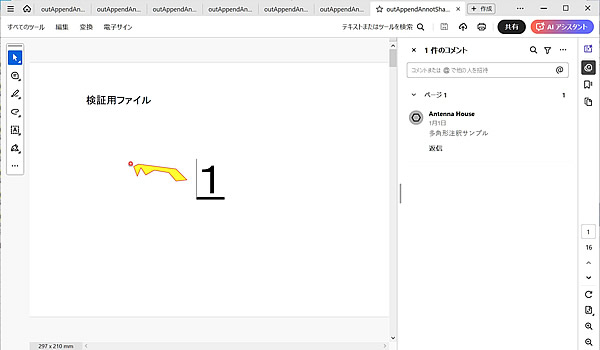
PDF Tool APIサンプルコード:FreeText(引き出し線あり)、FreeText(引き出し線なし)、円、矩形、線、折れ線、多角形注釈の新規作成
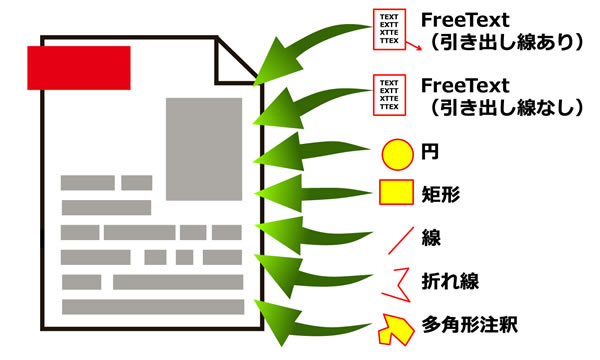
FreeText(引き出し線あり)、FreeText(引き出し線なし)、円、矩形、線、折れ線、多角形注釈を新規作成します。
概要
サンプルコードの概要
引数で指定した種類の注釈を添付します。
■フリーテキスト注釈の追加
- PtlPage :PDFのページオブジェクトを表現したクラス
- PtlAnnots :PDFの注釈を表現したクラス
- PtlPage.getAnnots() :注釈コンテナを取得
- PtlAnnotFreeText :PDFのフリーテキスト注釈を表現したクラス
- PtlAnnotFreeText.setTextBoxRect(PtlRect) :矩形座標を設定
- PtlAnnotFreeText.setColor() :線の色を設定
- PtlAnnotFreeText.setInteriorColor() :内部色を設定
- PtlAnnotFreeText.setTextContents() :内容を設定
- PtlAnnotFreeText.setDate() :日時を設定
- PtlAnnotFreeText.setMarkUpTitle() :ポップアップウィンドウのタイトル文字列を設定
- PtlAnnotFreeText.setMarkUpSubj() :サブジェクトの短い説明を設定
- PtlAnnotFreeText.setMarkUpDate() :注釈生成日時を設定
- PtlAnnotFreeText.setMarkUpCA() :不透明度を設定
- PtlTextBoxAnnot :FreeText注釈に描画されるテキストボックスを表現するクラス
- PtlParamTextBoxAnnot :FreeText注釈のTextBoxに使うパラメータクラス
- PtlTextBoxAnnot.writeStringNL() :文字列を出力して改行
- PtlAnnotFreeText.setTextBox() :テキストボックスを設定
- PtlAnnotFreeText.getCalloutPoints() :コールアウトの頂点POINTのコンテナを取得
- PtlAnnotFreeText.setLineEndingStyle() :引き出し線の線端スタイルを設定
- PtlAnnots.append(PtlAnnotFreeText) :注釈を追加
■円注釈の追加
- PtlPage :PDFのページオブジェクトを表現したクラス
- PtlAnnots :PDFの注釈を表現したクラス
- PtlPage.getAnnots() :注釈コンテナを取得
- PtlAnnotCircle :PDFの円注釈を表現したクラス
- PtlAnnotCircle.setRect() :矩形座標を設定
- PtlAnnotCircle.setTextContents() :内容を設定
- PtlAnnotCircle.setDate() :日時を設定
- PtlAnnotCircle.setAnnotFlags() :注釈フラグを設定
- PtlAnnotCircle.setColor() :線の色を設定
- PtlAnnotCircle.setInteriorColor() :内部色を設定
- PtlAnnotCircle.setBorderStyle() :境界線スタイルを設定
- PtlAnnotCircle.setBorderWidth() :境界線幅をBORDER_LINE_WIDTHで設定
- PtlAnnotCircle.setMarkUpTitle() :ポップアップウィンドウのタイトル文字列を設定
- PtlAnnotCircle.setMarkUpSubj() :サブジェクトの短い説明を設定
- PtlAnnotCircle.setMarkUpDate() :注釈生成日時を設定
- PtlAnnotCircle.setMarkUpCA() :不透明度を設定
- PtlAnnots.append(PtlAnnotCircle) :注釈を追加
■矩形注釈の追加
- PtlPage :PDFのページオブジェクトを表現したクラス
- PtlAnnots :PDFの注釈を表現したクラス
- PtlPage.getAnnots() :注釈コンテナを取得
- PtlAnnotSquare annotSquare :PDFの矩形注釈を表現したクラス
- PtlAnnotSquare.setRect() :矩形座標を設定
- PtlAnnotSquare.setTextContents() :内容を設定
- PtlAnnotSquare.setDate() :日時を設定
- PtlAnnotSquare.setAnnotFlags() :注釈フラグを設定
- PtlAnnotSquare.setColor() :線の色を設定
- PtlAnnotSquare.setInteriorColor() :内部色を設定
- PtlAnnotSquare.setBorderStyle() :境界線スタイルを設定
- PtlAnnotSquare.setBorderWidth() :境界線幅をBORDER_LINE_WIDTHで設定
- PtlAnnotSquare.setMarkUpTitle() :ポップアップウィンドウのタイトル文字列を設定
- PtlAnnotSquare.setMarkUpSubj() :サブジェクトの短い説明を設定
- PtlAnnotSquare.setMarkUpDate() :注釈生成日時を設定
- PtlAnnotSquare.setMarkUpCA() :不透明度を設定
- PtlAnnots.append(PtlAnnotSquare) :注釈を追加
■線注釈の追加
- PtlPage :PDFのページオブジェクトを表現したクラス
- PtlAnnots :PDFの注釈を表現したクラス
- PtlPage.getAnnots() :注釈コンテナを取得
- PtlAnnotLine annotLine :PDFの線注釈を表現したクラス
- PtlAnnotLine.setStartPoint() :注釈の開始座標を設定
- PtlAnnotLine.setEndPoint() :注釈の終了座標を設定
- PtlAnnotLine.setTextContents() :内容を設定
- PtlAnnotLine.setDate() :日時を設定
- PtlAnnotLine.setAnnotFlags() :注釈フラグを設定
- PtlAnnotLine.setColor() :線の色を設定
- PtlAnnotLine.setBorderStyle() :境界線スタイルを設定
- PtlAnnotLine.setBorderWidth() :境界線幅をBORDER_LINE_WIDTHで設定
- PtlAnnotLine.setCaptionPosition() :キャプションの表示位置を設定
- PtlAnnotLine.setViewCaption() :キャプションを表示するかどうかを設定
- PtlAnnotLine.setHorizontalOffset() :キャプションの表示位置の水平方向のオフセットを設定
- PtlAnnotLine.setVerticalOffset() :キャプションの表示位置の垂直方向のオフセットを設定
- PtlAnnotLine.setLineStartPointStyle() :開始座標の線端のスタイルを設定
- PtlAnnotLine.setLineEndPointStyle() :終了座標の線端のスタイルを設定
- PtlAnnotLine.setLeaderLinesLength() :線端から垂直に伸びる引き出し線の長さを設定
- PtlAnnotLine.setExtensionLeaderLines() :引き出し線と逆側に伸びる線の長さを設定
- PtlAnnotLine.setLeaderLinesOffset() :引き出し線オフセットを設定
- PtlAnnotLine.setMarkUpTitle() :ポップアップウィンドウのタイトル文字列を設定
- PtlAnnotLine.setMarkUpSubj() :サブジェクトの短い説明を設定
- PtlAnnotLine.setMarkUpDate() :注釈生成日時を設定
- PtlAnnotLine.setMarkUpCA() :不透明度を設定
- PtlAnnots.append(PtlAnnotLine) :注釈を追加
■折れ線注釈の追加
- PtlPage :PDFのページオブジェクトを表現したクラス
- PtlAnnots :PDFの注釈を表現したクラス
- PtlPage.getAnnots() :注釈コンテナを取得
- PtlAnnotPolyLine :PDFの折れ線注釈を表現したクラス
- PtlAnnotPolyLine.getVertices() :折れ線の頂点POINTのコンテナを取得
- PtlAnnotPolyLine.setTextContents() :内容を設定
- PtlAnnotPolyLine.setDate() :日時を設定
- PtlAnnotPolyLine.setAnnotFlags() :注釈フラグを設定
- PtlAnnotPolyLine.setColor() :線の色を設定
- PtlAnnotPolyLine.setBorderStyle() :境界線スタイルを設定
- PtlAnnotPolyLine.setBorderWidth() :境界線幅をBORDER_LINE_WIDTHで設定
- PtlAnnotPolyLine.setMarkUpTitle() :ポップアップウィンドウのタイトル文字列を設定
- PtlAnnotPolyLine.setMarkUpSubj() :サブジェクトの短い説明を設定
- PtlAnnotPolyLine.setMarkUpDate() :注釈生成日時を設定
- PtlAnnotPolyLine.setMarkUpCA() :不透明度を設定
- PtlAnnots.append(PtlAnnotPolyLine) :注釈を追加
■多角形注釈の追加
- PtlPage :PDFのページオブジェクトを表現したクラス
- PtlAnnots :PDFの注釈を表現したクラス
- PtlPage.getAnnots() :注釈コンテナを取得
- PtlAnnotPolygon annotPolygone :PDFの多角形注釈を表現したクラス
- PtlAnnotPolygon.getVertices();多角形の頂点POINTのコンテナを取得
- PtlAnnotPolygon.setTextContents() :内容を設定
- PtlAnnotPolygon.setDate() :日時を設定
- PtlAnnotPolygon.setAnnotFlags() :注釈フラグを設定
- PtlAnnotPolygon.setColor() :線の色を設定
- PtlAnnotPolygon.setInteriorColor() :内部色を設定
- PtlAnnotPolygon.setBorderStyle() :境界線スタイルを設定
- PtlAnnotPolygon.setBorderWidth() :境界線幅をBORDER_LINE_WIDTHで設定
- PtlAnnotPolygon.setMarkUpTitle() :ポップアップウィンドウのタイトル文字列を設定
- PtlAnnotPolygon.setMarkUpSubj() :サブジェクトの短い説明を設定
- PtlAnnotPolygon.setMarkUpDate() :注釈生成日時を設定
- PtlAnnotPolygon.setMarkUpCA() :不透明度を設定
- PtlAnnots.append(PtlAnnotPolygon) :注釈を追加
サンプルコード
/*
Antenna House PDF Tool API V8.0
Java Interface sample program
概要:各種注釈の作成
Copyright 2025 Antenna House, Inc.
*/
package Sample;
import jp.co.antenna.ptl.PtlAnnot;
import jp.co.antenna.ptl.PtlAnnotCircle;
import jp.co.antenna.ptl.PtlAnnotFreeText;
import jp.co.antenna.ptl.PtlAnnotLine;
import jp.co.antenna.ptl.PtlAnnotPolyLine;
import jp.co.antenna.ptl.PtlAnnotPolygon;
import jp.co.antenna.ptl.PtlAnnotSquare;
import jp.co.antenna.ptl.PtlAnnots;
import jp.co.antenna.ptl.PtlColorDeviceRGB;
import jp.co.antenna.ptl.PtlDate;
import jp.co.antenna.ptl.PtlException;
import jp.co.antenna.ptl.PtlPDFDocument;
import jp.co.antenna.ptl.PtlPage;
import jp.co.antenna.ptl.PtlPages;
import jp.co.antenna.ptl.PtlParamFontAnnot;
import jp.co.antenna.ptl.PtlParamInput;
import jp.co.antenna.ptl.PtlParamOutput;
import jp.co.antenna.ptl.PtlParamTextBoxAnnot;
import jp.co.antenna.ptl.PtlPoint;
import jp.co.antenna.ptl.PtlPoints;
import jp.co.antenna.ptl.PtlRect;
import jp.co.antenna.ptl.PtlTextBoxAnnot;
public class AppendAnnotShapes {
/**
* @param args the command line arguments
*/
public static void main(String[] args) {
// TODO 自動生成されたメソッド・スタブ
if (args.length < 3)
{
System.out.println("usage: AppendAnnotShapes.exe in-pdf-file out-pdf-file 規格");
System.out.println("規格");
System.out.println("1 : FreeText注釈(引き出し線あり) 2 : FreeText(引き出し線なし)注釈 3 : 円注釈");
System.out.println("4 : 矩形注釈 5 : ライン注釈 6 : 折れ線注釈 7 : 多角形注釈");
return;
}
try (PtlParamInput inputFile = new PtlParamInput(args[0]);
PtlParamOutput outputFile = new PtlParamOutput(args[1]);
PtlPDFDocument doc = new PtlPDFDocument())
{
// PDFファイルをロードします。
doc.load(inputFile);
try (PtlPages pages = doc.getPages()) // ページコンテナの取得
{
// ページコンテナが空かどうか
if (pages.isEmpty())
{
System.out.println("ページコンテナが空\n");
return;
}
try (PtlPage page = pages.get(0)) // 1ページ目の取得
{
int kind = Integer.parseInt(args[2]);
switch (kind) {
case 1:
// FreeText注釈(引き出し線あり)の追加
addAnnotFreeText(page, true);
break;
case 2:
// FreeText注釈(引き出し線なし)の追加
addAnnotFreeText(page, false);
break;
case 3:
// 円注釈の追加
addAnnotCircle(page);
break;
case 4:
// 矩形注釈の追加
addAnnotSquare(page);
break;
case 5:
// ライン注釈の追加
addAnnotLine(page);
break;
case 6:
// 折れ線注釈の追加
addAnnotPolyLine(page);
break;
case 7:
// 多角形注釈の追加
addAnnotPolygone(page);
break;
default:
System.out.println("usage: AppendAnnotShapes.exe in-pdf-file out-pdf-file 規格");
System.out.println("規格");
System.out.println("1 : FreeText注釈(引き出し線あり) 2 : FreeText(引き出し線なし)注釈 3 : 円注釈");
System.out.println("4 : 矩形注釈 5 : ライン注釈 6 : 折れ線注釈 7 : 多角形注釈");
return;
}
}
}
// ファイルに保存します。
doc.save(outputFile);
}
catch (PtlException pex) {
System.out.println("PtlException : ErrorCode = " + pex.getErrorCode() + "\n " + pex.getErrorMessage());
}
catch (Exception ex) {
System.out.println(ex.getMessage());
ex.printStackTrace();
}
catch (Error ex) {
System.out.println(ex.getMessage());
ex.printStackTrace();
}
finally {
System.out.println("-- 完了 --");
}
}
public static void addAnnotFreeText(PtlPage page, boolean on) throws PtlException, Exception, Error
{
try (PtlAnnots annots = page.getAnnots(); // 注釈コンテナの取得
PtlAnnotFreeText annotFreeText = new PtlAnnotFreeText(); // フリーテキスト注釈
PtlRect rectAnnot = new PtlRect(50.0f, 100.0f, 95.0f, 150.0f);
PtlTextBoxAnnot textBox = new PtlTextBoxAnnot(); // テキストボックス
PtlParamTextBoxAnnot paramTextBox1 = new PtlParamTextBoxAnnot(); // テキストボックスに書く文字のパラメータ1
PtlParamTextBoxAnnot paramTextBox2 = new PtlParamTextBoxAnnot(); // テキストボックスに書く文字のパラメータ2
PtlParamTextBoxAnnot paramTextBox3 = new PtlParamTextBoxAnnot(); // テキストボックスに書く文字のパラメータ3
PtlParamTextBoxAnnot paramTextBox4 = new PtlParamTextBoxAnnot(); // テキストボックスに書く文字のパラメータ4
PtlColorDeviceRGB colorRed = new PtlColorDeviceRGB(1.0f, 0.0f, 0.0f);
PtlColorDeviceRGB colorBlue = new PtlColorDeviceRGB(0.0f, 0.0f, 1.0f);
PtlColorDeviceRGB colorBlack = new PtlColorDeviceRGB(0.0f, 0.0f, 0.0f);
PtlParamFontAnnot font1 = new PtlParamFontAnnot("MS ゴシック", 12.0f, false, false);
PtlParamFontAnnot font2 = new PtlParamFontAnnot("MS 明朝", 20.0f, false, false);
PtlParamFontAnnot font3 = new PtlParamFontAnnot("MS P明朝", 20.0f, true, true);
PtlParamFontAnnot font4 = new PtlParamFontAnnot("MS 明朝", 10.0f, false, true);
)
{
// 矩形座標を設定 座標の単位はmmで原点(0,0)は左下
annotFreeText.setTextBoxRect(rectAnnot);
// 色を設定
annotFreeText.setColor(colorRed);
// 内部色を設定
annotFreeText.setInteriorColor(colorBlue);
// 内容を設定(注釈用に表示されるテキスト・可読な形式での注釈コンテンツの代替説明)
annotFreeText.setTextContents("フリーテキスト注釈サンプル");
// 日時の設定(2025/01/01 00:00:00)
try (PtlDate date = new PtlDate(2025, 1, 1, 0, 0, 0))
{
annotFreeText.setDate(date);
}
// ポップアップウィンドウのタイトル文字列設定
annotFreeText.setMarkUpTitle("Antenna House");
// サブジェクトの短い説明設定
annotFreeText.setMarkUpSubj("サブジェクトの短い説明");
// 注釈生成日時の設定(2025/01/01 00:00:00)
try (PtlDate date = new PtlDate(2025, 1, 1, 0, 0, 0))
{
annotFreeText.setMarkUpDate(date);
}
// 不透明度を設定 0.0 ~ 1.0。0.0が透明、1.0が不透明
annotFreeText.setMarkUpCA(0.8f);
// テキストボックスに書く文字のパラメータ1の設定
paramTextBox1.setFont(font1);
paramTextBox1.setTextColor(colorRed);
// テキストボックスに書く文字のパラメータ2の設定
paramTextBox2.setFont(font2);
paramTextBox2.setTextColor(colorBlack);
paramTextBox2.setUnderline(true);
// テキストボックスに書く文字のパラメータ3の設定
paramTextBox3.setFont(font3);
paramTextBox3.setTextColor(colorBlack);
paramTextBox3.setStrikeOut(true);
// テキストボックスに書く文字のパラメータ4の設定
paramTextBox4.setFont(font4);
paramTextBox4.setTextColor(colorBlack);
// テキストボックスへテキスト書き込み
textBox.writeStringNL("あいうえお", paramTextBox1);
textBox.writeStringNL("かきくけこ", paramTextBox2);
textBox.writeString("さしすせそ", paramTextBox1);
textBox.writeString("たちつてと", paramTextBox3);
textBox.writeStringNL("なにぬねの", paramTextBox4);
// フリーテキスト注釈にテキストボックスを設定
annotFreeText.setTextBox(textBox);
if(on) {
// 引き出し線の設定
try (PtlPoints points = annotFreeText.getCalloutPoints())
{
points.append(150.0f, 70.0f);
points.append(130.0f,125.0f);
points.append(95.0f,125.0f);
}
// 引き出し線の線端
annotFreeText.setLineEndingStyle(PtlAnnotFreeText.LINE_ENDING_STYLE.STYLE_OPEN_ARROW);
}
// 注釈の追加
annots.append(annotFreeText);
}
}
public static void addAnnotCircle(PtlPage page) throws PtlException, Exception, Error
{
try (PtlAnnots annots = page.getAnnots(); // 注釈コンテナの取得
PtlAnnotCircle annotCircle = new PtlAnnotCircle()) // 円形注釈
{
// 矩形座標を設定 座標の単位はmmで原点(0,0)は左下
try (PtlRect rectAnnot = new PtlRect(50.0f, 100.0f, 100.0f, 150.0f))
{
annotCircle.setRect(rectAnnot);
}
// 内容を設定(注釈用に表示されるテキスト・可読な形式での注釈コンテンツの代替説明)
annotCircle.setTextContents("円形注釈サンプル");
// 日時の設定(2025/01/01 00:00:00)
try (PtlDate date = new PtlDate(2025, 1, 1, 0, 0, 0))
{
annotCircle.setDate(date);
}
// 注釈フラグを設定(論理和) FLAG_NOROTATE = 0x00000010, /* 注釈の外観をページにあわせて回転しません。 */
annotCircle.setAnnotFlags(PtlAnnot.FLAG_NOROTATE);
// 色を設定
try (PtlColorDeviceRGB color = new PtlColorDeviceRGB(1.0f, 0.0f, 0.0f))
{
annotCircle.setColor(color);
}
// 内部色を設定
try (PtlColorDeviceRGB color = new PtlColorDeviceRGB(1.0f, 1.0f, 0.0f))
{
annotCircle.setInteriorColor(color);
}
// 境界線スタイルを設定 BORDER_SOLID = 1, /* 実線(注釈を囲む実線の矩形) */
annotCircle.setBorderStyle(PtlAnnot.BORDER_STYLE.BORDER_SOLID);
// 境界線幅を設定 BORDER_WIDTH_THIN = 1, /* 細い */
annotCircle.setBorderWidth(PtlAnnot.BORDER_LINE_WIDTH.BORDER_WIDTH_THIN);
// ポップアップウィンドウのタイトル文字列設定
annotCircle.setMarkUpTitle("Antenna House");
// サブジェクトの短い説明設定
annotCircle.setMarkUpSubj("サブジェクトの短い説明");
// 注釈生成日時の設定(2025/01/01 00:00:00)
try (PtlDate dateMarkup = new PtlDate(2025, 1, 1, 0, 0, 0))
{
annotCircle.setMarkUpDate(dateMarkup);
}
// 不透明度を設定 0.0 ~ 1.0。0.0が透明、1.0が不透明
annotCircle.setMarkUpCA(0.8f);
// 注釈の追加
annots.append(annotCircle);
}
}
public static void addAnnotSquare(PtlPage page) throws PtlException, Exception, Error
{
try (PtlAnnots annots = page.getAnnots(); // 注釈コンテナの取得
PtlAnnotSquare annotSquare = new PtlAnnotSquare()) // 矩形注釈
{
// 矩形座標を設定 座標の単位はmmで原点(0,0)は左下
try (PtlRect rectAnnot = new PtlRect(50.0f, 100.0f, 100.0f, 150.0f))
{
annotSquare.setRect(rectAnnot);
}
// 内容を設定(注釈用に表示されるテキスト・可読な形式での注釈コンテンツの代替説明)
annotSquare.setTextContents("矩形注釈サンプル");
// 日時の設定(2025/01/01 00:00:00)
try (PtlDate date = new PtlDate(2025, 1, 1, 0, 0, 0))
{
annotSquare.setDate(date);
}
// 注釈フラグを設定(論理和) FLAG_NOROTATE = 0x00000010, /* 注釈の外観をページにあわせて回転しません。 */
annotSquare.setAnnotFlags(PtlAnnot.FLAG_NOROTATE);
// 色を設定
try (PtlColorDeviceRGB color = new PtlColorDeviceRGB(1.0f, 0.0f, 0.0f))
{
annotSquare.setColor(color);
}
// 内部色を設定
try (PtlColorDeviceRGB color = new PtlColorDeviceRGB(1.0f, 1.0f, 0.0f))
{
annotSquare.setInteriorColor(color);
}
// 境界線スタイルを設定 BORDER_SOLID = 1, /* 実線(注釈を囲む実線の矩形) */
annotSquare.setBorderStyle(PtlAnnot.BORDER_STYLE.BORDER_SOLID);
// 境界線幅を設定 BORDER_WIDTH_THIN = 1, /* 細い */
annotSquare.setBorderWidth(PtlAnnot.BORDER_LINE_WIDTH.BORDER_WIDTH_THIN);
// ポップアップウィンドウのタイトル文字列設定
annotSquare.setMarkUpTitle("Antenna House");
// サブジェクトの短い説明設定
annotSquare.setMarkUpSubj("サブジェクトの短い説明");
// 注釈生成日時の設定(2025/01/01 00:00:00)
try (PtlDate dateMarkup = new PtlDate(2025, 1, 1, 0, 0, 0))
{
annotSquare.setMarkUpDate(dateMarkup);
}
// 不透明度を設定 0.0 ~ 1.0。0.0が透明、1.0が不透明
annotSquare.setMarkUpCA(0.8f);
// 注釈の追加
annots.append(annotSquare);
}
}
public static void addAnnotLine(PtlPage page) throws PtlException, Exception, Error
{
try (PtlAnnots annots = page.getAnnots(); // 注釈コンテナの取得
PtlAnnotLine annotLine = new PtlAnnotLine()) // ライン注釈
{
try (PtlPoint pointStart = new PtlPoint(0.0f, 100.0f);
PtlPoint pointEnd = new PtlPoint(100.0f, 200.0f))
{
// 開始点の設定 座標の単位はmmで原点(0,0)は左下
annotLine.setStartPoint(pointStart);
// 終了点の設定 座標の単位はmmで原点(0,0)は左下
annotLine.setEndPoint(pointEnd);
}
// 内容を設定(注釈用に表示されるテキスト・可読な形式での注釈コンテンツの代替説明)
annotLine.setTextContents("ライン注釈サンプル");
// 日時の設定(2025/01/01 00:00:00)
try (PtlDate date = new PtlDate(2025, 1, 1, 0, 0, 0))
{
annotLine.setDate(date);
}
// 注釈フラグを設定(論理和) FLAG_NOROTATE = 0x00000010, /* 注釈の外観をページにあわせて回転しません。 */
annotLine.setAnnotFlags(PtlAnnot.FLAG_NOROTATE);
// 色を設定
try (PtlColorDeviceRGB color = new PtlColorDeviceRGB(1.0f, 0.0f, 0.0f))
{
annotLine.setColor(color);
}
// 境界線スタイルを設定 BORDER_SOLID = 1, /* 実線(注釈を囲む実線の矩形) */
annotLine.setBorderStyle(PtlAnnot.BORDER_STYLE.BORDER_SOLID);
// 境界線幅を設定 BORDER_WIDTH_THIN = 1, /* 細い */
annotLine.setBorderWidth(PtlAnnot.BORDER_LINE_WIDTH.BORDER_WIDTH_THIN);
// キャプション設定
annotLine.setCaptionPosition(PtlAnnotLine.CAPTION_POSITION.POSITION_TOP);
annotLine.setViewCaption(true);
annotLine.setHorizontalOffset(30.0f);
annotLine.setVerticalOffset(10.0f);
// 線端スタイル設定
annotLine.setLineStartPointStyle(PtlAnnotLine.LINE_ENDING_STYLE.STYLE_R_OPEN_ARROW);
annotLine.setLineEndPointStyle(PtlAnnotLine.LINE_ENDING_STYLE.STYLE_DIAMOND);
// 引き出し線
annotLine.setLeaderLinesLength(-20.0f);
annotLine.setExtensionLeaderLines(50.0f);
// 引き出し線オフセット
annotLine.setLeaderLinesOffset(20.0f);
// ポップアップウィンドウのタイトル文字列設定
annotLine.setMarkUpTitle("Antenna House");
// サブジェクトの短い説明設定
annotLine.setMarkUpSubj("サブジェクトの短い説明");
// 注釈生成日時の設定(2025/01/01 00:00:00)
try (PtlDate dateMarkup = new PtlDate(2025, 1, 1, 0, 0, 0))
{
annotLine.setMarkUpDate(dateMarkup);
}
// 不透明度を設定 0.0 ~ 1.0。0.0が透明、1.0が不透明
annotLine.setMarkUpCA(0.8f);
// 注釈の追加
annots.append(annotLine);
}
}
public static void addAnnotPolyLine(PtlPage page) throws PtlException, Exception, Error
{
try (PtlAnnots annots = page.getAnnots(); // 注釈コンテナの取得
PtlAnnotPolyLine annotPolyLine = new PtlAnnotPolyLine()) // 折れ線注釈
{
// 座標を設定 座標の単位はmmで原点(0,0)は左下
try (PtlPoints points = annotPolyLine.getVertices();
PtlPoint point1 = new PtlPoint(92.0f, 123.0f);
PtlPoint point2 = new PtlPoint(96.0f, 117.0f);
PtlPoint point3 = new PtlPoint(103.0f, 121.0f);
PtlPoint point4 = new PtlPoint(115.0f, 119.0f);
PtlPoint point5 = new PtlPoint(121.0f, 112.0f);
PtlPoint point6 = new PtlPoint(130.0f, 113.0f);
PtlPoint point7 = new PtlPoint(121.0f, 122.0f);
PtlPoint point8 = new PtlPoint(90.0f, 126.0f);
PtlPoint point9 = new PtlPoint(86.0f, 124.0f);
PtlPoint point10 = new PtlPoint(89.0f, 116.0f))
{
points.append(point1);
points.append(point2);
points.append(point3);
points.append(point4);
points.append(point5);
points.append(point6);
points.append(point7);
points.append(point8);
points.append(point9);
points.append(point10);
}
// 内容を設定(注釈用に表示されるテキスト・可読な形式での注釈コンテンツの代替説明)
annotPolyLine.setTextContents("折れ線注釈サンプル");
// 日時の設定(2025/01/01 00:00:00)
try (PtlDate date = new PtlDate(2025, 1, 1, 0, 0, 0))
{
annotPolyLine.setDate(date);
}
// 注釈フラグを設定(論理和) FLAG_NOROTATE = 0x00000010, /* 注釈の外観をページにあわせて回転しません。 */
annotPolyLine.setAnnotFlags(PtlAnnot.FLAG_NOROTATE);
// 色を設定
try (PtlColorDeviceRGB color = new PtlColorDeviceRGB(1.0f, 0.0f, 0.0f))
{
annotPolyLine.setColor(color);
}
// 境界線スタイルを設定 BORDER_SOLID = 1, /* 実線(注釈を囲む実線の矩形) */
annotPolyLine.setBorderStyle(PtlAnnot.BORDER_STYLE.BORDER_SOLID);
// 境界線幅を設定 BORDER_WIDTH_THIN = 1, /* 細い */
annotPolyLine.setBorderWidth(PtlAnnot.BORDER_LINE_WIDTH.BORDER_WIDTH_THIN);
// ポップアップウィンドウのタイトル文字列設定
annotPolyLine.setMarkUpTitle("Antenna House");
// サブジェクトの短い説明設定
annotPolyLine.setMarkUpSubj("サブジェクトの短い説明");
// 注釈生成日時の設定(2025/01/01 00:00:00)
try (PtlDate dateMarkup = new PtlDate(2025, 1, 1, 0, 0, 0))
{
annotPolyLine.setMarkUpDate(dateMarkup);
}
// 不透明度を設定 0.0 ~ 1.0。0.0が透明、1.0が不透明
annotPolyLine.setMarkUpCA(0.8f);
// 注釈の追加
annots.append(annotPolyLine);
}
}
public static void addAnnotPolygone(PtlPage page) throws PtlException, Exception, Error
{
try (PtlAnnots annots = page.getAnnots(); // 注釈コンテナの取得
PtlAnnotPolygon annotPolygon = new PtlAnnotPolygon()) // 折れ線注釈
{
// 座標を設定 座標の単位はmmで原点(0,0)は左下
try (PtlPoints points = annotPolygon.getVertices();
PtlPoint point1 = new PtlPoint(92.0f, 123.0f);
PtlPoint point2 = new PtlPoint(96.0f, 117.0f);
PtlPoint point3 = new PtlPoint(103.0f, 121.0f);
PtlPoint point4 = new PtlPoint(115.0f, 119.0f);
PtlPoint point5 = new PtlPoint(121.0f, 112.0f);
PtlPoint point6 = new PtlPoint(130.0f, 113.0f);
PtlPoint point7 = new PtlPoint(121.0f, 122.0f);
PtlPoint point8 = new PtlPoint(90.0f, 126.0f);
PtlPoint point9 = new PtlPoint(86.0f, 124.0f);
PtlPoint point10 = new PtlPoint(89.0f, 116.0f))
{
points.append(point1);
points.append(point2);
points.append(point3);
points.append(point4);
points.append(point5);
points.append(point6);
points.append(point7);
points.append(point8);
points.append(point9);
points.append(point10);
}
// 内容を設定(注釈用に表示されるテキスト・可読な形式での注釈コンテンツの代替説明)
annotPolygon.setTextContents("多角形注釈サンプル");
// 日時の設定(2025/01/01 00:00:00)
try (PtlDate date = new PtlDate(2025, 1, 1, 0, 0, 0))
{
annotPolygon.setDate(date);
}
// 注釈フラグを設定(論理和) FLAG_NOROTATE = 0x00000010, /* 注釈の外観をページにあわせて回転しません。 */
annotPolygon.setAnnotFlags(PtlAnnot.FLAG_NOROTATE);
// 色を設定
try (PtlColorDeviceRGB color = new PtlColorDeviceRGB(1.0f, 0.0f, 0.0f))
{
annotPolygon.setColor(color);
}
// 内部色を設定
try (PtlColorDeviceRGB color = new PtlColorDeviceRGB(1.0f, 1.0f, 0.0f))
{
annotPolygon.setInteriorColor(color);
}
// 境界線スタイルを設定 BORDER_SOLID = 1, /* 実線(注釈を囲む実線の矩形) */
annotPolygon.setBorderStyle(PtlAnnot.BORDER_STYLE.BORDER_SOLID);
// 境界線幅を設定 BORDER_WIDTH_THIN = 1, /* 細い */
annotPolygon.setBorderWidth(PtlAnnot.BORDER_LINE_WIDTH.BORDER_WIDTH_THIN);
// ポップアップウィンドウのタイトル文字列設定
annotPolygon.setMarkUpTitle("Antenna House");
// サブジェクトの短い説明設定
annotPolygon.setMarkUpSubj("サブジェクトの短い説明");
// 注釈生成日時の設定(2025/01/01 00:00:00)
try (PtlDate dateMarkup = new PtlDate(2025, 1, 1, 0, 0, 0))
{
annotPolygon.setMarkUpDate(dateMarkup);
}
// 不透明度を設定 0.0 ~ 1.0。0.0が透明、1.0が不透明
annotPolygon.setMarkUpCA(0.8f);
// 注釈の追加
annots.append(annotPolygon);
}
}
}
/*
Antenna House PDF Tool API V8.0
.Net Interface sample program
概要:各種注釈の作成
Copyright 2025 Antenna House, Inc.
*/
using PdfTkNet;
namespace AppendAnnotShapes
{
class AppendAnnotShapes
{
static void Main(string[] args)
{
if (args.Length < 3)
{
Console.WriteLine("usage: AppendAnnotShapes.exe in-pdf-file out-pdf-file 規格");
Console.WriteLine("規格");
Console.WriteLine("1 : FreeText注釈(引き出し線あり) 2 : FreeText(引き出し線なし)注釈 3 : 円注釈");
Console.WriteLine("4 : 矩形注釈 5 : ライン注釈 6 : 折れ線注釈 7 : 多角形注釈");
return;
}
try
{
using (PtlParamInput input = new PtlParamInput(args[0]))
using (PtlParamOutput output = new PtlParamOutput(args[1]))
using (PtlPDFDocument doc = new PtlPDFDocument())
{
// PDFファイルをロードします。
doc.load(input);
// ページコンテナの取得
using (PtlPages pages = doc.getPages())
{
// ページコンテナが空かどうか
if (pages.isEmpty())
{
Console.WriteLine("ページコンテナが空\n");
return;
}
// 1ページ目の取得
using (PtlPage page = pages.get(0))
{
int kind = int.Parse(args[2]);
switch (kind)
{
case 1:
// FreeText注釈(引き出し線あり)の追加
// 注釈の追加
addAnnotFreeText(page, true);
break;
case 2:
// FreeText注釈(引き出し線なし)の追加
addAnnotFreeText(page, false);
break;
case 3:
// 円注釈の追加
addAnnotCircle(page);
break;
case 4:
// 矩形注釈の追加
addAnnotSquare(page);
break;
case 5:
// ライン注釈の追加
addAnnotLine(page);
break;
case 6:
// 折れ線注釈の追加
addAnnotPolyLine(page);
break;
case 7:
// 多角形注釈の追加
addAnnotPolygone(page);
break;
default:
Console.WriteLine("usage: AppendAnnotShapes.exe in-pdf-file out-pdf-file 規格");
Console.WriteLine("規格");
Console.WriteLine("1 : FreeText注釈(引き出し線あり) 2 : FreeText(引き出し線なし)注釈 3 : 円注釈");
Console.WriteLine("4 : 矩形注釈 5 : ライン注釈 6 : 折れ線注釈 7 : 多角形注釈");
return;
}
}
//doc.setSaveOption(PtlPDFDocument.SAVE_OPTION.SAVE_INCREMENTAL_UPDATE);
// ファイルに保存します。
doc.save(output);
}
}
}
catch (PtlException pex)
{
Console.WriteLine(pex.getErrorCode() + " : " + pex.getErrorMessageJP());
pex.Dispose();
}
catch (Exception ex)
{
Console.WriteLine(ex.Message);
}
finally
{
Console.WriteLine("-- 完了 --");
}
}
static void addAnnotFreeText(PtlPage page, bool on)
{
// 注釈コンテナの取得
using (PtlAnnots annots = page.getAnnots())
// フリーテキスト注釈
using (PtlAnnotFreeText annotFreeText = new PtlAnnotFreeText())
using (PtlRect rect = new PtlRect(50, 100, 95, 150))
using (PtlColorDeviceRGB colorRed = new PtlColorDeviceRGB(1.0f, 0.0f, 0.0f))
using (PtlColorDeviceRGB colorBlue = new PtlColorDeviceRGB(0.0f, 0.0f, 1.0f))
{
// 矩形座標を設定 座標の単位はmmで原点(0,0)は左下
annotFreeText.setTextBoxRect(rect);
// 色を設定
annotFreeText.setColor(colorRed);
// 内部色を設定
annotFreeText.setInteriorColor(colorBlue);
// 内容を設定(注釈用に表示されるテキスト・可読な形式での注釈コンテンツの代替説明)
annotFreeText.setTextContents("フリーテキスト注釈サンプル");
// 日時の設定(2025/01/01 00:00:00)
annotFreeText.setDate(new PtlDate(2025, 1, 1, 0, 0, 0));
// ポップアップウィンドウのタイトル文字列設定
annotFreeText.setMarkUpTitle("Antenna House");
// サブジェクトの短い説明設定
annotFreeText.setMarkUpSubj("サブジェクトの短い説明");
// 注釈生成日時の設定(2025/01/01 00:00:00)
annotFreeText.setMarkUpDate(new PtlDate(2025, 1, 1, 0, 0, 0));
// 不透明度を設定 0.0 ~ 1.0。0.0が透明、1.0が不透明
annotFreeText.setMarkUpCA(0.8f);
using (PtlTextBoxAnnot textBox = new PtlTextBoxAnnot())
using (PtlParamTextBoxAnnot paramTextBox1 = new PtlParamTextBoxAnnot())
using (PtlParamFontAnnot font = new PtlParamFontAnnot("MS ゴシック", 12, false, false))
using (PtlParamTextBoxAnnot paramTextBox2 = new PtlParamTextBoxAnnot())
using (PtlParamFontAnnot font2 = new PtlParamFontAnnot("MS 明朝", 20, false, false))
using (PtlParamTextBoxAnnot paramTextBox3 = new PtlParamTextBoxAnnot())
using (PtlParamFontAnnot font3 = new PtlParamFontAnnot("MS P明朝", 20, true, true))
using (PtlParamTextBoxAnnot paramTextBox4 = new PtlParamTextBoxAnnot())
using (PtlParamFontAnnot font4 = new PtlParamFontAnnot("MS 明朝", 10, false, true))
{
paramTextBox1.setFont(font);
paramTextBox1.setTextColor(colorRed);
paramTextBox2.setFont(font2);
paramTextBox2.setTextColor(new PtlColorDeviceRGB(0.0f, 0.0f, 0.0f));
paramTextBox2.setUnderline(true);
paramTextBox3.setFont(font3);
paramTextBox3.setTextColor(new PtlColorDeviceRGB(0.0f, 0.0f, 0.0f));
paramTextBox3.setStrikeOut(true);
paramTextBox4.setFont(font4);
paramTextBox4.setTextColor(new PtlColorDeviceRGB(0.0f, 0.0f, 0.0f));
textBox.writeStringNL("あいうえお", paramTextBox1);
textBox.writeStringNL("かきくけこ", paramTextBox2);
textBox.writeString("さしすせそ", paramTextBox1);
textBox.writeString("たちつてと", paramTextBox3);
textBox.writeStringNL("なにぬねの", paramTextBox4);
annotFreeText.setTextBox(textBox);
if (on)
{
// 引き出し線の設定
using (PtlPoints points = annotFreeText.getCalloutPoints())
{
// 右から右下へ
points.append(150, 70);
points.append(130, 125);
points.append(95, 125);
}
// 引き出し線の線端
annotFreeText.setLineEndingStyle(PtlAnnotFreeText.LINE_ENDING_STYLE.STYLE_OPEN_ARROW);
}
// 注釈の追加
annots.append(annotFreeText);
}
}
}
static void addAnnotCircle(PtlPage page)
{
using (PtlAnnots annots = page.getAnnots())
using (PtlAnnotCircle annotCircle = new PtlAnnotCircle())
using (PtlRect rect = new PtlRect(50.0f, 100.0f, 100.0f, 150.0f))
{
// 矩形座標を設定 座標の単位はmmで原点(0,0)は左下
annotCircle.setRect(rect);
// 内容を設定(注釈用に表示されるテキスト・可読な形式での注釈コンテンツの代替説明)
annotCircle.setTextContents("円形注釈サンプル");
// 日時の設定(2025/01/01 00:00:00)
annotCircle.setDate(new PtlDate(2025, 1, 1, 0, 0, 0));
// 注釈フラグを設定(論理和) FLAG_NOROTATE = 0x00000010, /* 注釈の外観をページにあわせて回転しません。 */
annotCircle.setAnnotFlags(PtlAnnotText.ANNOT_FLAGS.FLAG_NOROTATE);
using (PtlColorDeviceRGB colorLine = new PtlColorDeviceRGB(1.0f, 0.0f, 0.0f))
using (PtlColorDeviceRGB colorInterior = new PtlColorDeviceRGB(1.0f, 1.0f, 0.0f))
{
annotCircle.setColor(colorLine);
annotCircle.setInteriorColor(colorInterior);
}
// 境界線スタイルを設定 BORDER_SOLID = 1, /* 実線(注釈を囲む実線の矩形) */
annotCircle.setBorderStyle(PtlAnnotText.BORDER_STYLE.BORDER_SOLID);
// 境界線幅を設定 BORDER_WIDTH_THIN = 1, /* 細い */
annotCircle.setBorderWidth(PtlAnnotText.BORDER_LINE_WIDTH.BORDER_WIDTH_THIN);
//------
// ポップアップウィンドウのタイトル文字列設定
annotCircle.setMarkUpTitle("Antenna House");
// サブジェクトの短い説明設定
annotCircle.setMarkUpSubj("サブジェクトの短い説明");
// 注釈生成日時の設定(2025/01/01 00:00:00)
annotCircle.setMarkUpDate(new PtlDate(2025, 1, 1, 0, 0, 0));
// 不透明度を設定 0.0 ~ 1.0。0.0が透明、1.0が不透明
annotCircle.setMarkUpCA(0.8f);
//------
annots.append(annotCircle);
}
}
static void addAnnotSquare(PtlPage page)
{
using (PtlAnnots annots = page.getAnnots())
using (PtlAnnotSquare annotSquare = new PtlAnnotSquare())
using (PtlRect rect = new PtlRect(50.0f, 100.0f, 95.0f, 150.0f))
using (PtlColorDeviceRGB colorLine = new PtlColorDeviceRGB(1.0f, 0.0f, 0.0f))
using (PtlColorDeviceRGB colorInterior = new PtlColorDeviceRGB(1.0f, 1.0f, 0.0f))
{
// 矩形座標を設定 座標の単位はmmで原点(0,0)は左下
annotSquare.setRect(rect);
// 内容を設定(注釈用に表示されるテキスト・可読な形式での注釈コンテンツの代替説明)
annotSquare.setTextContents("矩形注釈サンプル");
// 日時の設定(2025/01/01 00:00:00)
annotSquare.setDate(new PtlDate(2025, 1, 1, 0, 0, 0));
// 注釈フラグを設定(論理和) FLAG_NOROTATE = 0x00000010, /* 注釈の外観をページにあわせて回転しません。 */
annotSquare.setAnnotFlags(PtlAnnotText.ANNOT_FLAGS.FLAG_NOROTATE);
// 色を設定
annotSquare.setColor(colorLine);
// 内部色を設定
annotSquare.setInteriorColor(colorInterior);
// 境界線スタイルを設定 BORDER_SOLID = 1, /* 実線(注釈を囲む実線の矩形) */
annotSquare.setBorderStyle(PtlAnnotText.BORDER_STYLE.BORDER_SOLID);
// 境界線幅を設定 BORDER_WIDTH_THIN = 1, /* 細い */
annotSquare.setBorderWidth(PtlAnnotText.BORDER_LINE_WIDTH.BORDER_WIDTH_THIN);
//------
// ポップアップウィンドウのタイトル文字列設定
annotSquare.setMarkUpTitle("Antenna House");
// サブジェクトの短い説明設定
annotSquare.setMarkUpSubj("サブジェクトの短い説明");
// 注釈生成日時の設定(2025/01/01 00:00:00)
annotSquare.setMarkUpDate(new PtlDate(2025, 1, 1, 0, 0, 0));
// 不透明度を設定 0.0 ~ 1.0。0.0が透明、1.0が不透明
annotSquare.setMarkUpCA(0.8f);
//------
// 注釈の追加
annots.append(annotSquare);
}
}
static void addAnnotLine(PtlPage page)
{
using (PtlAnnots annots = page.getAnnots())
using (PtlAnnotLine annotLine = new PtlAnnotLine())
{
// 開始座標を設定 座標の単位はmmで原点(0,0)は左下
annotLine.setStartPoint(new PtlPoint(0.0f, 100.0f));
// 終了座標を設定 座標の単位はmmで原点(0,0)は左下
annotLine.setEndPoint(new PtlPoint(100.0f, 200.0f));
// 内容を設定(注釈用に表示されるテキスト・可読な形式での注釈コンテンツの代替説明)
annotLine.setTextContents("ライン注釈サンプル");
// 日時の設定(2025/01/01 00:00:00)
annotLine.setDate(new PtlDate(2025, 1, 1, 0, 0, 0));
// 注釈フラグを設定(論理和) FLAG_NOROTATE = 0x00000010, /* 注釈の外観をページにあわせて回転しません。 */
annotLine.setAnnotFlags(PtlAnnotText.ANNOT_FLAGS.FLAG_NOROTATE);
// 色を設定
annotLine.setColor(new PtlColorDeviceRGB(1.0f, 0.0f, 0.0f));
// 境界線スタイルを設定 BORDER_SOLID = 1, /* 実線(注釈を囲む実線の矩形) */
annotLine.setBorderStyle(PtlAnnotText.BORDER_STYLE.BORDER_SOLID);
// 境界線幅を設定 BORDER_WIDTH_THIN = 1, /* 細い */
annotLine.setBorderWidth(PtlAnnotText.BORDER_LINE_WIDTH.BORDER_WIDTH_THIN);
// キャプション設定
annotLine.setCaptionPosition(PtlAnnotLine.CAPTION_POSITION.POSITION_TOP);
annotLine.setViewCaption(true);
annotLine.setHorizontalOffset(30.0f);
annotLine.setVerticalOffset(10.0f);
// 線端スタイル設定
annotLine.setLineStartPointStyle(PtlAnnotLine.LINE_ENDING_STYLE.STYLE_R_OPEN_ARROW);
annotLine.setLineEndPointStyle(PtlAnnotLine.LINE_ENDING_STYLE.STYLE_DIAMOND);
// 引き出し線
annotLine.setLeaderLinesLength(-20.0f);
annotLine.setExtensionLeaderLines(50.0f);
// 引き出し線オフセット
annotLine.setLeaderLinesOffset(20.0f);
//------
// ポップアップウィンドウのタイトル文字列設定
annotLine.setMarkUpTitle("Antenna House");
// サブジェクトの短い説明設定
annotLine.setMarkUpSubj("サブジェクトの短い説明");
// 注釈生成日時の設定(2025/01/01 00:00:00)
annotLine.setMarkUpDate(new PtlDate(2025, 1, 1, 0, 0, 0));
// 不透明度を設定 0.0 ~ 1.0。0.0が透明、1.0が不透明
annotLine.setMarkUpCA(0.8f);
//------
// 注釈の追加
annots.append(annotLine);
}
}
static void addAnnotPolyLine(PtlPage page)
{
using (PtlAnnots annots = page.getAnnots()) //注釈コンテナの取得
using (PtlAnnotPolyLine annotPolyline = new PtlAnnotPolyLine())
{
// 座標を設定 座標の単位はmmで原点(0,0)は左下
using (PtlPoints points = annotPolyline.getVertices())
{
points.append(new PtlPoint(92, 123));
points.append(new PtlPoint(96, 117));
points.append(new PtlPoint(103, 121));
points.append(new PtlPoint(115, 119));
points.append(new PtlPoint(121, 112));
points.append(new PtlPoint(130, 113));
points.append(new PtlPoint(121, 122));
points.append(new PtlPoint(90, 126));
points.append(new PtlPoint(86, 124));
points.append(new PtlPoint(89, 116));
}
// 内容を設定(注釈用に表示されるテキスト・可読な形式での注釈コンテンツの代替説明)
annotPolyline.setTextContents("折れ線注釈サンプル");
// 日時の設定(2025/01/01 00:00:00)
annotPolyline.setDate(new PtlDate(2025, 1, 1, 0, 0, 0));
// 注釈フラグを設定(論理和) FLAG_NOROTATE = 0x00000010, /* 注釈の外観をページにあわせて回転しません。 */
annotPolyline.setAnnotFlags(PtlAnnotText.ANNOT_FLAGS.FLAG_NOROTATE);
// 色を設定
annotPolyline.setColor(new PtlColorDeviceRGB(1.0f, 0.0f, 0.0f));
// 境界線スタイルを設定 BORDER_SOLID = 1, /* 実線(注釈を囲む実線の矩形) */
annotPolyline.setBorderStyle(PtlAnnotText.BORDER_STYLE.BORDER_SOLID);
// 境界線幅を設定 BORDER_WIDTH_THIN = 1, /* 細い */
annotPolyline.setBorderWidth(PtlAnnotText.BORDER_LINE_WIDTH.BORDER_WIDTH_THIN);
//------
// ポップアップウィンドウのタイトル文字列設定
annotPolyline.setMarkUpTitle("Antenna House");
// サブジェクトの短い説明設定
annotPolyline.setMarkUpSubj("サブジェクトの短い説明");
// 注釈生成日時の設定(2025/01/01 00:00:00)
annotPolyline.setMarkUpDate(new PtlDate(2025, 1, 1, 0, 0, 0));
// 不透明度を設定 0.0 ~ 1.0。0.0が透明、1.0が不透明
annotPolyline.setMarkUpCA(0.8f);
//------
//注釈の追加
annots.append(annotPolyline);
}
}
static void addAnnotPolygone(PtlPage page)
{
using (PtlAnnots annots = page.getAnnots()) //注釈コンテナの取得
using (PtlAnnotPolygon annotPolygone = new PtlAnnotPolygon())
{
using (PtlPoints points = annotPolygone.getVertices())
{
points.append(new PtlPoint(92, 123));
points.append(new PtlPoint(96, 117));
points.append(new PtlPoint(103, 121));
points.append(new PtlPoint(115, 119));
points.append(new PtlPoint(121, 112));
points.append(new PtlPoint(130, 113));
points.append(new PtlPoint(121, 122));
points.append(new PtlPoint(90, 126));
points.append(new PtlPoint(86, 124));
points.append(new PtlPoint(89, 116));
}
// 内容を設定(注釈用に表示されるテキスト・可読な形式での注釈コンテンツの代替説明)
annotPolygone.setTextContents("多角形注釈サンプル");
// 日時の設定(2025/01/01 00:00:00)
annotPolygone.setDate(new PtlDate(2025, 1, 1, 0, 0, 0));
// 注釈フラグを設定(論理和) FLAG_NOROTATE = 0x00000010, /* 注釈の外観をページにあわせて回転しません。 */
annotPolygone.setAnnotFlags(PtlAnnotText.ANNOT_FLAGS.FLAG_NOROTATE);
// 色を設定
annotPolygone.setColor(new PtlColorDeviceRGB(1.0f, 0.0f, 0.0f));
// 内部色を設定
annotPolygone.setInteriorColor(new PtlColorDeviceRGB(1.0f, 1.0f, 0.0f));
// 境界線スタイルを設定 BORDER_SOLID = 1, /* 実線(注釈を囲む実線の矩形) */
annotPolygone.setBorderStyle(PtlAnnotText.BORDER_STYLE.BORDER_SOLID);
// 境界線幅を設定 BORDER_WIDTH_THIN = 1, /* 細い */
annotPolygone.setBorderWidth(PtlAnnotText.BORDER_LINE_WIDTH.BORDER_WIDTH_THIN);
//------
// ポップアップウィンドウのタイトル文字列設定
annotPolygone.setMarkUpTitle("Antenna House");
// サブジェクトの短い説明設定
annotPolygone.setMarkUpSubj("サブジェクトの短い説明");
// 注釈生成日時の設定(2025/01/01 00:00:00)
annotPolygone.setMarkUpDate(new PtlDate(2025, 1, 1, 0, 0, 0));
// 不透明度を設定 0.0 ~ 1.0。0.0が透明、1.0が不透明
annotPolygone.setMarkUpCA(0.8f);
//------
//注釈の追加
annots.append(annotPolygone);
}
}
}
}
実行例
コマンドラインでの実行例
AppendAnnotShapes.exe C:\in\test.pdf C:\sav\outAppendAnnotShapes1.pdf 1
完了!

AppendAnnotShapes.exe C:\in\test.pdf C:\sav\outAppendAnnotShapes2.pdf 2
完了!

AppendAnnotShapes.exe C:\in\test.pdf C:\sav\outAppendAnnotShapes3.pdf 3
完了!

AppendAnnotShapes.exe C:\in\test.pdf C:\sav\outAppendAnnotShapes4.pdf 4
完了!

AppendAnnotShapes.exe C:\in\test.pdf C:\sav\outAppendAnnotShapes5.pdf 5
完了!

AppendAnnotShapes.exe C:\in\test.pdf C:\sav\outAppendAnnotShapes6.pdf 6
完了!

AppendAnnotShapes.exe C:\in\test.pdf C:\sav\outAppendAnnotShapes7.pdf 7
完了!

AppendAnnotShapes.exe C:\in	est.pdf C:\sav\outAppendAnnotShapes8.pdf 8
usage: AppendAnnotShapes.exe in-pdf-file out-pdf-file 規格
規格
1 : FreeText注釈(引き出し線あり)  2 : FreeText(引き出し線なし)注釈  3 : 円注釈
4 : 矩形注釈  5 : ライン注釈  6 : 折れ線注釈  7 : 多角形注釈
java -jar AppendAnnotShapes.jar C:\in\test.pdf C:\sav\outAppendAnnotShapes1.pdf 1
-- 完了 --

java -jar AppendAnnotShapes.jar C:\in\test.pdf C:\sav\outAppendAnnotShapes2.pdf 2
-- 完了 --

java -jar AppendAnnotShapes.jar C:\in\test.pdf C:\sav\outAppendAnnotShapes3.pdf 3
-- 完了 --

java -jar AppendAnnotShapes.jar C:\in\test.pdf C:\sav\outAppendAnnotShapes4.pdf 4
-- 完了 --

java -jar AppendAnnotShapes.jar C:\in\test.pdf C:\sav\outAppendAnnotShapes5.pdf 5
-- 完了 --

java -jar AppendAnnotShapes.jar C:\in\test.pdf C:\sav\outAppendAnnotShapes6.pdf 6
-- 完了 --

java -jar AppendAnnotShapes.jar C:\in\test.pdf C:\sav\outAppendAnnotShapes7.pdf 7
-- 完了 --

java -jar AppendAnnotShapes.jar C:\in\test.pdf C:\sav\outAppendAnnotShapes8.pdf 8
usage: AppendAnnotShapes.exe in-pdf-file out-pdf-file 規格
規格
1 : FreeText注釈(引き出し線あり)  2 : FreeText(引き出し線なし)注釈  3 : 円注釈
4 : 矩形注釈  5 : ライン注釈  6 : 折れ線注釈  7 : 多角形注釈
-- 完了 --
AppendAnnotShapes.exe C:\in\test.pdf C:\sav\outAppendAnnotShapes1.pdf 1
-- 完了 --

AppendAnnotShapes.exe C:\in\test.pdf C:\sav\outAppendAnnotShapes2.pdf 2
-- 完了 --

AppendAnnotShapes.exe C:\in\test.pdf C:\sav\outAppendAnnotShapes3.pdf 3
-- 完了 --

AppendAnnotShapes.exe C:\in\test.pdf C:\sav\outAppendAnnotShapes4.pdf 4
-- 完了 --

AppendAnnotShapes.exe C:\in\test.pdf C:\sav\outAppendAnnotShapes5.pdf 5
-- 完了 --

AppendAnnotShapes.exe C:\in\test.pdf C:\sav\outAppendAnnotShapes6.pdf 6
-- 完了 --

AppendAnnotShapes.exe C:\in\test.pdf C:\sav\outAppendAnnotShapes7.pdf 7
-- 完了 --

AppendAnnotShapes.exe C:\in\test.pdf C:\sav\outAppendAnnotShapes8.pdf 8
usage: AppendAnnotShapes.exe in-pdf-file out-pdf-file 規格
規格
1 : FreeText注釈(引き出し線あり)  2 : FreeText(引き出し線なし)注釈  3 : 円注釈
4 : 矩形注釈  5 : ライン注釈  6 : 折れ線注釈  7 : 多角形注釈
-- 完了 --
出力結果イメージ
出力PDF FreeText注釈(引き出し線あり)
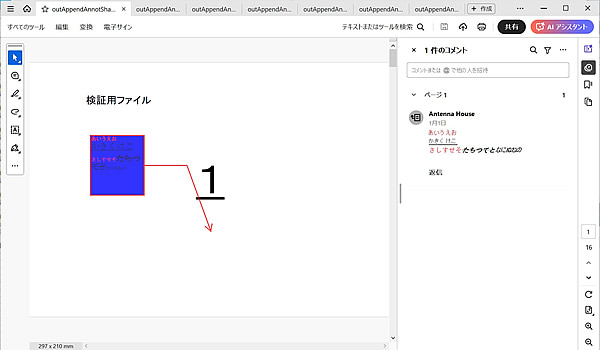
出力PDF FreeText注釈(引き出し線なし)
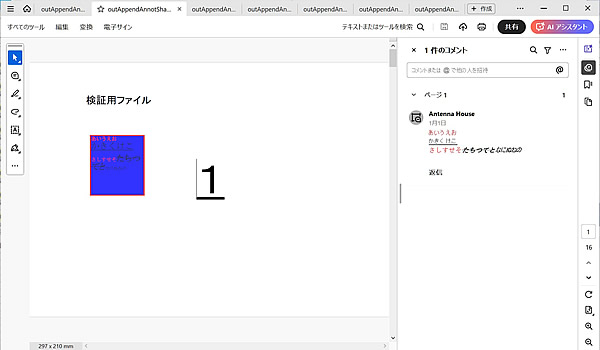
出力PDF 円注釈
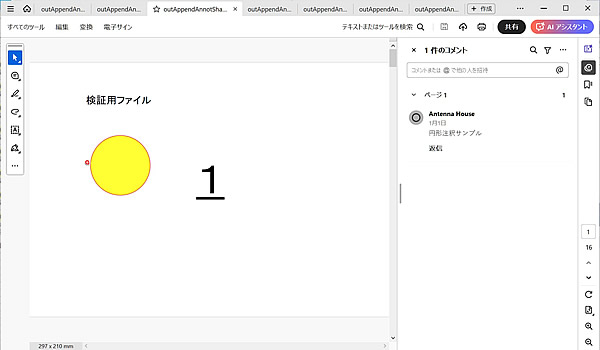
出力PDF 矩形注釈
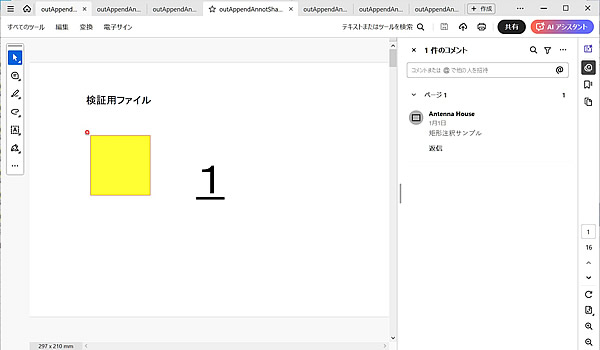
出力PDF ライン注釈
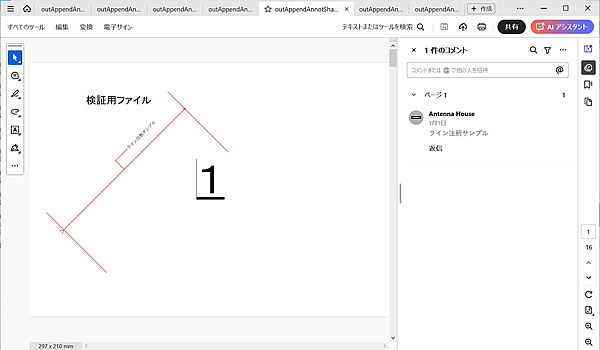
出力PDF 折れ線注釈
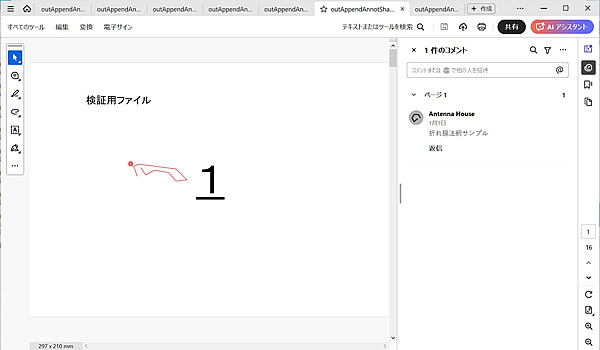
出力PDF 多角形注釈