/*
	Antenna House PDF Tool API V8.0
	C++ Interface sample program

	概要:ファイル添付とセキュリティ設定

	Copyright 2026- Antenna House, Inc.
*/

#include < PdfTk.h >
#include < stdio.h >

using namespace PdfTk;

int main(int argc, char* argv[])
{
	if (argc < 4) {
		printf("usage: CombiEmbeddedEncrypt.exe in-pdf-file out-pdf-file embedded-file\n");
		return 1;
	}
	try
	{
		PtlParamInput input(argv[1]);
		PtlParamOutput output(argv[2]);
		PtlParamString embeddedfilename(argv[3]);

		PtlPDFDocument doc;

		// PDFファイルをロードします。
		doc.load(input);

		// 添付ファイルコンテナの取得
		PtlEmbeddedFiles& embeddedfiles = doc.getEmbeddedFiles();

		// PDFの添付ファイル
		PtlEmbeddedFile embeddedfile;

		// 添付ファイル名の設定
		embeddedfile.setFileName(embeddedfilename);

		// 添付するファイルの読み込み
		PtlParamInput inputEmbed(embeddedfilename);
		embeddedfile.readFile(inputEmbed);

		// 添付ファイルの追加
		embeddedfiles.append(embeddedfile);

		// 256 bit AES
		PtlEncryptStandard256AES enc;

		// 文書の全てのコンテンツを暗号化
		enc.setEncryptComponent(PtlEncrypt::ENCRYPT_ALL);

		// オーナーパスワード値の設定
		enc.setOwnerPassword("pass123");

		PtlEncryptPermissionType2 typ;

		// 印刷権限の設定
		// PERM_PRINT_LOW = 1, /* 低解像度 */
		typ.setPrint(PtlEncryptPermissionType2::PERM_PRINT_LOW);

		// テキスト、画像、その他の内容のコピーを有効にするかどうかの設定
		typ.setCopy(true);

		// ユーザアクセス許可フラグの設定
		enc.setPermission(typ);

		// 暗号化設定
		doc.setEncrypt(enc);

		// ファイルに保存します。
		doc.save(output);

		printf("完了!\n");
	}
	catch (const PtlException &e)
	{
		fprintf(stderr, "Error code : %d\n %s\n", e.getErrorCode(), e.getErrorMessage().c_str());
		return 1;
	}
	return 0;
}


PDF Tool APIサンプルコード:ファイル添付とセキュリティ設定
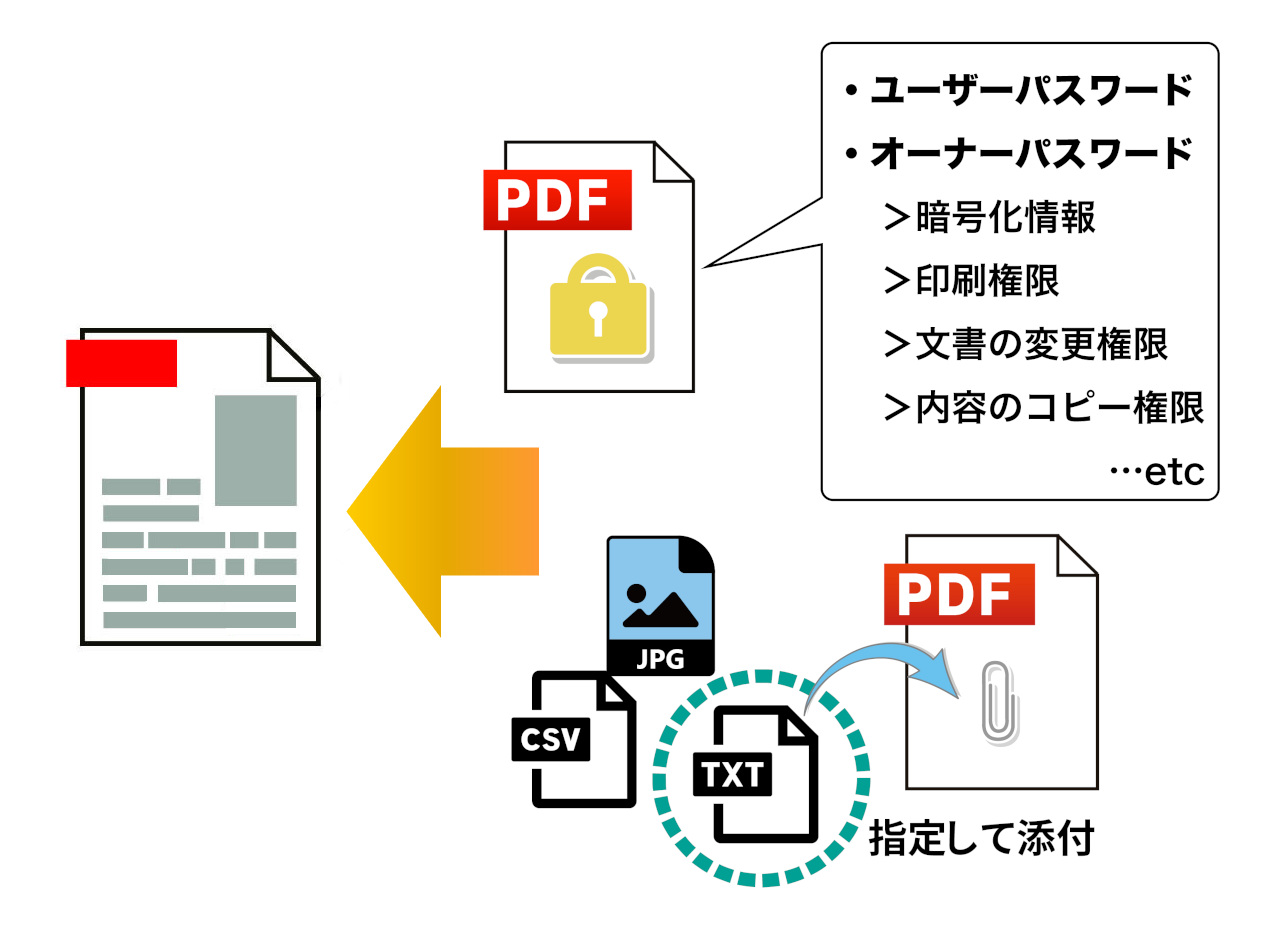
コマンドを組み合わせる例としてファイル添付とセキュリティ設定をおこないます。
概要
サンプルコードの概要
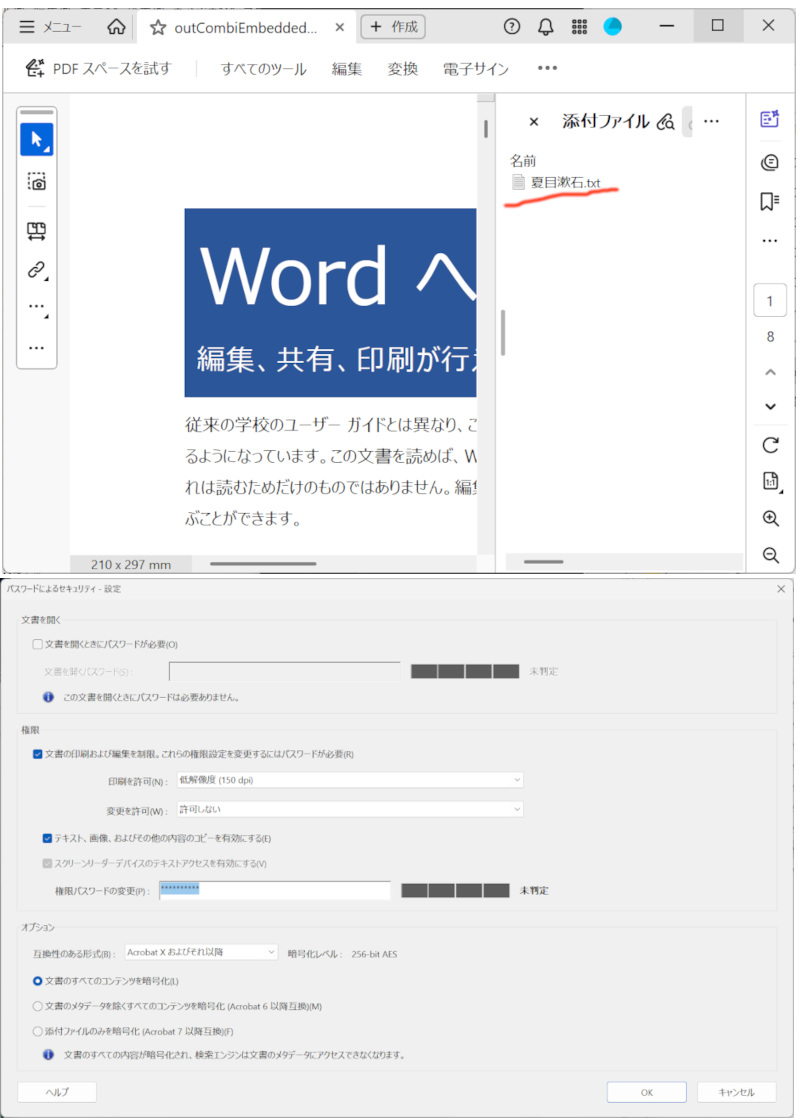
入力ファイルにテキストファイルを添付し、256bit AES暗号化を行う。
暗号化の内容
文書の編集:許可されない
印刷:低解像で許可
内容のコピー:許可
アクセシビリティ:許可
- PtlEmbeddedFiles :添付ファイルのコンテナを表現するクラス
- PtlPDFDocument.getEmbeddedFiles() :添付ファイルコンテナを取得
- PtlEmbeddedFile :PDFの添付ファイルを表現したクラス
- PtlEmbeddedFile.readFile() :添付するファイルの読み込み
- PtlEmbeddedFiles.append() :添付ファイルを追加
- PtlEncryptStandard256AES :PDFの標準セキュリティハンドラの256ビットAES暗号化を表現したクラス
- PtlEncryptStandard256AES.setEncryptComponent() :暗号化する文書コンポーネントの設定
- PtlEncryptStandard256AES.setOwnerPassword() :オーナーパスワード値を設定
- PtlEncryptPermissionType2 :標準セキュリティハンドラのリビジョン番号が3以降での権限を表現したクラス
- PtlEncryptStandard256AES.setPermission() :ユーザアクセス許可フラグを設定
- PtlPDFDocument.setEncrypt() :暗号化情報を設定
サンプルコード
/*
    Antenna House PDF Tool API V8.0
    Java Interface sample program

    概要:ファイル添付とセキュリティ設定

    Copyright 2026- Antenna House, Inc.
*/

package Sample;

import jp.co.antenna.ptl.*;

public class CombiEmbeddedEncrypt {

    /**
     * @param args the command line arguments
     */
    public static void main(String[] args) {
        if (args.length < 3)
        {
            System.out.println("usage: java CombiEmbeddedEncrypt in-pdf-file out-pdf-file embedded-file");
            return;
        }

        try (PtlParamInput inputFile = new PtlParamInput(args[0]);
             PtlParamOutput outputFile = new PtlParamOutput(args[1]);
             PtlPDFDocument doc = new PtlPDFDocument())
        {
            String embeddedfilename = args[2];

            // PDFファイルをロード
            doc.load(inputFile);

            // 添付ファイルコンテナの取得
            try (PtlEmbeddedFiles embeddedfiles = doc.getEmbeddedFiles();
                // PDFの添付ファイル
        		PtlEmbeddedFile embeddedfile = new PtlEmbeddedFile();
                PtlParamInput inputEmbed = new PtlParamInput(embeddedfilename);)
            {
                // 添付ファイル名の設定
                embeddedfile.setFileName(embeddedfilename);

                // 添付するファイルの読み込み
                embeddedfile.readFile(inputEmbed);

                // 添付ファイルの追加
                embeddedfiles.append(embeddedfile);
            }


    		// 256 bit AES
            try (PtlEncryptStandard256AES enc = new PtlEncryptStandard256AES();
            		PtlEncryptPermissionType2 permissionType2 = new PtlEncryptPermissionType2();)
            {
	    		// 文書の全てのコンテンツを暗号化
	    		enc.setEncryptComponent(PtlEncrypt.ENCRYPT_COMPONENT.ENCRYPT_ALL);

	    		// オーナーパスワード値の設定
	    		enc.setOwnerPassword("pass123");

	    		// 印刷権限の設定
	    		// PERM_PRINT_LOW = 1, /* 低解像度 */
	    		permissionType2.setPrint(PtlEncryptPermissionType2.PERMISSION_PRINT.PERM_PRINT_LOW);

	    		// テキスト、画像、その他の内容のコピーを有効にするかどうかの設定
	    		permissionType2.setCopy(true);

	    		// ユーザアクセス許可フラグの設定
	    		enc.setPermission(permissionType2);

	    		// 暗号化設定
	    		doc.setEncrypt(enc);
            }

            // ファイルに保存します。
            doc.save(outputFile);
        }
        catch (PtlException pex) {
            System.out.println("PtlException : ErrorCode = " + pex.getErrorCode() + "\n  " + pex.getErrorMessage());
        }
        catch (Exception ex) {
            System.out.println(ex.getMessage());
            ex.printStackTrace();
        }
        catch (Error ex) {
            System.out.println(ex.getMessage());
            ex.printStackTrace();
        }
        finally {
            System.out.println("-- 完了 --");
        }
    }
}
/*
	Antenna House PDF Tool API V8.0
	.NET Interface sample program

	概要:ファイル添付とセキュリティ設定

	Copyright 2026- Antenna House, Inc.
*/

using System;
using PdfTkNet;

namespace CombiEmbeddedEncrypt
{
    class Program
    {
        static void Main(string[] args)
        {
            if (args.Length < 3)
            {
                Console.WriteLine("usage: CombiEmbeddedEncrypt.exe in-pdf-file out-pdf-file embedded-file");
                return;
            }

            try
            {
                using (PtlParamInput inputFile = new PtlParamInput(args[0]))
                using (PtlParamOutput outputFile = new PtlParamOutput(args[1]))
                using (PtlPDFDocument doc = new PtlPDFDocument())
                {
                    string embeddedfilename = args[2];

                    // PDFファイルをロードします。
                    doc.load(inputFile);

                    // 添付ファイルコンテナの取得
                    using (PtlEmbeddedFiles embeddedfiles = doc.getEmbeddedFiles())
                    // PDFの添付ファイル
                    using (PtlEmbeddedFile embeddedfile = new PtlEmbeddedFile())
                    {
                        // 添付ファイル名の設定
                        embeddedfile.setFileName(embeddedfilename);

                        // 添付するファイルの読み込み
                        using (PtlParamInput input = new PtlParamInput(embeddedfilename))
                        {
                            embeddedfile.readFile(input);
                        }
                        // 添付ファイルの追加
                        embeddedfiles.append(embeddedfile);
                    }

                    // 256 bit AES
                    using (PtlEncryptStandard256AES enc = new PtlEncryptStandard256AES())
                    using (PtlEncryptPermissionType2 typ = new PtlEncryptPermissionType2())
                    {
                        // 文書の全てのコンテンツを暗号化
                        enc.setEncryptComponent(PtlEncrypt.ENCRYPT_COMPONENT.ENCRYPT_ALL);

                        // オーナーパスワード値の設定
                        enc.setOwnerPassword("pass123");

                        // 印刷権限の設定
                        // PERM_PRINT_LOW = 1, /* 低解像度 */
                        typ.setPrint(PtlEncryptPermissionType2.PERMISSION_PRINT.PERM_PRINT_LOW);

                        // テキスト、画像、その他の内容のコピーを有効にするかどうかの設定
                        typ.setCopy(true);

                        // ユーザアクセス許可フラグの設定
                        enc.setPermission(typ);

                        // 暗号化設定
                        doc.setEncrypt(enc);
                    }

                    // ファイルに保存します。
                    doc.save(outputFile);
                }
            }
            catch (PtlException pex)
            {
                Console.WriteLine("ErrorCode = " + pex.getErrorCode() + " : " + pex.getErrorMessageJP());
                pex.Dispose();
            }
            catch (Exception ex)
            {
                Console.WriteLine(ex.Message);
            }
            finally
            {
                Console.WriteLine("-- 完了 --");
            }
        }
    }
}
AHPDFToolCmd80.exe -addEmbeddedFile c:\in\夏目漱石.txt -encrypt -ownerPass pass123 -filterType 4 -perms2 -print 1 -copy true -d C:\in\in.pdf -o C:\sav\outCombiEmbeddedEncrypt.pdf
実行例
コマンドラインでの実行例
CombiEmbeddedEncrypt.exe C:\in\in.pdf C:\sav\outCombiEmbeddedEncrypt.pdf c:\in\夏目漱石.txt
完了!
java -jar CombiEmbeddedEncrypt.jar C:\in\in.pdf C:\sav\outCombiEmbeddedEncrypt.pdf c:\in\夏目漱石.txt
-- 完了 --
CombiEmbeddedEncrypt.exe C:\in\in.pdf C:\sav\outCombiEmbeddedEncrypt.pdf c:\in\夏目漱石.txt
-- 完了 --
AHPDFToolCmd80.exe -addEmbeddedFile c:\in\夏目漱石.txt -encrypt -ownerPass pass123 -filterType 4 -perms2 -print 1 -copy true -d C:\in\in.pdf -o C:\sav\outCombiEmbeddedEncrypt.pdf
 use time 0.035000s
出力結果イメージ
ファイル添付とセキュリティ設定が追加されたPDFが出力されます。