/*
	Antenna House PDF Tool API V8.0
	C++ Interface sample program

	概要:ページ抽出2

	Copyright 2013-2025 Antenna House, Inc.
*/

#include < PdfTk.h >
#include < stdio.h >
#include < string >
#include < vector >
# include < sstream >

using namespace PdfTk;

int main(int argc, char* argv[])
{
	if (argc < 3) {
		printf("usage: ExtractPage_2.exe in-pdf-file out-pdf page-renge\n");
		return 1;
	}
	try
	{
		PtlParamString inputfile(argv[1]);		// 抽出元となるファイル名
		PtlParamString outputfile(argv[2]);		// 出力するファイル名

		PtlParamInput input(inputfile);
		PtlParamOutput output(outputfile);
		PtlPDFDocument doc;

		// PDFファイルをロードします。
		doc.load(input);

		// 文書プロパティの取得
		PtlDocProperty& docproperty = doc.getDocProperty();

		// 文書情報の取得
		PtlDocInfo& docinfo = docproperty.getDocInfo();

		PtlPDFDocument doc_ext;
		PtlPages& pages = doc_ext.getPages();

		// 文書プロパティの取得
		PtlDocProperty& docproperty_ext = doc_ext.getDocProperty();

		// 文書情報の取得
		PtlDocInfo& docinfo_ext = docproperty_ext.getDocInfo();

		// タイトルをコピー
		docinfo_ext.setTitle(docinfo.getTitle());

		// 著者をコピー
		docinfo_ext.setAuthor(docinfo.getAuthor());

		// サブジェクトをコピー
		docinfo_ext.setSubject(docinfo.getSubject());

		// キーワードをコピー
		docinfo_ext.setKeywords(docinfo.getKeywords());

		// クリエータをコピー
		docinfo_ext.setCreator(docinfo.getCreator());

		// プロデューサをコピー
		docinfo_ext.setProducer(docinfo.getProducer());

		// 作成日付をコピー
		docinfo_ext.setCreationDate(docinfo.getCreationDate());

		// 更新日付をコピー
		docinfo_ext.setModDate(docinfo.getModDate());

		// ページ挿入オプション
		// OPTION_NONE  = 0x00000000 オプションはありません。
		int insertoption = (PtlPages::OPTION_NONE );

		// 出力ページ範囲
		//std::vector Ranges;
		std::stringstream pageRange((std::string)argv[3]);
		std::string tmp, tmp_2;
		while (std::getline(pageRange, tmp, ',')) {
			if (!tmp.empty()) {
				std::stringstream pageRange_2(tmp);
				int i = 0, tmpStrt = -1, tmpEnd = -1;
				while (std::getline(pageRange_2, tmp_2, '-')) {
					if (!tmp_2.empty()) {
						if (i == 0)
						{
							tmpStrt = stoi(tmp_2);
						}
						else if (i == 1)
						{
							tmpEnd = stoi(tmp_2);
						}
						else
						{
							break;
						}
						i++;
					}
				}
				if (tmpStrt > -1) {
					if (tmpEnd == -1) {
						pages.append(doc, tmpStrt, 1, insertoption);
					}
					else if (tmpEnd > -1) {
						pages.append(doc, tmpStrt, (tmpEnd - tmpStrt + 1), insertoption);
					}
				}
			}
		}
		// ファイルに保存します。
		doc_ext.save(output);

		printf("完了!\n");
	}
	catch (const PtlException& e)
	{
		fprintf(stderr, "Error code : %d\n %s\n", e.getErrorCode(), e.getErrorMessage().c_str());
		return 1;
	}
	return 0;
}


PDF Tool APIサンプルコード:ページ抽出:ページを抽出してひとつのPDFとして保存する
ページを抽出してひとつのPDFとして保存します。
概要
サンプルコードの概要
ページを抽出してひとつのPDFとして保存します。
コマンドラインのパラメータの -copyInfo は文書情報を出力ファイルにコピーします。
- PtlPDFDocument.getDocProperty() :文書プロパティの取得
- PtlDocProperty :PDFの文書プロパティを表現したクラス
- PtlDocProperty.getDocInfo() :文書情報の取得
- PtlDocInfo :PDFの文書情報を表現したクラス
- PtlDocInfo.getTitle/setTitle(), getAuthor/setAuthor()など :タイトル、作成者などを出力側にコピー
- PtlPDFDocument.getPages() :ページコンテナの取得
- PtlPages :ページのコンテナを表現するクラス
- PtlPages.append() :ページの追加
サンプルコード
/*
    Antenna House PDF Tool API V8.0
    Java Interface sample program

    概要:ページ抽出2

    Copyright 2015-2025 Antenna House, Inc.
*/

package Sample;

import jp.co.antenna.ptl.*;

public class ExtractPage_2 {

	public static void main(String[] args) {
		// TODO 自動生成されたメソッド・スタブ

        if (args.length < 2)
        {
            System.out.println("usage: java ExtractPage_2 in-pdf-file out-folder");
            return;
        }

        try (PtlParamInput inputFile = new PtlParamInput(args[0]);
    		PtlParamOutput outputFile = new PtlParamOutput(args[1]);
			PtlPDFDocument doc = new PtlPDFDocument())
        {
            // PDFファイルをロード
            doc.load(inputFile);

            try (PtlDocProperty docproperty = doc.getDocProperty();	// 文書プロパティの取得
	            PtlDocInfo docinfo = docproperty.getDocInfo(); 	// 文書情報の取得
	            PtlPDFDocument doc_ext = new PtlPDFDocument();
	            PtlDocProperty docproperty_ext = doc_ext.getDocProperty(); // 文書プロパティの取得
	            PtlDocInfo docinfo_ext = docproperty_ext.getDocInfo();     // 文書情報の取得
	            PtlPages pages = doc_ext.getPages())
            {
                // タイトルをコピー
                docinfo_ext.setTitle(docinfo.getTitle());

                // 著者をコピー
                docinfo_ext.setAuthor(docinfo.getAuthor());

                // サブジェクトをコピー
                docinfo_ext.setSubject(docinfo.getSubject());

                // キーワードをコピー
                docinfo_ext.setKeywords(docinfo.getKeywords());

                // クリエータをコピー
                docinfo_ext.setCreator(docinfo.getCreator());

                // プロデューサをコピー
                docinfo_ext.setProducer(docinfo.getProducer());

                // 作成日付をコピー
                try (PtlDate dateCreate = docinfo.getCreationDate())
                {
                    docinfo_ext.setCreationDate(dateCreate);
                }

                // 更新日付をコピー
                try (PtlDate dateMod = docinfo.getModDate())
                {
                    docinfo_ext.setModDate(dateMod);
                }

                // ページ挿入オプション
        		// OPTION_NONE  = 0x00000000 オプションはありません。
                int insertoption = PtlPages.OPTION_NONE;

                 // 出力ページ範囲
                String pageRange = (String)args[2];
                String[] Ranges = pageRange.split(",");
                int rc = Ranges.length;
                for (int i = 0; i < rc; i++)
                {
                	String tmp = Ranges[i];
                    if (tmp.contains("-"))
                    {
                    	String[] pg = tmp.split("-");
                        int tmpStrt = Integer.parseInt(pg[0]);
                        int tmpEnd = Integer.parseInt(pg[1]);

                        // ページの追加(tmpStrtページからtmpEndページ)
                        pages.append(doc, tmpStrt, (tmpEnd - tmpStrt + 1), insertoption);
                    }
                    else
                    {
                        int tmpStrt = Integer.parseInt(tmp);
                        // ページの追加(tmpStrtページから1P)
                        pages.append(doc, tmpStrt, 1, insertoption);
                    }
                }

                // ファイルに保存します。
                doc_ext.save(outputFile);
            }
        }
        catch (PtlException pex) {
             System.out.println("PtlException : ErrorCode = " + pex.getErrorCode() + "\n  " + pex.getErrorMessage());
        }
        catch (Exception ex) {
            System.out.println(ex.getMessage());
            ex.printStackTrace();
        }
        catch (Error ex) {
            System.out.println(ex.getMessage());
            ex.printStackTrace();
        }
        finally {
            System.out.println("-- 完了 --");
        }
	}

}
/*
	Antenna House PDF Tool API V8.0
	.NET Interface sample program

	概要:ページ抽出2

	Copyright 2013-2025 Antenna House, Inc.
*/

using PdfTkNet;
using System;
using System.Xml;

namespace ExtractPage_2
{
    class ExtractPage_2
    {
        static void Main(string[] args)
        {
            if (args.Length < 2)
            {
                Console.WriteLine("usage: ExtractPage_2.exe input-pdf out-pdf page-renge");
                return;
            }

            try
            {
                using (PtlParamInput inputFile = new PtlParamInput(args[0]))
                using (PtlParamOutput outputFile = new PtlParamOutput(args[1]))
                using (PtlPDFDocument doc = new PtlPDFDocument())
                {
                    // PDFファイルをロードします。
                    doc.load(inputFile);

                    // 文書プロパティの取得
                    using (PtlDocProperty docproperty = doc.getDocProperty())
                    // 文書情報の取得
                    using (PtlDocInfo docinfo = docproperty.getDocInfo())
                    using (PtlPDFDocument doc_ext = new PtlPDFDocument())
                    using (PtlPages pages = doc_ext.getPages())
                    using (PtlDocProperty docproperty_ext = doc_ext.getDocProperty())
                    using (PtlDocInfo docinfo_ext = docproperty_ext.getDocInfo())
                    {
                        // タイトルをコピー
                        docinfo_ext.setTitle(docinfo.getTitle());

                        // 著者をコピー
                        docinfo_ext.setAuthor(docinfo.getAuthor());

                        // サブジェクトをコピー
                        docinfo_ext.setSubject(docinfo.getSubject());

                        // キーワードをコピー
                        docinfo_ext.setKeywords(docinfo.getKeywords());

                        // クリエータをコピー
                        docinfo_ext.setCreator(docinfo.getCreator());

                        // プロデューサをコピー
                        docinfo_ext.setProducer(docinfo.getProducer());

                        // 作成日付をコピー
                        docinfo_ext.setCreationDate(docinfo.getCreationDate());

                        // 更新日付をコピー
                        docinfo_ext.setModDate(docinfo.getModDate());

                        // ページ挿入オプション
                        //OPTION_NONE  = 0x00000000 オプションはありません。
                        PtlPages.INSERT_OPTION insertoption = (PtlPages.INSERT_OPTION.OPTION_NONE);

                        // 出力ページ範囲
                        string pageRange = (string)args[2];
                        string[] Ranges = pageRange.Split(",");
                        int rc = Ranges.Count();
                        for (int i = 0; i < rc; i++)
                        {
                            string tmp = Ranges[i];
                            if (tmp.Contains("-"))
                            {
                                string[] pg = tmp.Split("-");
                                int tmpStrt, tmpEnd;
                                if (int.TryParse(pg[0], out tmpStrt)
                                    && int.TryParse(pg[1], out tmpEnd))
                                {
                                    // ページの追加(tmpStrtページからtmpEndページ)
                                    pages.append(doc, tmpStrt, (tmpEnd - tmpStrt + 1), insertoption);
                                }
                                else
                                {
                                    Console.WriteLine("invalid pageRange value.");
                                    return;
                                }
                            }
                            else
                            {
                                int tmpStrt;
                                if (int.TryParse(tmp, out tmpStrt))
                                {
                                    // ページの追加(tmpStrtページから1P)
                                    pages.append(doc, tmpStrt, 1, insertoption);
                                }
                                else
                                {
                                    Console.WriteLine("invalid pageRange value.");
                                    return;
                                }
                            }
                        }
                        // ファイルに保存します。
                        doc_ext.save(outputFile);
                    }
                }
            }
            catch (PtlException pex)
            {
                Console.WriteLine(pex.getErrorCode() + " : " + pex.getErrorMessageJP());
                pex.Dispose();
            }
            catch (Exception ex)
            {
                Console.WriteLine(ex.Message);
            }
            finally
            {
                Console.WriteLine("-- 完了 --");
            }
        }
    }
}
AHPDFToolCmd80.exe -pageExtract "0-2,5" -copyInfo -d c:\in\test.pdf -o c:\sav\outExtractPage_2.pdf
実行例
コマンドラインでの実行例
ExtractPage_2.exe C:\in\test.pdf C:\sav\outExtractPage_2.pdf "0-2,5"
完了!
java -jar ExtractPage_2.jar C:\in\test.pdf C:\sav\outExtractPage_2.pdf "0-2,5"
-- 完了 --
ExtractPage_2.exe C:\in\test.pdf C:\sav\outExtractPage_2.pdf "0-2,5"
-- 完了 --
AHPDFToolCmd80.exe -pageExtract "0-2,5" -copyInfo -d c:\in\test.pdf -o c:\sav\outExtractPage_2.pdf
 use time 0.007000s
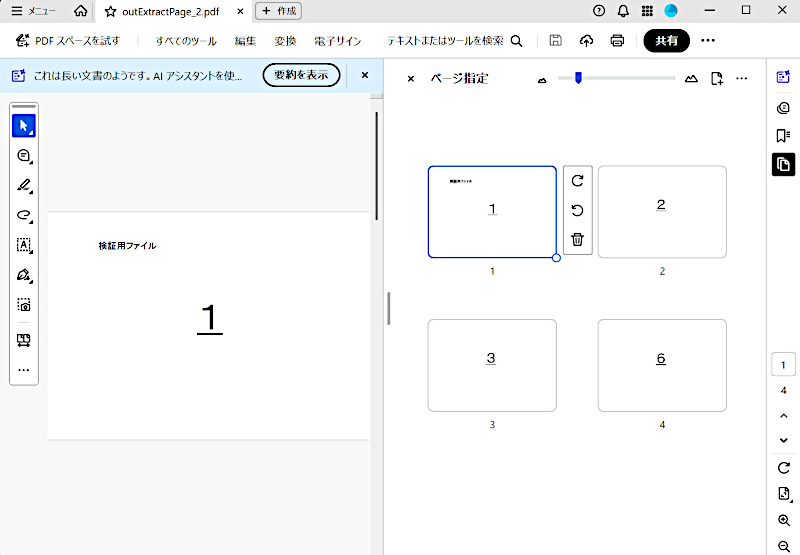
出力結果イメージ
ページを抽出してひとつのPDFとして保存します。
このサンプルは"0-2,5"を指定しているので1,2,3,6ページが抽出されます。