/* Antenna House PDF Tool API V8.0 C++ Interface sample program 概要:テキスト検索して下線、波線、取り消し線注釈 Copyright 2025- Antenna House, Inc. */ #include#include using namespace PdfTk; void addAnnotSquiggly(PtlAnnots&, PtlQuadPoint&, bool); void addAnnotStrikeOut(PtlAnnots&, PtlQuadPoint&, bool); void addAnnotUnderline(PtlAnnots&, PtlQuadPoint&, bool); int main(int argc, char* argv[]) { if (argc < 4) { printf("usage: SearchTextAndHighlight.exe in-pdf-file out-pdf-file keyword\n"); return 1; } try { PtlParamInput input(argv[1]); PtlParamOutput output(argv[2]); PtlParamString keyword(argv[3]); PtlPDFDocument doc; // PDFファイルをロードします。 doc.load(input); PtlPages& pages = doc.getPages(); //// ハイライト注釈の色 //PtlColorDeviceRGB colorRed(1.0f, 0.0f, 0.0f); // 検索の為のパラメータ PtlParamSearchText paramSearchText; paramSearchText.appendText(keyword); paramSearchText.setTextType(PtlParamSearchText::TEXT_RAW); // 検索実行して検索結果コンテナ取得 PtlSearchTextResults results = doc.searchText(paramSearchText); int numResults = results.getCount(); for (int i=0; i < numResults; ++i) { // 検索結果取得 PtlSearchTextResult& result = results.get(i); // 検索に使用したキーワード PtlParamString keyword = result.getKeyword(); //const char* keywordC = keyword.c_str(); // ヒットしたページ番号 int pageNumber = result.getPageNumber(); PtlPage page = pages.get(pageNumber); PtlAnnots& annots = page.getAnnots(); // 検索結果詳細コンテナ取得 PtlSearchTextResultDetails& details = result.getResultDetails(); int numDetails = details.getCount(); for (int j=0; j < numDetails; ++j) { // 検索結果詳細取得 PtlSearchTextResultDetail& resultDetail = details.get(j); // 検索に使用したキーワードの部分文字列 PtlParamString keyword = resultDetail.getKeyword(); //const char* keywordC = keyword.c_str(); // 検索に使用したキーワードの部分文字列を囲むQuadPoint PtlQuadPoint quad = resultDetail.getQuadPoint(); // 検索に使用したキーワードの部分文字列が縦書きか bool verticalWriting = resultDetail.isVerticalWriting(); //注釈の追加 switch(i % 3) { case 0: //波状下線注釈 addAnnotSquiggly(annots, quad, verticalWriting); break; case 1: //取り消し線注釈 addAnnotStrikeOut(annots, quad, verticalWriting); break; case 2: //下線注釈 addAnnotUnderline(annots, quad, verticalWriting); break; } } } // ファイルに保存します。 doc.save(output); printf("完了!\n"); } catch (const PtlException &e) { fprintf(stderr, "Error code : %d\n %s\n", e.getErrorCode(), e.getErrorMessage().c_str()); return 1; } return 0; } void addAnnotSquiggly(PtlAnnots& annots, PtlQuadPoint& quadPoint, bool verticalWriting) { //波状下線注釈 PtlAnnotSquiggly annotSquiggly; //矩形座標を設定 座標の単位はmmで原点(0,0)は左下 PtlQuadPoints& quadPoints = annotSquiggly.getQuadPoints(); quadPoints.append(quadPoint); //テキストを縦書き方向に囲むかどうかを設定 annotSquiggly.setVerticalDirection(verticalWriting); //内容を設定(注釈用に表示されるテキスト・可読な形式での注釈コンテンツの代替説明) annotSquiggly.setTextContents("波状下線注釈サンプル"); // 日時の設定(2025/01/01 00:00:00) annotSquiggly.setDate(PtlDate(2025, 1, 1, 0, 0, 0)); //注釈フラグを設定(論理和) FLAG_NOROTATE = 0x00000010, /* 注釈の外観をページにあわせて回転しません。 */ annotSquiggly.setAnnotFlags(PtlAnnotText::FLAG_NOROTATE); //色を設定 setColor(const PtlColorDeviceRGB& color); PtlColorDeviceRGB color(1.0f, 0.0f, 0.0f); annotSquiggly.setColor(color); //境界線スタイルを設定 BORDER_SOLID = 1, /* 実線(注釈を囲む実線の矩形) */ annotSquiggly.setBorderStyle(PtlAnnotText::BORDER_SOLID); //境界線幅を設定 BORDER_WIDTH_THIN = 1, /* 細い */ annotSquiggly.setBorderWidth(PtlAnnotText::BORDER_WIDTH_THIN); //注釈の追加 annots.append(annotSquiggly); } void addAnnotStrikeOut(PtlAnnots& annots, PtlQuadPoint& quadPoint, bool verticalWriting) { //取り消し線注釈 PtlAnnotStrikeOut annotStrikeOut; //矩形座標を設定 座標の単位はmmで原点(0,0)は左下 PtlQuadPoints& quadPoints = annotStrikeOut.getQuadPoints(); quadPoints.append(quadPoint); //テキストを縦書き方向に囲むかどうかを設定 annotStrikeOut.setVerticalDirection(verticalWriting); //内容を設定(注釈用に表示されるテキスト・可読な形式での注釈コンテンツの代替説明) annotStrikeOut.setTextContents("取り消し線注釈サンプル"); // 日時の設定(2025/01/01 00:00:00) annotStrikeOut.setDate(PtlDate(2025, 1, 1, 0, 0, 0)); //注釈フラグを設定(論理和) FLAG_NOROTATE = 0x00000010, /* 注釈の外観をページにあわせて回転しません。 */ annotStrikeOut.setAnnotFlags(PtlAnnotText::FLAG_NOROTATE); //色を設定 setColor(const PtlColorDeviceRGB& color); PtlColorDeviceRGB color(1.0f, 0.0f, 0.0f); annotStrikeOut.setColor(color); //境界線スタイルを設定 BORDER_SOLID = 1, /* 実線(注釈を囲む実線の矩形) */ annotStrikeOut.setBorderStyle(PtlAnnotText::BORDER_SOLID); //境界線幅を設定 BORDER_WIDTH_THIN = 1, /* 細い */ annotStrikeOut.setBorderWidth(PtlAnnotText::BORDER_WIDTH_THIN); //注釈の追加 annots.append(annotStrikeOut); } void addAnnotUnderline(PtlAnnots& annots, PtlQuadPoint& quadPoint, bool verticalWriting) { //下線注釈 PtlAnnotUnderline annotUnderline; //矩形座標を設定 座標の単位はmmで原点(0,0)は左下 PtlQuadPoints& quadPoints = annotUnderline.getQuadPoints(); quadPoints.append(quadPoint); //テキストを縦書き方向に囲むかどうかを設定 annotUnderline.setVerticalDirection(verticalWriting); //内容を設定(注釈用に表示されるテキスト・可読な形式での注釈コンテンツの代替説明) annotUnderline.setTextContents("下線注釈サンプル"); //日時の設定(2025/01/01 00:00:00) annotUnderline.setDate(PtlDate(2025, 1, 1, 0, 0, 0)); //注釈フラグを設定(論理和) FLAG_NOROTATE = 0x00000010, /* 注釈の外観をページにあわせて回転しません。 */ annotUnderline.setAnnotFlags(PtlAnnotText::FLAG_NOROTATE); //色を設定 setColor(const PtlColorDeviceRGB& color); PtlColorDeviceRGB color(1.0f, 0.0f, 0.0f); annotUnderline.setColor(color); //境界線スタイルを設定 BORDER_SOLID = 1, /* 実線(注釈を囲む実線の矩形) */ annotUnderline.setBorderStyle(PtlAnnotText::BORDER_SOLID); //境界線幅を設定 BORDER_WIDTH_THIN = 1, /* 細い */ annotUnderline.setBorderWidth(PtlAnnotText::BORDER_WIDTH_THIN); //注釈の追加 annots.append(annotUnderline); }


PDF Tool APIサンプルコード:下線/波線/取り消し線注釈を追加
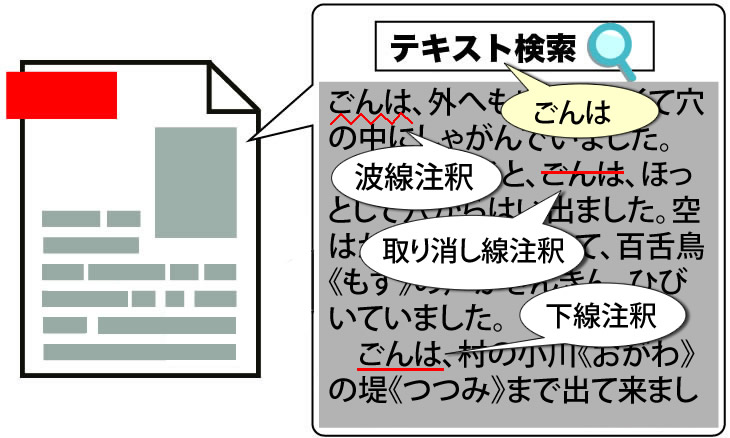
PDF文書をテキストを検索して下線/波線/取り消し線注釈を追加します。
概要
サンプルコードの概要
テキストを検索してヒットした文字列の座標を取得します。
波状下線注釈/消し線注釈/下線注釈を表現したクラスに座標などを設定し注釈を追加します。
- PtlParamSearchText: テキストを検索する為のパラメータを表現したクラス
- PtlParamSearchText.appendText(): 検索するテキストを追加
- PtlSearchTextResultDetail.getQuadPoint(): テキスト検索でヒットした文字のQuadPointを取得
- PtlQuadPoint: PDFの矩形4隅座標を表現したクラス
- PtlAnnotSquiggly: PDFの波状下線注釈を表現したクラス
- PtlAnnotSquiggly.getQuadPoints(): テキストを囲むQuadPointのコンテナを取得
- PtlAnnotSquiggly.setVerticalDirection(): テキストを縦書き方向に囲むかどうかを設定
- PtlAnnots.append(PtlAnnotSquiggly): 注釈を追加
- PtlAnnotStrikeOut: PDFの消し線注釈を表現したクラス
- PtlAnnotStrikeOut.getQuadPoints(): テキストを囲むQuadPointのコンテナを取得
- PtlAnnotStrikeOut.setVerticalDirection(): テキストを縦書き方向に囲むかどうかを設定
- PtlAnnots.append(PtlAnnotStrikeOut): 注釈を追加
- PtlAnnotUnderline: PDFの下線注釈を表現したクラス
- PtlAnnotUnderline.getQuadPoints(): テキストを囲むQuadPointのコンテナを取得
- PtlAnnotUnderline.setVerticalDirection(): テキストを縦書き方向に囲むかどうかを設定
- PtlAnnots.append(PtlAnnotUnderline): 注釈を追加
サンプルコード
/*
    Antenna House PDF Tool API V8.0
    Java Interface sample program

    概要:テキスト検索して下線、波線、取り消し線注釈

    Copyright 2025 Antenna House, Inc.
*/
package Sample;

import jp.co.antenna.ptl.PtlAnnot;
import jp.co.antenna.ptl.PtlAnnotHighlight;
import jp.co.antenna.ptl.PtlAnnotSquiggly;
import jp.co.antenna.ptl.PtlAnnotStrikeOut;
import jp.co.antenna.ptl.PtlAnnotUnderline;
import jp.co.antenna.ptl.PtlAnnots;
import jp.co.antenna.ptl.PtlColorDeviceRGB;
import jp.co.antenna.ptl.PtlDate;
import jp.co.antenna.ptl.PtlException;
import jp.co.antenna.ptl.PtlPDFDocument;
import jp.co.antenna.ptl.PtlPage;
import jp.co.antenna.ptl.PtlPages;
import jp.co.antenna.ptl.PtlParamInput;
import jp.co.antenna.ptl.PtlParamOutput;
import jp.co.antenna.ptl.PtlParamSearchText;
import jp.co.antenna.ptl.PtlQuadPoint;
import jp.co.antenna.ptl.PtlQuadPoints;
import jp.co.antenna.ptl.PtlSearchTextResult;
import jp.co.antenna.ptl.PtlSearchTextResultDetail;
import jp.co.antenna.ptl.PtlSearchTextResultDetails;
import jp.co.antenna.ptl.PtlSearchTextResults;

public class SearchTextAndAppendAnnot {

    /**
     * @param args the command line arguments
     */
    public static void main(String[] args) {
        if (args.length < 3)
        {
            System.out.println("usage: java SearchTextAndAppendAnnot in-pdf-file out-pdf-file keyword");
            return;
        }

        try (PtlParamInput inputFile = new PtlParamInput(args[0]);
             PtlParamOutput outputFile = new PtlParamOutput(args[1]);
             PtlPDFDocument doc = new PtlPDFDocument())
        {
            // PDFファイルをロード
            doc.load(inputFile);

            try (PtlPages pages = doc.getPages()) // ページコンテナの取得
            {
                // ページコンテナが空かどうか
                if (pages.isEmpty())
                {
                    System.out.println("ページコンテナが空\n");
                    return;
                }

                try (PtlParamSearchText paramSearchText = new PtlParamSearchText())
                {
                    // 検索設定
                    paramSearchText.appendText(args[2]);

                    // 検索実行して検索結果コンテナ取得
                    try (PtlSearchTextResults results = doc.searchText(paramSearchText))
                    {
                        int numResults = results.getCount();
                        for (int i = 0; i < numResults; ++i)
                        {
                            // 検索結果取得
                            try (PtlSearchTextResult result = results.get(i))
                            {
                                // 検索に使用したキーワード
                                String keyword = result.getKeyword();

                                // ヒットしたページ番号
                                int pageNumber = result.getPageNumber();
                                try (PtlPage page = pages.get(pageNumber);
                                     PtlAnnots annots = page.getAnnots())
                                {
                                    // 検索結果詳細コンテナ取得
                                    try (PtlSearchTextResultDetails details = result.getResultDetails())
                                    {
                                        int numDetails = details.getCount();
                                        for (int j = 0; j < numDetails; ++j)
                                        {
                                            // 検索結果詳細取得
                                            try (PtlSearchTextResultDetail resultDetail = details.get(j))
                                            {
                                                // 検索に使用したキーワードの部分文字列
                                                String keywordD = resultDetail.getKeyword();

                                                try (PtlAnnotHighlight annot = new PtlAnnotHighlight();
                                                     PtlQuadPoints quads = annot.getQuadPoints();
                                                // 検索に使用したキーワードの部分文字列を囲むQuadPoint
                                                	PtlQuadPoint quad = resultDetail.getQuadPoint())
                                                {
                                                    quads.append(quad);
                                                    // 検索に使用したキーワードの部分文字列が縦書きか
                                                    boolean verticalWriting = resultDetail.isVerticalWriting();
                                                    //annot.setVerticalDirection(verticalWriting);
                                        			//注釈の追加
                                        			switch(i % 3)
                                        			{
                                        			case 0:
                                                   	// 波状下線釈追加
                                                       addAnnotSquiggly(annots, quad, verticalWriting);
                                        				break;
                                        			case 1:
                                                       // 取り消し線注釈
                                                       addAnnotStrikeOut(annots, quad, verticalWriting);
                                        				break;
                                        			case 2:
                                                       // 下線注釈
                                                       addAnnotUnderline(annots, quad, verticalWriting);
                                        				break;
                                        			}


                                                    //annots.append(annot);
                                                }
                                            }
                                        }
                                    }
                                }
                            }
                        }
                    }
                }
            }

            // ファイルに保存します。
            doc.save(outputFile);
        }
        catch (PtlException pex) {
             System.out.println("PtlException : ErrorCode = " + pex.getErrorCode() + "\n  " + pex.getErrorMessage());
        }
        catch (Exception ex) {
            System.out.println(ex.getMessage());
            ex.printStackTrace();
        }
        catch (Error ex) {
            System.out.println(ex.getMessage());
            ex.printStackTrace();
        }
        finally {
            System.out.println("-- 完了 --");
        }
    }

    public static void addAnnotSquiggly(PtlAnnots annots, PtlQuadPoint quadPoint, boolean verticalWriting) throws PtlException, Exception, Error
    {
    	try (PtlAnnotSquiggly annotSquiggly = new PtlAnnotSquiggly())     // 波状下線注釈
        {

            // 座標を設定 座標の単位はmmで原点(0,0)は左下
            try (PtlQuadPoints quadPoints = annotSquiggly.getQuadPoints())
            {
                quadPoints.append(quadPoint);
            }
        	//テキストを縦書き方向に囲むかどうかを設定
        	annotSquiggly.setVerticalDirection(verticalWriting);

            // 内容を設定(注釈用に表示されるテキスト・可読な形式での注釈コンテンツの代替説明)
            annotSquiggly.setTextContents("波状下線サンプル");

            // 日時の設定(2025/01/01 00:00:00)
            try (PtlDate date = new PtlDate(2025, 1, 1, 0, 0, 0))
            {
                annotSquiggly.setDate(date);
            }

            // 注釈フラグを設定(論理和) FLAG_NOROTATE = 0x00000010, /* 注釈の外観をページにあわせて回転しません。 */
            annotSquiggly.setAnnotFlags(PtlAnnot.FLAG_NOROTATE);

            // 色を設定
            try (PtlColorDeviceRGB color =  new PtlColorDeviceRGB(1.0f, 0.0f, 0.0f))
            {
                annotSquiggly.setColor(color);
            }

            // 内部色を設定
            try (PtlColorDeviceRGB color =  new PtlColorDeviceRGB(1.0f, 1.0f, 0.0f))
            {
                annotSquiggly.setInteriorColor(color);
            }

            // 境界線スタイルを設定 BORDER_SOLID = 1, /* 実線(注釈を囲む実線の矩形) */
            annotSquiggly.setBorderStyle(PtlAnnot.BORDER_STYLE.BORDER_SOLID);

            // 境界線幅を設定 BORDER_WIDTH_THIN = 1, /* 細い */
            annotSquiggly.setBorderWidth(PtlAnnot.BORDER_LINE_WIDTH.BORDER_WIDTH_THIN);

            // 不透明度を設定 0.0 ~ 1.0。0.0が透明、1.0が不透明
            annotSquiggly.setMarkUpCA(0.8f);

            // 注釈の追加
            annots.append(annotSquiggly);
        }
    }

    public static void addAnnotStrikeOut(PtlAnnots annots, PtlQuadPoint quadPoint, boolean verticalWriting) throws PtlException, Exception, Error
    {
		try (PtlAnnotStrikeOut annotStrikeOut = new PtlAnnotStrikeOut())     // 取り消し線注釈
        {
            // 座標を設定 座標の単位はmmで原点(0,0)は左下
        	try (PtlQuadPoints quadPoints = annotStrikeOut.getQuadPoints())
        	{
        	    quadPoints.append(quadPoint);
        	}

        	//テキストを縦書き方向に囲むかどうかを設定
        	annotStrikeOut.setVerticalDirection(verticalWriting);

            // 内容を設定(注釈用に表示されるテキスト・可読な形式での注釈コンテンツの代替説明)
            annotStrikeOut.setTextContents("取り消し線注釈サンプル");

            // 日時の設定(2025/01/01 00:00:00)
            try (PtlDate date = new PtlDate(2025, 1, 1, 0, 0, 0))
            {
                annotStrikeOut.setDate(date);
            }

            // 注釈フラグを設定(論理和) FLAG_NOROTATE = 0x00000010, /* 注釈の外観をページにあわせて回転しません。 */
            annotStrikeOut.setAnnotFlags(PtlAnnot.FLAG_NOROTATE);

            // 色を設定
            try (PtlColorDeviceRGB color =  new PtlColorDeviceRGB(1.0f, 0.0f, 0.0f))
            {
                annotStrikeOut.setColor(color);
            }

            // 内部色を設定
            try (PtlColorDeviceRGB color =  new PtlColorDeviceRGB(1.0f, 1.0f, 0.0f))
            {
                annotStrikeOut.setInteriorColor(color);
            }

            // 境界線スタイルを設定 BORDER_SOLID = 1, /* 実線(注釈を囲む実線の矩形) */
            annotStrikeOut.setBorderStyle(PtlAnnot.BORDER_STYLE.BORDER_SOLID);

            // 境界線幅を設定 BORDER_WIDTH_THIN = 1, /* 細い */
            annotStrikeOut.setBorderWidth(PtlAnnot.BORDER_LINE_WIDTH.BORDER_WIDTH_THIN);

            // 不透明度を設定 0.0 ~ 1.0。0.0が透明、1.0が不透明
            annotStrikeOut.setMarkUpCA(0.8f);

            // 注釈の追加
            annots.append(annotStrikeOut);
        }
    }

    public static void addAnnotUnderline(PtlAnnots annots, PtlQuadPoint quadPoint, boolean verticalWriting) throws PtlException, Exception, Error
    {
		try (PtlAnnotUnderline annotUnderline = new PtlAnnotUnderline())     // 下線注釈
        {
            // 座標を設定 座標の単位はmmで原点(0,0)は左下
        	try (PtlQuadPoints quadPoints = annotUnderline.getQuadPoints())
        	{
        	    quadPoints.append(quadPoint);
        	}

        	//テキストを縦書き方向に囲むかどうかを設定
        	annotUnderline.setVerticalDirection(verticalWriting);

            // 内容を設定(注釈用に表示されるテキスト・可読な形式での注釈コンテンツの代替説明)
            annotUnderline.setTextContents("下線注釈サンプル");

            // 日時の設定(2025/01/01 00:00:00)
            try (PtlDate date = new PtlDate(2025, 1, 1, 0, 0, 0))
            {
                annotUnderline.setDate(date);
            }

            // 注釈フラグを設定(論理和) FLAG_NOROTATE = 0x00000010, /* 注釈の外観をページにあわせて回転しません。 */
            annotUnderline.setAnnotFlags(PtlAnnot.FLAG_NOROTATE);

            // 色を設定
            try (PtlColorDeviceRGB color =  new PtlColorDeviceRGB(1.0f, 0.0f, 0.0f))
            {
                annotUnderline.setColor(color);
            }

            // 内部色を設定
            try (PtlColorDeviceRGB color =  new PtlColorDeviceRGB(1.0f, 1.0f, 0.0f))
            {
                annotUnderline.setInteriorColor(color);
            }

            // 境界線スタイルを設定 BORDER_SOLID = 1, /* 実線(注釈を囲む実線の矩形) */
            annotUnderline.setBorderStyle(PtlAnnot.BORDER_STYLE.BORDER_SOLID);

            // 境界線幅を設定 BORDER_WIDTH_THIN = 1, /* 細い */
            annotUnderline.setBorderWidth(PtlAnnot.BORDER_LINE_WIDTH.BORDER_WIDTH_THIN);

            // 不透明度を設定 0.0 ~ 1.0。0.0が透明、1.0が不透明
            annotUnderline.setMarkUpCA(0.8f);

            // 注釈の追加
            annots.append(annotUnderline);
        }
    }

}
/*
Antenna House PDF Tool API V8.0
.NET Interface sample program
概要:テキスト検索して下線、波線、取り消し線注釈
Copyright 2025- Antenna House, Inc.
*/
using PdfTkNet;
using System;
using System.Xml;
namespace SearchTextAndAppendAnnot
{
class Program
{
static void Main(string[] args)
{
if (args.Length < 3)
{
Console.WriteLine("usage: SearchTextAndAppendAnnot.exe in-pdf-file out-pdf-file keyword");
return;
}
try
{
using (PtlParamInput inputFile = new PtlParamInput(args[0]))
using (PtlParamOutput outputFile = new PtlParamOutput(args[1]))
using (PtlPDFDocument doc = new PtlPDFDocument())
{
// PDFファイルをロードします。
doc.load(inputFile);
// ページコンテナの取得
using (PtlPages pages = doc.getPages())
using (PtlParamSearchText paramSearchText = new PtlParamSearchText()) // 検索の為のパラメータ
using (PtlColorDeviceRGB colorRed = new PtlColorDeviceRGB(1.0f, 0.0f, 0.0f))
{
// ページコンテナが空かどうか
if (pages.isEmpty())
{
Console.WriteLine("ページコンテナが空");
return;
}
// 検索設定
paramSearchText.appendText(args[2]);
// 検索実行して検索結果コンテナ取得
using (PtlSearchTextResults results = doc.searchText(paramSearchText))
{
int numResults = results.getCount();
for (int i = 0; i < numResults; ++i)
{
// 検索結果取得
using (PtlSearchTextResult result = results.get(i))
{
// 検索に使用したキーワード
String keyword = result.getKeyword();
// ヒットしたページ番号
int pageNumber = result.getPageNumber();
using (PtlPage page = pages.get(pageNumber))
using (PtlAnnots annots = page.getAnnots())
// 検索結果詳細コンテナ取得
using (PtlSearchTextResultDetails details = result.getResultDetails())
{
int numDetails = details.getCount();
for (int j = 0; j < numDetails; ++j)
{
// 検索結果詳細取得
using (PtlSearchTextResultDetail resultDetail = details.get(j))
using (PtlAnnotHighlight annot = new PtlAnnotHighlight())
using (PtlQuadPoints quads = annot.getQuadPoints())
// 検索に使用したキーワードの部分文字列を囲むQuadPoint
using (PtlQuadPoint quad = resultDetail.getQuadPoint())
{
// 検索に使用したキーワードの部分文字列
String keywordD = resultDetail.getKeyword();
// 検索に使用したキーワードの部分文字列が縦書きか
bool verticalWriting = resultDetail.isVerticalWriting();
//注釈の追加
switch (i % 3)
{
case 0:
//波状下線注釈
addAnnotSquiggly(annots, quad, verticalWriting);
break;
case 1:
//取り消し線注釈
addAnnotStrikeOut(annots, quad, verticalWriting);
break;
case 2:
//下線注釈
addAnnotUnderline(annots, quad, verticalWriting);
break;
}
//// 文字列にハイライト注釈を付ける
//using (PtlAnnotHighlight annot = new PtlAnnotHighlight())
//using (PtlQuadPoints quads = annot.getQuadPoints())
//{
// // 検索に使用したキーワードの部分文字列を囲むQuadPoint
// using (PtlQuadPoint quad = resultDetail.getQuadPoint())
// {
// quads.append(quad);
// }
// // 検索に使用したキーワードの部分文字列が縦書きか
// bool verticalWriting = resultDetail.isVerticalWriting();
// annot.setVerticalDirection(verticalWriting);
// annot.setColor(colorRed);
// annot.setMarkUpCA(0.5f);
// annots.append(annot);
//}
}
}
}
}
}
}
}
// ファイルに保存します。
doc.save(outputFile);
}
}
catch (PtlException pex)
{
Console.WriteLine(pex.getErrorCode() + " : " + pex.getErrorMessageJP());
pex.Dispose();
}
catch (Exception ex)
{
Console.WriteLine(ex.Message);
}
finally
{
Console.WriteLine("-- 完了 --");
}
}
static void addAnnotSquiggly(PtlAnnots annots, PtlQuadPoint quadPoint, bool verticalWriting)
{
using (PtlAnnotSquiggly annotSquiggly = new PtlAnnotSquiggly()) //PDFの波状下線注釈
using (PtlAnnotPopup annotpopup = new PtlAnnotPopup())
{
//矩形座標を設定 座標の単位はmmで原点(0,0)は左下
using (PtlQuadPoints points = annotSquiggly.getQuadPoints())
{
points.append(quadPoint);
}
// 検索に使用したキーワードの部分文字列が縦書きか
annotSquiggly.setVerticalDirection(verticalWriting);
//内容を設定(注釈用に表示されるテキスト・可読な形式での注釈コンテンツの代替説明)
annotSquiggly.setTextContents("波状下線注釈サンプル");
//日時の設定(2025/2/1 0:0:0)
using (PtlDate date = new PtlDate(2025, 2, 1, 0, 0, 0))
{
annotSquiggly.setDate(date);
}
//注釈フラグを設定(論理和) FLAG_NOROTATE = 0x00000010, /* 注釈の外観をページにあわせて回転しません。 */
annotSquiggly.setAnnotFlags(PtlAnnotText.ANNOT_FLAGS.FLAG_NOROTATE);
//色を設定 setColor(const PtlColorDeviceRGB& color);
using (PtlColorDeviceRGB color = new PtlColorDeviceRGB(1.0f, 0.0f, 0.0f))
{
annotSquiggly.setColor(color);
}
//境界線スタイルを設定 BORDER_SOLID = 1, /* 実線(注釈を囲む実線の矩形) */
annotSquiggly.setBorderStyle(PtlAnnotText.BORDER_STYLE.BORDER_SOLID);
//境界線幅を設定 BORDER_WIDTH_THIN = 1, /* 細い */
annotSquiggly.setBorderWidth(PtlAnnotText.BORDER_LINE_WIDTH.BORDER_WIDTH_THIN);
//注釈の追加
annots.append(annotSquiggly);
}
}
static void addAnnotStrikeOut(PtlAnnots annots, PtlQuadPoint quadPoint, bool verticalWriting)
{
using (PtlAnnotStrikeOut annotStrikeOut = new PtlAnnotStrikeOut()) //PDFの消し線注釈
using (PtlAnnotPopup annotpopup = new PtlAnnotPopup())
{
//矩形座標を設定 座標の単位はmmで原点(0,0)は左下
using (PtlQuadPoints points = annotStrikeOut.getQuadPoints())
{
points.append(quadPoint);
}
// 検索に使用したキーワードの部分文字列が縦書きか
annotStrikeOut.setVerticalDirection(verticalWriting);
//内容を設定(注釈用に表示されるテキスト・可読な形式での注釈コンテンツの代替説明)
annotStrikeOut.setTextContents("取り消し線注釈サンプル");
//日時の設定(2025/2/1 0:0:0)
using (PtlDate date = new PtlDate(2025, 2, 1, 0, 0, 0))
{
annotStrikeOut.setDate(date);
}
//注釈フラグを設定(論理和) FLAG_NOROTATE = 0x00000010, /* 注釈の外観をページにあわせて回転しません。 */
annotStrikeOut.setAnnotFlags(PtlAnnotText.ANNOT_FLAGS.FLAG_NOROTATE);
//色を設定 setColor(const PtlColorDeviceRGB& color);
using (PtlColorDeviceRGB color = new PtlColorDeviceRGB(1.0f, 0.0f, 0.0f))
{
annotStrikeOut.setColor(color);
}
//境界線スタイルを設定 BORDER_SOLID = 1, /* 実線(注釈を囲む実線の矩形) */
annotStrikeOut.setBorderStyle(PtlAnnotText.BORDER_STYLE.BORDER_SOLID);
//境界線幅を設定 BORDER_WIDTH_THIN = 1, /* 細い */
annotStrikeOut.setBorderWidth(PtlAnnotText.BORDER_LINE_WIDTH.BORDER_WIDTH_THIN);
//注釈の追加
annots.append(annotStrikeOut);
}
}
static void addAnnotUnderline(PtlAnnots annots, PtlQuadPoint quadPoint, bool verticalWriting)
{
using (PtlAnnotUnderline annotUnderLine = new PtlAnnotUnderline()) //PDFの下線注釈
using (PtlAnnotPopup annotpopup = new PtlAnnotPopup())
{
//矩形座標を設定 座標の単位はmmで原点(0,0)は左下
using (PtlQuadPoints points = annotUnderLine.getQuadPoints())
{
points.append(quadPoint);
}
// 検索に使用したキーワードの部分文字列が縦書きか
annotUnderLine.setVerticalDirection(verticalWriting);
//内容を設定(注釈用に表示されるテキスト・可読な形式での注釈コンテンツの代替説明)
annotUnderLine.setTextContents("下線注釈サンプル");
//日時の設定(2025/2/1 0:0:0)
using (PtlDate date = new PtlDate(2025, 2, 1, 0, 0, 0))
{
annotUnderLine.setDate(date);
}
//注釈フラグを設定(論理和) FLAG_NOROTATE = 0x00000010, /* 注釈の外観をページにあわせて回転しません。 */
annotUnderLine.setAnnotFlags(PtlAnnotText.ANNOT_FLAGS.FLAG_NOROTATE);
//色を設定 setColor(const PtlColorDeviceRGB& color);
using (PtlColorDeviceRGB color = new PtlColorDeviceRGB(1.0f, 0.0f, 0.0f))
{
annotUnderLine.setColor(color);
}
//境界線スタイルを設定 BORDER_SOLID = 1, /* 実線(注釈を囲む実線の矩形) */
annotUnderLine.setBorderStyle(PtlAnnotText.BORDER_STYLE.BORDER_SOLID);
//境界線幅を設定 BORDER_WIDTH_THIN = 1, /* 細い */
annotUnderLine.setBorderWidth(PtlAnnotText.BORDER_LINE_WIDTH.BORDER_WIDTH_THIN);
//注釈の追加
annots.append(annotUnderLine);
}
}
}
}
実行例
コマンドラインでの実行例
SearchTextAndAppendAnnot.exe C:\in\gon.pdf C:\sav\outSearchTextAndAppendAnnot.pdf "ごんは"
完了!
java -jar SearchTextAndAppendAnnot.jar C:\in\gon.pdf C:\sav\outSearchTextAndAppendAnnot.pdf "ごんは"
-- 完了 --
SearchTextAndAppendAnnot.exe C:\in\gon.pdf C:\sav\outSearchTextAndAppendAnnot.pdf "ごんは"
-- 完了 --
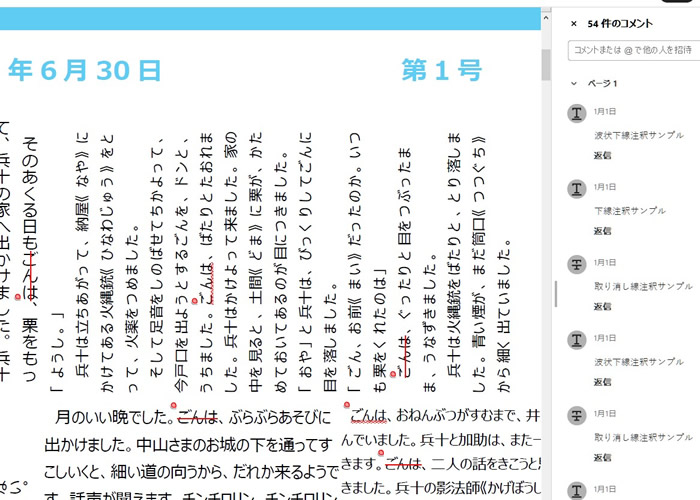
出力結果イメージ
「ごんは」という文字列を検索し、順に波状下線注釈、取り消し線注釈、下線注釈を追加します。