/*
	Antenna House PDF Tool API V8.0
	C++ Interface sample program

	概要:テキストボックス:枠の線種設定

	Copyright 2021-2025 Antenna House, Inc.
*/

#include < PdfTk.h >

using namespace std;
using namespace PdfTk;

int main(int argc, char* argv[])
{
	if (argc != 3)
	{
		printf("usage: TextBoxOutlineStyle.exe in-pdf-file out-pdf-file \n");
		return 1;
	}

	try {
		PtlParamInput input(argv[1]);
		PtlParamOutput output(argv[2]);
		PtlPDFDocument aDoc;
		aDoc.load(input);

		PtlOption option;
		option.setUnit(PtlOption::UNIT_PT);

		PtlPages& pages = aDoc.getPages();

		PtlPage page0 = pages.get(0);
		PtlSize pageSize = page0.getSize();

		// TextBoxを書き込む領域矩形はページサイズより上下左右80ポイント小さいものにする
		PtlRect rect(80, 80, pageSize.getWidth() - 80, pageSize.getHeight() - 80);

		PtlContent& content = page0.getContent();

		float fontSize = 24.0f;
		PtlParamString fontname = "MS ゴシック";

		PtlParamFont fontNormal(fontname, fontSize, false, false, true);

		PtlColorDeviceRGB colorBlack = PtlColorDeviceRGB(0.0f, 0.0f, 0.0f);
		PtlColorDeviceRGB colorRed = PtlColorDeviceRGB(1.0f, 0.0f, 0.0f);
		PtlColorDeviceRGB colorBlue = PtlColorDeviceRGB(0.0f, 0.0f, 1.0f);
		PtlColorDeviceRGB colorWite = PtlColorDeviceRGB(1.0f, 1.0f, 1.0f);
		PtlColorDeviceRGB colorYellow = PtlColorDeviceRGB(1.0f, 1.0f, 0.0f);

		// 実線
		{
			// rectに200×200のTextBoxを左上に書く
			PtlTextBox& textBox = content.drawTextBox(rect, PtlContent::ALIGN_TOP_LEFT, 200, 200);

			// TextBoxの線スタイル
			textBox.setOutlineStyle(PtlTextBox::OUTLINE_STYLE_SOLID);
			// TextBoxの縁取りを付ける
			textBox.setOutlineColor(colorRed);
			// 縁取りがテキストを囲むサイズに変わるよう指定
			textBox.fitToBBox(true);

			PtlParamWriteStringTextBox paramWriteString;
			paramWriteString.setFont(fontNormal);
			paramWriteString.setTextColor(colorRed);

			const char* text1("実線赤・背景色なし(テキストを囲むサイズ)");
			textBox.writeStringNL(PtlParamString(text1), paramWriteString);

			textBox.terminate();
		}
		// 破線
		{
			// rectに200×200のTextBoxを左下に書く
			PtlTextBox& textBox = content.drawTextBox(rect, PtlContent::ALIGN_RIGHT, 200, 200);

			// TextBoxの線スタイル
			textBox.setOutlineStyle(PtlTextBox::OUTLINE_STYLE_DASHED);
			// TextBoxの縁取りを付ける
			textBox.setOutlineColor(colorBlue);
			// TextBoxの塗りつぶし色
			textBox.setBackColor(colorWite);
			// 縁取りがテキストを囲むサイズに変わるよう指定
			textBox.fitToBBox(false);

			PtlParamWriteStringTextBox paramWriteString;
			paramWriteString.setFont(fontNormal);
			paramWriteString.setTextColor(colorBlack);

			const char* text1("破線青・背景色白");
			textBox.writeStringNL(PtlParamString(text1), paramWriteString);

			textBox.terminate();
		}
		// 縁取りなし
		{
			// rectに200×200のTextBoxを左下に書く
			PtlTextBox& textBox = content.drawTextBox(rect, PtlContent::ALIGN_BOTTOM_LEFT, 200, 200);

			// TextBoxの塗りつぶし色
			textBox.setBackColor(colorYellow);
			// 縁取りがテキストを囲むサイズに変わるよう指定
			textBox.fitToBBox(true);

			PtlParamWriteStringTextBox paramWriteString;
			paramWriteString.setFont(fontNormal);
			paramWriteString.setTextColor(colorBlack);

			const char* text1("縁取り線なし・背景色黄(テキストを囲むサイズ)");
			textBox.writeStringNL(PtlParamString(text1), paramWriteString);

			textBox.terminate();
		}

		aDoc.save(output);

		printf("-- 完了 --\n");

	}
	catch (PtlException e) {
		fprintf(stderr, "Error code : %d\n %s\n", e.getErrorCode(), e.getErrorMessage().c_str());

	}
	catch (...) {
		printf("Exception\n");
	}
}


PDF Tool APIサンプルコード:テキストボックス:枠の線種設定
テキストボックスの枠の線種が設定できます。
概要
サンプルコードの概要
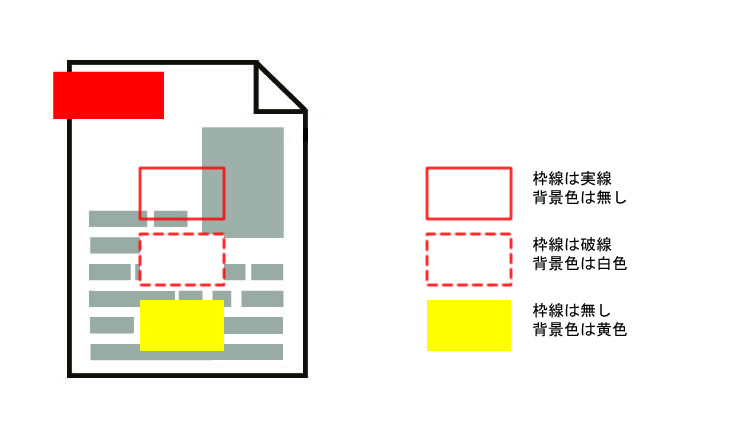
テキストボックスの枠線として実践・破線・線なしが設定できます。
- PtlTextBox: ページに描画されるテキストボックスを表現するクラス
- PtlContent.drawTextBox(): テキストボックスを描画
- PtlTextBox.setOutlineStyle(): テキストボックスの縁取のスタイルをOUTLINE_STYLEで設定
- PtlTextBox.setOutlineColor(): テキストボックスの縁取り色を設定
- PtlTextBox.setBackColor(): テキストボックスの背景色を設定
- PtlTextBox.fitToBBox(): TextBoxのサイズをテキストのBBoxに合わせるかどうかの設定
- PtlTextBox.writeStringNL(): 文字列を出力して改行
- PtlTextBox.terminate(): テキストボックスを終了しページコンテントに書き出し
サンプルコード
/*
Antenna House PDF Tool API V8.0
Java Interface sample program

概要:テキストボックス

Copyright 2021-2025 Antenna House,Inc.
*/

package Sample;

import jp.co.antenna.ptl.*;

public class TextBoxOutlineStyle {

	public static void main(String[] args) {
	    if (args.length < 2)
	    {
	        System.out.println("usage: java TextBoxOutlineStyle in-pdf-file out-pdf-file");
	        return;
	    }

	    try (PtlParamInput inputFile = new PtlParamInput(args[0]);
	         PtlParamOutput outputFile = new PtlParamOutput(args[1]);
	         PtlPDFDocument doc = new PtlPDFDocument();
	         PtlOption option = new PtlOption())
	    {
	        option.setUnit(PtlOption.UNIT.UNIT_PT);

	        doc.load(inputFile);

	        String fontName = "メイリオ";
	        float fontSize = 12.0f;

	        try (PtlParamFont fontNormal = new PtlParamFont(fontName, fontSize, false, false, true);
	        		PtlColorDeviceRGB colorBlack = new PtlColorDeviceRGB(0.0f, 0.0f, 0.0f);
	        		PtlColorDeviceRGB colorRed = new PtlColorDeviceRGB(1.0f, 0.0f, 0.0f);
	        		PtlColorDeviceRGB colorBlue = new PtlColorDeviceRGB(0.0f, 0.0f, 1.0f);
	        		PtlColorDeviceRGB colorWite = new PtlColorDeviceRGB(1.0f, 1.0f, 1.0f);
	        		PtlColorDeviceRGB colorYellow = new PtlColorDeviceRGB(1.0f, 1.0f, 0.0f);
    				PtlPages pages = doc.getPages();
	                PtlPage page = pages.get(0);     //1ページ目
	                PtlSize pageSize = page.getSize();
	                PtlContent content = page.getContent();
	                PtlRect rect = new PtlRect(80, 80, pageSize.getWidth() - 80, pageSize.getHeight() - 80))
	        {

            		// 実線
            		{
                    	PtlTextBox textBox = content.drawTextBox(rect, PtlContent.ALIGN.ALIGN_TOP_LEFT, 200, 200);

            			// TextBoxの線スタイル
            			textBox.setOutlineStyle(PtlTextBox.OUTLINE_STYLE.OUTLINE_STYLE_SOLID);
            			// TextBoxの縁取りを付ける
            			textBox.setOutlineColor(colorRed);
            			// 縁取りがテキストを囲むサイズに変わるよう指定
            			textBox.fitToBBox(true);

            			PtlParamWriteStringTextBox paramWriteString = new PtlParamWriteStringTextBox();
            			paramWriteString.setFont(fontNormal);
            			paramWriteString.setTextColor(colorRed);

            			String text = "実線赤・背景色なし(テキストを囲むサイズ)";
            			textBox.writeStringNL(text, paramWriteString);

            			textBox.terminate();
            		}
            		// 破線
            		{
                    	PtlTextBox textBox = content.drawTextBox(rect, PtlContent.ALIGN.ALIGN_RIGHT, 200, 200);

            			// TextBoxの線スタイル
            			textBox.setOutlineStyle(PtlTextBox.OUTLINE_STYLE.OUTLINE_STYLE_DASHED);
            			// TextBoxの縁取りを付ける
            			textBox.setOutlineColor(colorBlue);
            			// TextBoxの塗りつぶし色
            			textBox.setBackColor(colorWite);
            			// 縁取りがテキストを囲むサイズに変わるよう指定
            			textBox.fitToBBox(false);

            			PtlParamWriteStringTextBox paramWriteString = new PtlParamWriteStringTextBox();
            			paramWriteString.setFont(fontNormal);
            			paramWriteString.setTextColor(colorBlack);

            			String text = "破線青・背景色白";
            			textBox.writeStringNL(text, paramWriteString);

            			textBox.terminate();
            		}
            		// 縁取りなし
                	{
                    	PtlTextBox textBox = content.drawTextBox(rect, PtlContent.ALIGN.ALIGN_BOTTOM_LEFT, 200, 200);

            			// TextBoxの塗りつぶし色
            			textBox.setBackColor(colorYellow);
            			// 縁取りがテキストを囲むサイズに変わるよう指定
            			textBox.fitToBBox(true);

            			PtlParamWriteStringTextBox paramWriteString = new PtlParamWriteStringTextBox();
            			paramWriteString.setFont(fontNormal);
            			paramWriteString.setTextColor(colorBlack);

            			String text = "縁取り線なし・背景色黄(テキストを囲むサイズ)";
            			textBox.writeStringNL(text, paramWriteString);

            			textBox.terminate();
            		}

                    doc.save(outputFile);
            	}
	    }
	    catch (PtlException pex) {
	        System.out.println("PtlException : ErrorCode = " + pex.getErrorCode() + "\n  " + pex.getErrorMessage());
	    }
	    catch (Exception ex) {
	        System.out.println(ex.getMessage());
	        ex.printStackTrace();
	    }
	    catch (Error ex) {
	        System.out.println(ex.getMessage());
	        ex.printStackTrace();
	    }
	    finally {
	        System.out.println("-- 完了 --");
	    }
	}
}
/*
	Antenna House PDF Tool API V8.0
	.NET Interface sample program

	概要:テキストボックス:枠の線種設定

	Copyright 2021-2025 Antenna House,Inc.
*/

using System;

using PdfTkNet;

namespace TextBoxOutlineStyle
{
    class TextBoxOutlineStyle
    {
        static void Main(string[] args)
        {
            if (args.Length != 2)
            {
                Console.WriteLine("usage: TextBoxOutlineStyle.exe in-pdf-file out-pdf-file\n");
                return;
            }

            try
            {
                using (PtlParamInput input = new PtlParamInput(args[0]))
                using (PtlParamOutput output = new PtlParamOutput(args[1]))
                using (PtlPDFDocument doc = new PtlPDFDocument())
                using (PtlOption option = new PtlOption())
                {
                    option.setUnit(PtlOption.UNIT.UNIT_PT);

                    doc.load(input);

                    string fontName = "メイリオ";
                    float fontSize = 24.0f;

                    using (PtlParamFont fontNormal = new PtlParamFont(fontName, fontSize, false, false, true))
                    using (PtlPages pages = doc.getPages())
                    using (PtlPage page = pages.get(0))     //1ページ目
                    using (PtlSize pageSize = page.getSize())
                    using (PtlContent content = page.getContent())
                    using (PtlRect rect = new PtlRect(80, 80, pageSize.getWidth() - 80, pageSize.getHeight() - 80))
                    using (PtlColorDeviceRGB colorBlack = new PtlColorDeviceRGB(0.0f, 0.0f, 0.0f))
                    using (PtlColorDeviceRGB colorRed = new PtlColorDeviceRGB(1.0f, 0.0f, 0.0f))
                    using (PtlColorDeviceRGB colorBlue = new PtlColorDeviceRGB(0.0f, 0.0f, 1.0f))
                    using (PtlColorDeviceRGB colorWite = new PtlColorDeviceRGB(1.0f, 1.0f, 1.0f))
                    using (PtlColorDeviceRGB colorYellow = new PtlColorDeviceRGB(1.0f, 1.0f, 0.0f))
                    {
                        // 実線
                        using (PtlParamWriteStringTextBox paramWriteString = new PtlParamWriteStringTextBox())
                        using (PtlTextBox textBox = content.drawTextBox(rect, PtlContent.ALIGN.ALIGN_TOP_LEFT, 200, 200))
                        {
                            // TextBoxの線スタイル
                            textBox.setOutlineStyle(PtlTextBox.OUTLINE_STYLE.OUTLINE_STYLE_SOLID);
                            // TextBoxの縁取りを付ける
                            textBox.setOutlineColor(colorRed);
                            // 縁取りがテキストを囲むサイズに変わるよう指定
                            textBox.fitToBBox(true);

                            paramWriteString.setFont(fontNormal);
                            paramWriteString.setTextColor(colorRed);

                            string text = "実線赤・背景色なし(テキストを囲むサイズ)";
                            textBox.writeStringNL(text, paramWriteString);

                            textBox.terminate();
                        }
                        // 破線
                        using (PtlParamWriteStringTextBox paramWriteString = new PtlParamWriteStringTextBox())
                        using (PtlTextBox textBox = content.drawTextBox(rect, PtlContent.ALIGN.ALIGN_RIGHT, 200, 200))
                        {

                            // TextBoxの線スタイル
                            textBox.setOutlineStyle(PtlTextBox.OUTLINE_STYLE.OUTLINE_STYLE_DASHED);
                            // TextBoxの縁取りを付ける
                            textBox.setOutlineColor(colorBlue);
                            // TextBoxの塗りつぶし色
                            textBox.setBackColor(colorWite);
                            // 縁取りがテキストを囲むサイズに変わるよう指定
                            textBox.fitToBBox(false);

                            paramWriteString.setFont(fontNormal);
                            paramWriteString.setTextColor(colorBlack);

                            string text = "破線青・背景色白";
                            textBox.writeStringNL(text, paramWriteString);

                            textBox.terminate();
                        }
                        // 縁取りなし
                        using (PtlParamWriteStringTextBox paramWriteString = new PtlParamWriteStringTextBox())
                        using (PtlTextBox textBox = content.drawTextBox(rect, PtlContent.ALIGN.ALIGN_BOTTOM_LEFT, 200, 200))
                        {
                            // TextBoxの塗りつぶし色
                            textBox.setBackColor(colorYellow);
                            // 縁取りがテキストを囲むサイズに変わるよう指定
                            textBox.fitToBBox(true);

                            paramWriteString.setFont(fontNormal);
                            paramWriteString.setTextColor(colorBlack);

                            string text = "縁取り線なし・背景色黄(テキストを囲むサイズ)";
                            textBox.writeStringNL(text, paramWriteString);

                            textBox.terminate();
                        }

                        doc.save(output);

                        Console.WriteLine("-- 完了 --");
                    }

                }
            }
            catch (PtlException pex)
            {
                Console.WriteLine(pex.getErrorCode() + " : " + pex.getErrorMessageJP());
                pex.Dispose();
            }
            catch (Exception ex)
            {
                Console.WriteLine(ex.Message);
            }
        }
	}
}
実行例
コマンドラインでの実行例
TextBoxOutlineStyle.exe C:\in\in.pdf C:\sav\outTextBoxOutlineStyle.pdf
-- 完了 --
java -jar TextBoxOutlineStyle.jar C:\in\in.pdf C:\sav\outTextBoxOutlineStyle.pdf
-- 完了 --
TextBoxOutlineStyle.exe C:\in\in.pdf C:\sav\outTextBoxOutlineStyle.pdf
-- 完了 --
出力結果イメージ
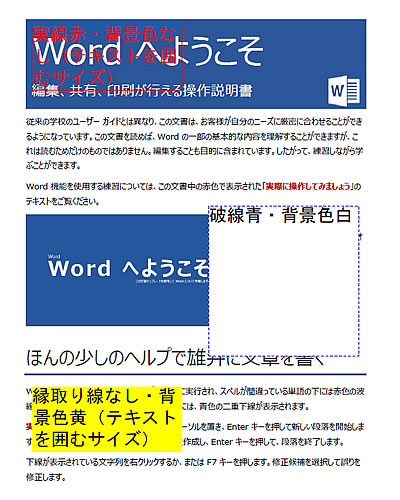
このサンプルでは枠が赤い実線で背景色の設定なしのテキストボックスと、
枠が青い破線で背景色が白色のテキストボックスと、
枠線なしで背景色が黄色のテキストボックスを追加しています。