/*
	Antenna House PDF Tool API V8.0
	C++ Interface sample program

	概要:テキストオブジェクトの挿入

	Copyright 2013-2025 Antenna House, Inc.
*/

#include < PdfTk.h >
#include < stdio.h >

using namespace PdfTk;

void writeString(PtlPage& page, PtlParamString str);

int main(int argc, char* argv[])
{
	if (argc < 3) {
		printf("usage: WriteTextPageNo.exe in-pdf-file out-pdf-file\n");
		return 1;
	}
	try
	{
		PtlParamInput input(argv[1]);
		PtlParamOutput output(argv[2]);

		PtlPDFDocument doc;

		// PDFファイルをロードします。
		doc.load(input);

		// ページコンテナの取得
		PtlPages& pages = doc.getPages();

		if (pages.isEmpty()) {
			printf("ページコンテナが空\n");
			return 1;
		}

		int pageno = pages.getCount();

		// 現在日時取得
		time_t now = time(NULL);
		struct tm local_time;
		errno_t err = localtime_s(&local_time, &now);
		int year = 0;
		int month = 0;
		int day = 0;
		char str[10];
		if (err == 0) {
			year = local_time.tm_year + 1900;
			month = local_time.tm_mon + 1;
			day = local_time.tm_mday;
		}

		for (int i = 0; i < pageno; i++)
		{
			// ページの取得
			PtlPage page = pages.get(i);

			char str[40];
			int ret = sprintf_s(str, "実行日:%d/%d/%d  ページ番号:%d/ %d", year, month, day, i + 1, pageno);

			// テキスト追加
			writeString(page, str);
		}

		// ファイルに保存します。
		doc.save(output);

		printf("完了!\n");
	}
	catch (const PtlException& e)
	{
		fprintf(stderr, "Error code : %d\n %s\n", e.getErrorCode(), e.getErrorMessage().c_str());
		return 1;
	}
	return 0;
}

//文字列出力
void writeString(PtlPage& page, PtlParamString str)
{
	//ページコンテントの取得
	PtlContent& content = page.getContent();
	PtlSize pageSize = page.getSize();

	//出力矩形
	PtlRect rect(0.0f, 0.0f, pageSize.getWidth(), pageSize.getHeight());

	//文字の描画に使うパラメータクラス
	PtlParamWriteString writestring;

	//フォント指定に使うパラメータクラス
	PtlParamFont font;

	//フォント名の設定
	font.setName("游ゴシック");

	//サイズの設定
	font.setSize(12.0f);


	//フォントの設定
	writestring.setFont(font);

	//文字色設定
	writestring.setTextColor(PtlColorDeviceRGB(1.0f, 0.0f, 0.0f));
	writestring.setOutlineColor(PtlColorDeviceRGB(0.0f, 0.0f, 1.0f));

	//文字列出力
	content.writeString(rect, PtlContent::ALIGN_TOP_RIGHT, str, writestring);
}


PDF Tool APIサンプルコード:文字列追加:現在の日付とページ番号を追加
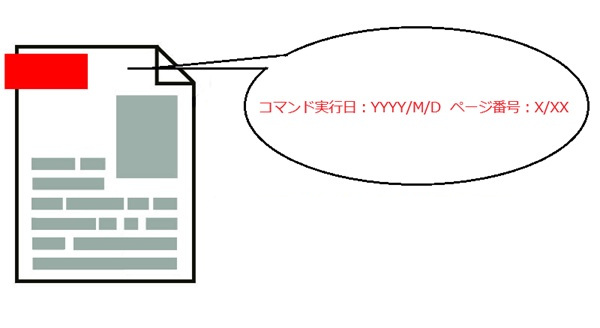
入力PDFのページ右上に、日付とページ番号/ページ総数の文字列を追加します。
概要
サンプルコードの概要
入力PDFのページ右上に、日付とページ番号/ページ総数の文字列を追加する。
コマンドラインでは日付、ページ番号、ページ総数はマクロ文字列で指定します。
使用できるマクロ文字列については
オンラインマニュアル
「PDF Tool API コマンドライン説明書」の
「10-2 マクロ文字列」を参照ください。
- PtlContent: ページに描画される内容(コンテント)を表現するクラス
- PtlParamWriteString: 文字の描画に使うパラメータクラス
- PtlContent.writeString: 文字列を出力
- PtlContent.writeStringV: 縦書きの文字列を出力
サンプルコード
/*
    Antenna House PDF Tool API V8.0
    Java Interface sample program

    概要:テキストオブジェクトの挿入

    Copyright 2015-2025 Antenna House, Inc.
*/

package Sample;

import java.time.LocalDateTime;

import jp.co.antenna.ptl.*;

public class WriteTextPageNo {

	public static void main(String[] args) {
		// TODO 自動生成されたメソッド・スタブ
        if (args.length < 2)
        {
            System.out.println("usage: java WriteTextPageNo in-pdf-file out-pdf-file");
            return;
        }

        try (PtlParamInput inputFile = new PtlParamInput(args[0]);
             PtlParamOutput outputFile = new PtlParamOutput(args[1]);
             PtlPDFDocument doc = new PtlPDFDocument())
        {
            // PDFファイルをロードします。
            doc.load(inputFile);

            try (PtlPages pages = doc.getPages()) //ページコンテナの取得
            {
                // ページコンテナが空かどうか
                if (pages.isEmpty())
                {
                    System.out.println("ページコンテナが空\n");
                    return;
                }

                int pageno = pages.getCount();

                // 現在日時取得
                LocalDateTime nowDate = LocalDateTime.now();
                int year = nowDate.getYear();
                int month = nowDate.getMonthValue();
                int day = nowDate.getDayOfMonth();

                for (int i = 0; i < pageno; i++)
                {
                    // ページの取得
                    try (PtlPage page = pages.get(i))
                    {
                    	String str = "実行日:" + year + "/" + month + "/" + day + "  ページ番号:" + (i + 1) + "/ " + pageno;
                        // テキスト追加
                        writeString(page, str);
                    }
                }
            }

            // ファイルに保存します。
            doc.save(outputFile);
        }
        catch (PtlException pex) {
             System.out.println("PtlException : ErrorCode = " + pex.getErrorCode() + "\n  " + pex.getErrorMessage());
        }
        catch (Exception ex) {
            System.out.println(ex.getMessage());
            ex.printStackTrace();
        }
        catch (Error ex) {
            System.out.println(ex.getMessage());
            ex.printStackTrace();
        }
        finally {
            System.out.println("-- 完了 --");
        }
	}

    public static void writeString(PtlPage page, String str) throws PtlException, Exception, Error
    {
        // ページコンテントの取得
        try (PtlContent content = page.getContent())
        {
            PtlSize pageSize = page.getSize();
            // 文字列出力
            try (PtlRect rect1 = new PtlRect(0.0f, 0.0f, pageSize.getWidth(),pageSize.getHeight());      // 出力矩形
                 PtlParamWriteString writestring1 = new PtlParamWriteString()) // 文字の描画に使うパラメータクラス
            {
                // フォント指定に使うパラメータクラス
                try (PtlParamFont font1 = new PtlParamFont())
                {
                    // フォント名の設定
                    font1.setName("游ゴシック");

                    // サイズの設定
                    font1.setSize(12.0f);

                    // フォントの設定
                    writestring1.setFont(font1);
                }

                // 文字色設定
                writestring1.setTextColor(new PtlColorDeviceRGB(1.0f, 0.0f, 0.0f));
                writestring1.setOutlineColor(new PtlColorDeviceRGB(0.0f, 0.0f, 1.0f));

                // 文字列出力
                content.writeString(rect1, PtlContent.ALIGN.ALIGN_TOP_RIGHT, str, writestring1);
            }

        }
    }
}
/*
	Antenna House PDF Tool API V8.0
	.NET Interface sample program

	概要:テキストオブジェクトの挿入

	Copyright 2013-2025 Antenna House, Inc.
*/

using PdfTkNet;
using System;
using System.Diagnostics;
using System.Xml;

namespace WriteTextPageNo
{
    class WriteTextPageNo
    {
        static void Main(string[] args)
        {
            if (args.Length < 2)
            {
                Console.WriteLine("usage: WriteTextPageNo.exe in-pdf-file out-pdf-file");
                return;
            }

            try
            {
                using (PtlParamInput inputFile = new PtlParamInput(args[0]))
                using (PtlParamOutput outputFile = new PtlParamOutput(args[1]))
                using (PtlPDFDocument doc = new PtlPDFDocument())
                {
                    // PDFファイルをロードします。
                    doc.load(inputFile);

                    using (PtlPages pages = doc.getPages())
                    {
                        // ページコンテナが空かどうか
                        if (pages.isEmpty())
                        {
                            Console.WriteLine("ページコンテナが空");
                            return;
                        }

                        int pageno = pages.getCount();

                        // 現在日時取得
                        DateTime today = DateTime.Today;
                        int year = today.Year;
                        int month = today.Month;
                        int day = today.Day;

                        for (int i = 0; i < pageno; i++)
                        {
                            // ページの取得
                            using (PtlPage page = pages.get(i))
                            {
                                string str = "実行日:" + year + "/" + month + "/" + day + "  ページ番号:" + (i + 1) + "/ " + pageno;

                                // テキスト追加
                                writeString(page, str);
                            }
                        }
                    }

                    // ファイルに保存します。
                    doc.save(outputFile);
                }
            }
            catch (PtlException pex)
            {
                Console.WriteLine(pex.getErrorCode() + " : " + pex.getErrorMessageJP());
                pex.Dispose();
            }
            catch (Exception ex)
            {
                Console.WriteLine(ex.Message);
            }
            finally
            {
                Console.WriteLine("-- 完了 --");
            }
        }

        static void writeString(PtlPage page, string str)
        {
            using (PtlContent content = page.getContent())  // ページコンテントの取得
            {
                PtlSize pageSize = page.getSize();
                // 文字列出力
                using (PtlRect rect = new PtlRect(0.0f, 0.0f, pageSize.getWidth(), pageSize.getHeight()))
                using (PtlParamWriteString writestring = new PtlParamWriteString()) // 文字の描画に使うパラメータクラス
                {
                    // フォント指定に使うパラメータクラス
                    using (PtlParamFont font = new PtlParamFont())
                    {
                        // フォント名の設定
                        font.setName("游ゴシック");

                        // サイズの設定
                        font.setSize(12.0f);

                        // フォントの設定
                        writestring.setFont(font);
                    }
                    // 文字色設定
                    writestring.setTextColor(new PtlColorDeviceRGB(1.0f, 0.0f, 0.0f));
                    writestring.setOutlineColor(new PtlColorDeviceRGB(0.0f, 0.0f, 1.0f));
                    // 文字列出力
                    content.writeString(rect, PtlContent.ALIGN.ALIGN_TOP_RIGHT, str, writestring);
                }
            }
        }
    }
}
AHPDFToolCmd80.exe -writeText -text "コマンド実行日:#DATE(YYYY/M/D) ページ番号:#PAGE_NUM/ #TOTAL_PAGES" -align 3 -colorText 1 0 0 -colorOutline 0 0 1 -font -name "游ゴシック" -size 12 -d C:\in\in.pdf -o C:\sav\outWriteTextPageNo.pdf
実行例
コマンドラインでの実行例
WriteTextPageNo.exe C:\in\in.pdf C:\sav\outWriteTextPageNo.pdf
完了!
java -jar WriteTextPageNo.jar C:\in\in.pdf C:\sav\outWriteTextPageNo.pdf
-- 完了 --
WriteTextPageNo.exe C:\in\in.pdf C:\sav\outWriteTextPageNo.pdf
-- 完了 --
AHPDFToolCmd80.exe -writeText -text "コマンド実行日:#DATE(YYYY/M/D)  ページ番号:#PAGE_NUM/ #TOTAL_PAGES" -align 3 -colorText 1 0 0 -colorOutline 0 0 1 -font -name "游ゴシック" -size 12 -d C:\in\in.pdf -o C:\sav\outWriteTextPageNo.pdf
 use time 0.332000s
出力結果イメージ
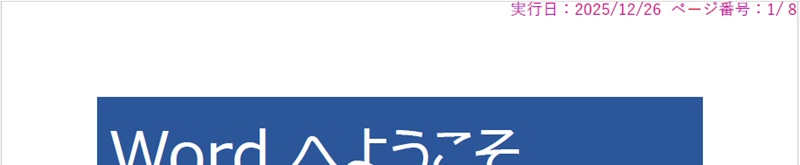
各ページの右上に実行日付とページ番号の文字列を挿入します。
※このサンプルでは文字の色は赤色、輪郭は青色で指定しました。
ビューアーによっては出力結果の文字列が青く表示されます